
Research in Motion, the company behind the popular email-focussed smartphones, BlackBerry, announced at the launch of the new Torch smartphone early last year, the next version of their operating system, the BlackBerry OS.
Version 6 brings the aged look of the BlackBerry user interface and experience into the age of the iOS-ruled world. Gone are the days of simply having functionality; Apple’s foray into the mobile phone market has opened consumers’ eyes to good design and aesthetics when it comes to software. And BlackBerry’s version 6 certainly delivers on the eye candy.
While most new BlackBerries come with OS 6 pre-installed and supported, it took RIM and networks quite some some to launch the software for current devices that were said at the announcement to support it – namely, one of the more popular BlackBerries, the Bold 9700 (which also happens to be my phone of choice).
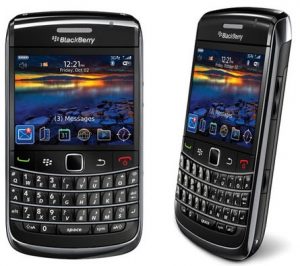
Last week, I finally updated my 9700 to OS 6. It’s a simple matter of doing so via the Desktop Manager for Windows (I unfortunately didn’t manage to do this on Mac OS X, as my Internet connection was playing up there). It does take some time, and I suggest you get a good beverage and take some well-deserved chill-out time while your BlackBerry gets updated. Furthermore, it is strongly recommended that you perform a full backup of your device’s data before the update – in fact, the update process does this for you as you begin it.
The Good
It’s a dramatic shift from the previous versions. OS 6 is a lot more refined, stylish and intuitive. Gone is the traditional “menu”; instead, there’s a tray of icons that sit on your homescreen (very iPhone-esque). You can choose to hide the tray, as I’ve done, for a cleaner look when your device is in standby. OS 6 brings your BlackBerry into the “modern” age of the smartphone, very much in league with the aesthetics and user experience of the iPhone.
The Bad
I have found that my phone can get a bit laggy at times. A clean-up of the device’s onboard log (Hold Shift and type LG-LG) can help. A full refresh of the device by restarting it works too. I’m hoping that an update will address the occasional slow-down of the 9700 – at times, I can see that this OS is built for processing power, and RIM should take heed from the fact that they should be supporting the 9700 if they release official software for it like this.
A few apps don’t work as normal anymore: TIME magazine’s mobile app is over-sensitive to scrolling, and I’ve resorted to using BlackBerry News for my RSS feeds as both the TIME app and my usual RSS reader, FreeRange, don’t work anymore. On the plus side, though, BlackBerry News is a promising app and I am keen to see where the developers take this app.
The Bottom Line
Despite a few teething problems I’m having, OS 6 is a great update to an awesome range of smartphones. Update if you’re really interested in it, but if you’re happy with the way your 9700 is working for you, stick with it. You may be disappointed in the update if a few of your apps stop working.