
By using this site, you agree to the Privacy Policy and Terms of Use.
Accept
BlogoteBlogoteBlogote
  • Software
  • Tech News
  • Business
  • Fashion
  • Finance
  • Health
  • Lifestyle
Search
  • Contact
  • Blog
  • Complaint
  • Advertise
Reading: Enable Gzip Compression on WordPress Blog
Share
Sign In
Notification Show More
Font ResizerAa
BlogoteBlogote
Font ResizerAa
  • Tech News
  • Gadget
  • Technology
  • Mobile
Search
  • Home
    • Home 1
    • Home 2
    • Home 3
    • Home 4
    • Home 5
  • Categories
    • Tech News
    • Gadget
    • Technology
    • Mobile
  • Bookmarks
  • More Foxiz
    • Sitemap
Have an existing account? Sign In
Follow US
  • Contact
  • Blog
  • Complaint
  • Advertise
Home » Blog » Enable Gzip Compression on WordPress Blog
How to

Enable Gzip Compression on WordPress Blog

Sara Taylor
Last updated: June 6, 2022 7:49 am
Sara Taylor
Share
SHARE

Once you’ve Gzip enabled on your wordpress blog, the content is compressed so that when the browser receives them, the page loads faster than before. In brief, Gzip saves the bandwidth and makes web pages to load faster.

Google has prioritized web page speed to be one of the factor for ranking in search engine. So, it is better to have a blog that loads faster, for which, there are many other techniques and one among them being Gzipping of files on the server.
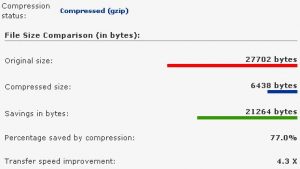
 

You’d notice a greater speed improvement after Gzip Compressing, and I would advice gzipping if you’ve an reliable hosting server, because if you’re on shared server then this can cause high cpu usage and your hosting company might as well suspend temporarily. So, be careful.

How to enable Gzip compression on your wordpress blog?

There are multiple ways for implementing Gzip compression on wordpress, I would recommend downloading the EzGz plugin from James Socol. Click here to download. The plugin saves your time from htaccess editing or any other complex gzip solution. If activating this plugin strips your css then deactivate other plugins and reactivate them one by one to find out the incompatible plugin.

Alternately, you can also visit your wordpress options.php (yourdomain.com/wp-admin/options.php) and enter ‘1’ in the field of gzipcompression (1 stands for true, 0 is false). This does the trick for activating Gzip compression on wordpress.

To check if your website is properly compressed (gzip) visit this website.

Guide to Open .XPS File Extension on Your Browser
Buy Notion Ink Adam Tablet [Second Preorder E-mail]
Cydia Crash 3.1.3 Fix For iPhone and iPod Touch Devices
Free Demonoid Invitation Code 2011 – 2012
How to Make Your YouTube Channel Stand Out

Sign Up For Daily Newsletter

Be keep up! Get the latest breaking news delivered straight to your inbox.
[mc4wp_form]
By signing up, you agree to our Terms of Use and acknowledge the data practices in our Privacy Policy. You may unsubscribe at any time.
Share This Article
Facebook Copy Link Print
Share
Previous Article Great Jailbreak Apps for a More Superb iPhone Experience
Next Article Latest iOS4.2 for iPhone, iPad And iPod touch is here! [Apple Developers Download iOS4.2 Beta]

Stay Connected

248.1KLike
69.1KFollow
134KPin
54.3KFollow

							banner							
							banner
Create an Amazing Newspaper
Discover thousands of options, easy to customize layouts, one-click to import demo and much more.
Learn More

Latest News

Juanita Katt
Juanita Katt: The Private Daughter of a Hollywood Family
Biography
What Date is 72 Days From Today?
Guides
What is 18 Weeks From Today?
Weeks
Brazil Tech News
Brazil Tech News: Top 10 Startups Changing Latin America
News

You Might also Like

How to detect Memory Leak in Firefox

Sara Taylor
Sara Taylor
4 Min Read

How to Convert XPS To PDF File For Free

Sara Taylor
Sara Taylor
3 Min Read

How to SPY on Cell Phones — Mobile Spying Softwares Overview

Sara Taylor
Sara Taylor
4 Min Read
//

We influence 20 million users and is the number one business and technology news network on the planet

Sign Up for Our Newsletter

Subscribe to our newsletter to get our newest articles instantly!

[mc4wp_form id=”1616″]

BlogoteBlogote
Follow US
Join Us!
Subscribe to our newsletter and never miss our latest news, podcasts etc..
[mc4wp_form]
Zero spam, Unsubscribe at any time.
Welcome Back!

Sign in to your account

Username or Email Address
Password

Lost your password?