
By using this site, you agree to the Privacy Policy and Terms of Use.
Accept
BlogoteBlogoteBlogote
  • Software
  • Tech News
  • Business
  • Fashion
  • Finance
  • Health
  • Lifestyle
Search
  • Contact
  • Blog
  • Complaint
  • Advertise
Reading: How to activate ephemeral mode on Instagram
Share
Sign In
Notification Show More
Font ResizerAa
BlogoteBlogote
Font ResizerAa
  • Tech News
  • Gadget
  • Technology
  • Mobile
Search
  • Home
    • Home 1
    • Home 2
    • Home 3
    • Home 4
    • Home 5
  • Categories
    • Tech News
    • Gadget
    • Technology
    • Mobile
  • Bookmarks
  • More Foxiz
    • Sitemap
Have an existing account? Sign In
Follow US
  • Contact
  • Blog
  • Complaint
  • Advertise
Home » Blog » How to activate ephemeral mode on Instagram
How to

How to activate ephemeral mode on Instagram

admin
Last updated: June 6, 2022 7:49 am
admin
Share
SHARE

We will teach you how to activate ephemeral mode on Instagram, know this tool that allows you to send messages that disappear at a certain time.

Contents
  • Instagram: how to activate ephemeral mode in your chats
    •  Step by step to activate ephemeral mode on Instagram
  • How to activate ephemeral mode on Instagram
      • How ephemeral mode works
        •  New features released by Instagram
        • Watch together
        • Selfie stickers
        • Chat colors
        • Reactions to emojis
        • Forwarding
        • Answers
        • Animated Message Effects
        • Message controls

Instagram: how to activate ephemeral mode in your chats

The social network that belongs to Mark Zuckerberg, was inspired by Telegram to offer an option in direct messages that can now be read for a certain time and then disappear.

Instagram, like all social networks, have to be in constant change and renew itself and offer new functions for its users. But these options are usually adaptations of something created by another social network.

As they have done with Messenger, Facebook created an Instagram function where the user can create an ephemeral chat that will delete the message as soon as the conversation with that person is closed.

According to Manik Singh, product manager of Instagram explained that “thinking that users sometimes want to say something at the moment without worrying about its permanence, it is that they brought this new function that allows sending messages that disappear automatically.”

 Step by step to activate ephemeral mode on Instagram

  • To activate this function on Instagram, the user will only have to enter a conversation and slide their finger up.
  • Then the application will warn you that the ephemeral mode will be activated and the chat will appear with a black background.
  • The user everything he writes in the chat will disappear when the window of that conversation is closed.
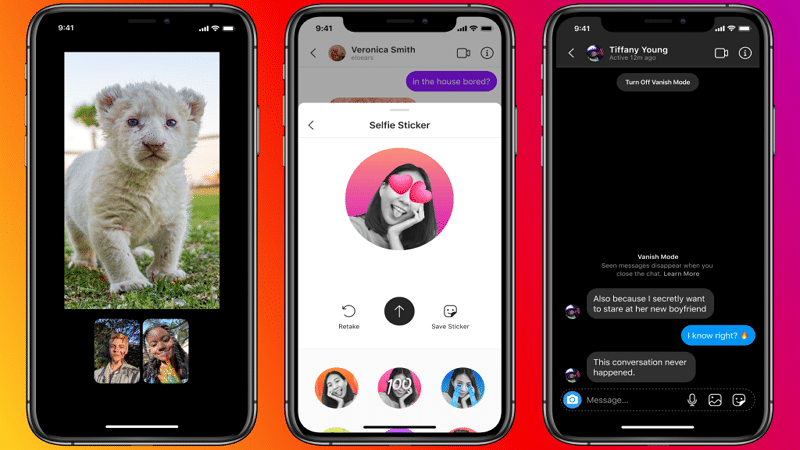

How to activate ephemeral mode on Instagram

How ephemeral mode works

The user who wants to use this function only has to enter a conversation and slide his finger up, in the chat the dark-colored wallpaper will appear and Instagram warns that the ephemeral mode will be activated.

And the read messages will disappear when the window is closed.

This function is very similar to Telegram secret chats where messages self-destruct after closing the chat window.

However, on Instagram, one of the users is the one who decides to participate in this type of chats.

 New features released by Instagram

For the first time in years, Instagram decided to change the design of its home screen and, little by little, users are receiving an update that includes new Reels and Buy tabs.

Among the novelties within the social network, there are also new functions when it comes to sharing messages and which will be available soon.

Watch together

This option allows users to watch videos from Facebook Watch, IGTV and Reels during a video call.

Selfie stickers

It will allow you to create a series of stickers with Boomerang with a photograph to be shared during the conversation.

Chat colors

With this option to customize the chats with different colors and according to the user’s preference.

Reactions to emojis

It allows you to create shortcuts to your favorite emojis in order to find them more quickly during conversations.

Forwarding

It gives the option to share content up to five friends or groups at the same time.

Answers

You can reply directly to a specific message within the conversation.

Animated Message Effects

It allows to include animated send effects in the chat.

Message controls

It makes it easy for the user to decide who can send him messages directly and who cannot.

The new Acer Vero mini pcs and monitors use recycled plastic to protect the planet
Edit XPS File: Learn How to Edit .XPS Documents In Windows Word 2007
Remove Kaspersky Antivirus 2010 Trial from Computer
How to Make a Successful Plan to Improve Your Business Results
Control Preview From Opening Multiple Windows

Sign Up For Daily Newsletter

Be keep up! Get the latest breaking news delivered straight to your inbox.
[mc4wp_form]
By signing up, you agree to our Terms of Use and acknowledge the data practices in our Privacy Policy. You may unsubscribe at any time.
Share This Article
Facebook Copy Link Print
Share
Previous Article Logic Pro 9 Crashes on Mac OS X — Expect a Fix Soon
Next Article How to View Windows 10 Saved WiFi Passwords

Stay Connected

248.1KLike
69.1KFollow
134KPin
54.3KFollow

							banner							
							banner
Create an Amazing Newspaper
Discover thousands of options, easy to customize layouts, one-click to import demo and much more.
Learn More

Latest News

Juanita Katt
Juanita Katt: The Private Daughter of a Hollywood Family
Biography
What Date is 72 Days From Today?
Guides
What is 18 Weeks From Today?
Weeks
Brazil Tech News
Brazil Tech News: Top 10 Startups Changing Latin America
News

You Might also Like

Unable to Watch Youtube Videos (Black Video Screen Issue) on Safari Mac OS Browser?

admin
admin
2 Min Read

How to Speed-up Your Mac [Performance Guide]

Sara Taylor
Sara Taylor
4 Min Read

8 Best Solutions for Discord to Resolve its opening Problems on Windows 10

admin
admin
8 Min Read
//

We influence 20 million users and is the number one business and technology news network on the planet

Sign Up for Our Newsletter

Subscribe to our newsletter to get our newest articles instantly!

[mc4wp_form id=”1616″]

BlogoteBlogote
Follow US
Join Us!
Subscribe to our newsletter and never miss our latest news, podcasts etc..
[mc4wp_form]
Zero spam, Unsubscribe at any time.
Welcome Back!

Sign in to your account

Username or Email Address
Password

Lost your password?



