By using this site, you agree to the Privacy Policy and Terms of Use.
Accept
BlogoteBlogoteBlogote
  • Software
  • Tech News
  • Business
  • Fashion
  • Finance
  • Health
  • Lifestyle
Search
  • Contact
  • Blog
  • Complaint
  • Advertise
Reading: How to disable the Weather Widget from the Windows 10 taskbar
Share
Sign In
Notification Show More
Font ResizerAa
BlogoteBlogote
Font ResizerAa
  • Tech News
  • Gadget
  • Technology
  • Mobile
Search
  • Home
    • Home 1
    • Home 2
    • Home 3
    • Home 4
    • Home 5
  • Categories
    • Tech News
    • Gadget
    • Technology
    • Mobile
  • Bookmarks
  • More Foxiz
    • Sitemap
Have an existing account? Sign In
Follow US
  • Contact
  • Blog
  • Complaint
  • Advertise
Home » Blog » How to disable the Weather Widget from the Windows 10 taskbar
Tech

How to disable the Weather Widget from the Windows 10 taskbar

admin
Last updated: July 3, 2021 11:36 am
admin
Share
SHARE

If you have received the latest Windows 10 update, you may have noticed that suddenly and without your meaning to, a kind of weather widget appears on the operating system’s taskbar. This is a new feature called News and Interests and it basically allows you to access certain information that you might be interested in, directly from the Windows 10 taskbar.

This may be liked by many users, however for many others (including myself) the News and Interests section is not to their liking. On a personal note, I will say that I like having as much space as possible on the Windows 10 taskbar, so I don’t like the space occupied by time or any other information in the News and Interests section.

Fortunately, Microsoft incorporates both the possibility of customizing the content displayed on the taskbar, as well as completely deactivating this section and freeing up space that the icons of programs and open windows can occupy on your computer with the Windows 10 operating system.

Therefore, in this tutorial we show you in detail how to remove the time from the Windows 10 taskbar or any other information from the News and Interests:

How to disable the Weather Widget from the Windows 10 taskbar
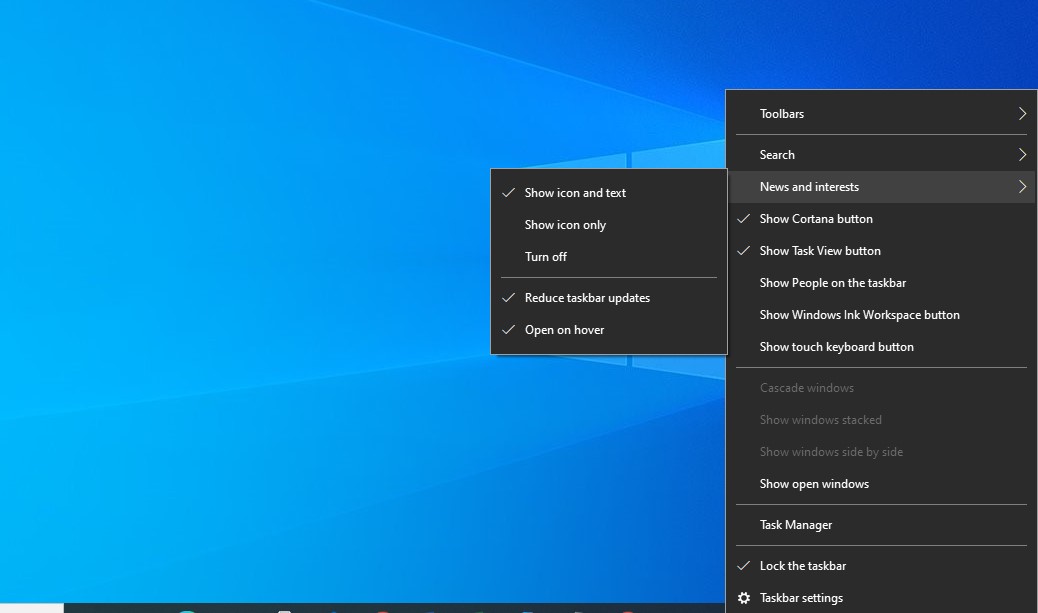
  • Right-click on any free space on the taskbar.
  • When the drop-down menu appears, you should go to: News and Interests.
  • This will display a sub-menu in which you will have to uncheck the option: Disconnect
  • Automatically the weather information or any other related information will be removed from the Windows 10 taskbar.
Projection Mapping: A Beginner’s Guide to Elevating Events with Technology
The Top 5 Benefits of Being a Technical Support Analyst
How to Chose the Right Business Coach & Measuring the Effectiveness of Training
Surefire Tips To Master Video Storytelling For Your Brand
The Risks of Torrenting Without a VPN: Protect Yourself Online

Sign Up For Daily Newsletter

Be keep up! Get the latest breaking news delivered straight to your inbox.
[mc4wp_form]
By signing up, you agree to our Terms of Use and acknowledge the data practices in our Privacy Policy. You may unsubscribe at any time.
Share This Article
Facebook Copy Link Print
Share
Previous Article 10 easy ways to speed up Windows 10
Next Article Mozilla VPN: what it is and how it works

Stay Connected

248.1KLike
69.1KFollow
134KPin
54.3KFollow

							banner							
							banner
Create an Amazing Newspaper
Discover thousands of options, easy to customize layouts, one-click to import demo and much more.
Learn More

Latest News

Juanita Katt
Juanita Katt: The Private Daughter of a Hollywood Family
Biography
What Date is 72 Days From Today?
Guides
What is 18 Weeks From Today?
Weeks
Brazil Tech News
Brazil Tech News: Top 10 Startups Changing Latin America
News

You Might also Like

Revealing CapCut’s Advanced Online Photo Editing Features

admin
admin
9 Min Read

What Is the Purpose of NetSuite?

admin
admin
5 Min Read

The Importance of Stock Research for New Investors

admin
admin
6 Min Read
//

We influence 20 million users and is the number one business and technology news network on the planet

Sign Up for Our Newsletter

Subscribe to our newsletter to get our newest articles instantly!

[mc4wp_form id=”1616″]

BlogoteBlogote
Follow US
Join Us!
Subscribe to our newsletter and never miss our latest news, podcasts etc..
[mc4wp_form]
Zero spam, Unsubscribe at any time.
Welcome Back!

Sign in to your account

Username or Email Address
Password

Lost your password?