Besides revealing Windows 8 that is said to debut this October, Microsoft also unveiled the hotly anticipated Office 2013, which brings new features like tablet touchscreen support and cloud-based functionality to the productivity suite table.
Here’s our initial review about Office 2013.
A brief look at Microsoft Office
Microsoft Office applications were first introduced 10 years ago and, to be honest, that seems like yesterday to us. The 3 basic apps in the suite — Word, Excel and PowerPoint — were considered “mature” during those days, and we thoroughly enjoyed using them, at home and at work.
Right from a school boy making his school projects on PowerPoint, a college kid working on his college assignments in Microsoft Word, to a Business working on a financial report on Excel, everyone — whether they loved Office or not — used, or at least had, Office Suite on their Windows PCs and laptops.
Microsoft knew this was probably their best program ever, and that’s when Office Suite saw a fresh upgrade with newer and useful apps like Outlook, Publisher, Access, InfoPath, Picture Manager, OneNote, SharePoint and Visio Viewer.
Today, Office Suite clearly drives in good chunk of revenue to Microsoft. Why? Because the apps bundled with Office Suite are certainly useful. But with the new Office 2013 Suite, Microsoft plans to break all its previous records. Is Office 2013 really that good? Let’s find out.
Microsoft pulls wraps off Office 2013
The preview version of Office 2013 was launched in July 2012. Available for free download, Office 2013 improves all the apps — both visually and technically — to a greater degree. You will feel better after using the new Office Suite, as it is has been completely revamped:
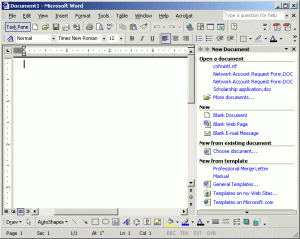
We miss the old Microsoft Word 2000
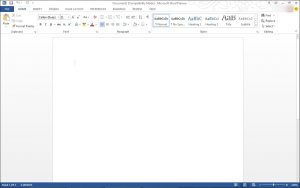
Microsoft Office 2013 has adopted the Metro Layout style. The interface is downright beautiful — it’s fresh and clean, too.
In this article we will look at all the improvements and new features of Word, Excel, PowerPoint, and Outlook and also learn about SkyDrive and its integration with Office 2013. We will also see how these apps are designed to interact with the new Windows 8, and later on rant about the Live Tile or Grid layout or the so-called “Metro Layout” and its integration with Windows 8 OS.
Syncing Office files to the Cloud with SkyDrive
Microsoft Office 2013 brings more to the table. Apart from a new user interface, users will be able to save documents and files to SkyDrive – Microsoft’s cloud-based storage service — and access these documents available across smartphones, tablets and home PC.
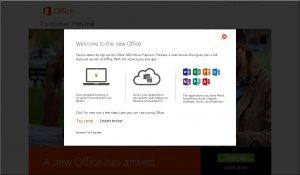
Previously, Microsoft’s SkyDrive was used as a tool to backup, store files online, and to share documents with others (that is what it was built for). As every other giant is going after Cloud Services, Microsoft took a step further and introduced SkyDrive storage to the new Office Suite. Now you can save your files directly to SkyDrive from your office suite of apps.
Everything that Microsoft is doing now is being revolving around your Microsoft ID (also called as Live ID). This means you have to link your Hotmail or Outlook account to the Office app for automatic document syncing. Even Windows Phone users know this very well — just login with your Windows Live ID and the phone connects to every possible service. Similar is the case with Office 2013 and SkyDrive.
What’s exciting about Office 2013
Why is Office 2013 the talk of the town?
The answer is pretty simple. Microsoft had learned to move with times rather than getting past in the future. Microsoft’s only forte has always been with the Office franchise and they never went wrong with that.
The release of Office 2010 or commonly known as Office XP helped renew the Office Suite. The launch of the visually strong and the most stable Office 2011 happened when Microsoft was losing its ground on the hardware front to apple. And now the Office 2013 is all set to turn the tables for Microsoft.
The new office has everything that one would wish for, with many different side apps bundled for every kind of user. The current preview version looks stable, too. Microsoft added a feather in its hat and took the entire Office 2013 online.