
By using this site, you agree to the Privacy Policy and Terms of Use.
Accept
BlogoteBlogoteBlogote
  • Software
  • Tech News
  • Business
  • Fashion
  • Finance
  • Health
  • Lifestyle
Search
  • Contact
  • Blog
  • Complaint
  • Advertise
Reading: How to Delete Hotmail Account Like a Boss
Share
Sign In
Notification Show More
Font ResizerAa
BlogoteBlogote
Font ResizerAa
  • Tech News
  • Gadget
  • Technology
  • Mobile
Search
  • Home
    • Home 1
    • Home 2
    • Home 3
    • Home 4
    • Home 5
  • Categories
    • Tech News
    • Gadget
    • Technology
    • Mobile
  • Bookmarks
  • More Foxiz
    • Sitemap
Have an existing account? Sign In
Follow US
  • Contact
  • Blog
  • Complaint
  • Advertise
Home » Blog » How to Delete Hotmail Account Like a Boss
Tech

How to Delete Hotmail Account Like a Boss

Sara Taylor
Last updated: July 7, 2012 11:41 am
Sara Taylor
Share
SHARE
Note: This article is about closing your existing Hotmail email address. I am saying this to make sure you know what you are doing here. Remember: After Microsoft permanently deletes a Hotmail account, there’s no way to recover older messages and attachments anymore, unless you have a backup.

Let’s get to the basics of what happens when you close an email account:

Contents
  • Update to This Article
  • Steps to Close Your Hotmail Account
      • Step 1
      • Step 2
    • Why My Hotmail Account Isn’t Deleted Yet?
  • All your messages and attachments will be gone.
  • You will not be able to access your Hotmail account anymore.
  • All the Microsoft’s MSN services linked with your Hotmail account will be disabled. You have to create a new account to access these services.
  • A message sent to your @Hotmail account will bounce back.

Update to This Article

I wrote a blog post a few years ago on shutting down Hotmail account that required you to navigate through a series of steps. This article — updated on July 11th, 2012 — is a better version of our previous article.

Feel free to contact me if you have any questions.

Steps to Close Your Hotmail Account

Follow the instructions given below to cancel your Hotmail account immediately. Please do read this after you have initiated the deletion process.

Step 1

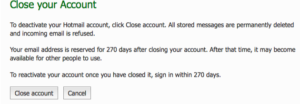
Sign in to your Hotmail account. Now, visit the Close your account webpage.
Step 2

Hit the Close account button.
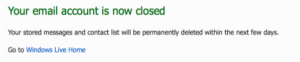
How easy was it? Piece of cake, right? Now, the worse part is to ‘wait.’

Why My Hotmail Account Isn’t Deleted Yet?

Your @Hotmail.com address will be deleted in 270 days — not instantly. Do not sign in to your Hotmail account during this 270 days period. If you do, you will reactivate the account. In such cases, you have to go through the whole process once again to deactivate Hotmail account, which can be a pain.

Do not log in back, your account will close itself.

Your Questions Answered – FAQ

How do I know if Microsoft deleted my Hotmail account?

There’s no way to ‘check’ if your account has been disabled. If you have tried the steps given above, prepared to wait for 270 days. Simply forget about the account.

I want to delete my hacked Hotmail account. How should I do it?

You can’t. You must claim your account first; try doing a password reset, or answer a security question to regain your account. Only then you will be able to close your Hotmail account. There’s no other way, unfortunately.

I received a message like this while deleting my MSN account: “To close your Hotmail account, you must first cancel your billing service. Go to Microsoft Account and Billing Services at https://billing.microsoft.com.”

You have to go to the link and hit “cancel my billing service.” This was not applicable in the above two-step process, as I didn’t have any services linked to my Hotmail account.

How can I contact Microsoft Billing?

The phone number for Billing Hotlines are as follows: 1866 672-4551 (US) and 0800-587-2920 (UK).

Unlocking the Future: Tech Investments to Transform Your Small Business
New Tesla patent? The revolution comes to electric cars
Projection Mapping: A Beginner’s Guide to Elevating Events with Technology
Google chrome Trick – Changing the default search engine
The Ultimate Guide to Buying Direct Traffic: Boost Your Website’s Traffic and Revenue

Sign Up For Daily Newsletter

Be keep up! Get the latest breaking news delivered straight to your inbox.
[mc4wp_form]
By signing up, you agree to our Terms of Use and acknowledge the data practices in our Privacy Policy. You may unsubscribe at any time.
Share This Article
Facebook Copy Link Print
Share
Previous Article Complete List of Gmail Shortcut Keys
Next Article Introduction to Microsoft Office 2013

Stay Connected

248.1KLike
69.1KFollow
134KPin
54.3KFollow

							banner							
							banner
Create an Amazing Newspaper
Discover thousands of options, easy to customize layouts, one-click to import demo and much more.
Learn More

Latest News

Juanita Katt
Juanita Katt: The Private Daughter of a Hollywood Family
Biography
What Date is 72 Days From Today?
Guides
What is 18 Weeks From Today?
Weeks
Brazil Tech News
Brazil Tech News: Top 10 Startups Changing Latin America
News

You Might also Like

How to Grow Your Brand and Stand Out in Your Niche?

admin
admin
8 Min Read

v2 spacetrax: Revolutionizing Space Exploration and Tracking

admin
admin
7 Min Read

AI Video Generator: Revolutionizing Video Creation

admin
admin
5 Min Read
//

We influence 20 million users and is the number one business and technology news network on the planet

Sign Up for Our Newsletter

Subscribe to our newsletter to get our newest articles instantly!

[mc4wp_form id=”1616″]

BlogoteBlogote
Follow US
Join Us!
Subscribe to our newsletter and never miss our latest news, podcasts etc..
[mc4wp_form]
Zero spam, Unsubscribe at any time.
Welcome Back!

Sign in to your account

Username or Email Address
Password

Lost your password?



