
By using this site, you agree to the Privacy Policy and Terms of Use.
Accept
BlogoteBlogoteBlogote
  • Software
  • Tech News
  • Business
  • Fashion
  • Finance
  • Health
  • Lifestyle
Search
  • Contact
  • Blog
  • Complaint
  • Advertise
Reading: Lite MP3 Players on Slow Windows Computer
Share
Sign In
Notification Show More
Font ResizerAa
BlogoteBlogote
Font ResizerAa
  • Tech News
  • Gadget
  • Technology
  • Mobile
Search
  • Home
    • Home 1
    • Home 2
    • Home 3
    • Home 4
    • Home 5
  • Categories
    • Tech News
    • Gadget
    • Technology
    • Mobile
  • Bookmarks
  • More Foxiz
    • Sitemap
Have an existing account? Sign In
Follow US
  • Contact
  • Blog
  • Complaint
  • Advertise
Home » Blog » Lite MP3 Players on Slow Windows Computer
Features

Lite MP3 Players on Slow Windows Computer

Sara Taylor
Last updated: June 16, 2016 1:54 pm
Sara Taylor
Share
SHARE

Why does your windows computer slow down after a couple of years? This is because you have a whole lot of applications installed, less hard disk space, and the overall specs of your system is mediocre or below bare minimum. The Windows XP computer I had been using for four years was really slow and lagging, and the main reason was the RAM (512MB).

Playing audio or video files while opening applications and switching between the two was not easy. The computer could freeze and crash applications. For this reason, I had to stop using Windows Media Player. Now, I have installed these two MP3 players that take up very less memory space and works perfectly on a slow computer.

Audio Player 1: 1by1 MP3 Player:

First thing you will notice after launching 1by1 MP3 player is that it’s really fast. The song directories can be imported and added to this player in no time. Once you are done with the installation process, launch the player and try to play songs one after the other. There’s no lag, and it takes up very little amount of memory that you don’t have to think twice while multitasking.

I’d like to add that the interface of 1by1 player reminds me of Notepad. The main window panel contains all the songs while the left panel helps you navigate through different drives while your MP3 files are located. Like any other audio player, you can minimize it and resume your other applications.
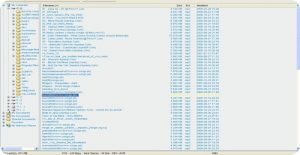
There is an audio enhancer which acts like a woofer where you can level the quality of the song. You can select the songs directory and play music instantly — eliminating the need to create an MP3 playlist. Other features of 1by1 includes Winamp support and tree navigation.

I have been using 1by1 freeware player for around 3 months as it helps me listen to my favorite music songs on my slow PC. 1by1 lite MP3 player is available for Windows and Linux and can be can be downloaded from here!

Audio Player 2: Foober MP3 Player:

Foobar is an easy-to-use audio and Mp3 file player available only for Windows computer. Both the players 1by1 and Foobar consumes almost same amount of low memory.

But Foobar lite supports many file formats and also comes with music tagging ability (to neatly create playlists of your favorite songs) and a few features unseen in most of the simple audio mp3 players (also Supports AAC,Wav and opening of Flac file). As usual, this little utility is free to download and supports Windows OS including Windows XP,Windows Vista and 2003.
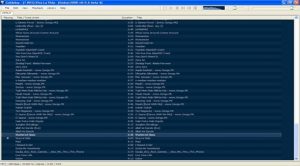
Download Foobar Music Player


Cell phone users can also download KDE payer on their devices, and if you are looking for more lite yet stylish MP3 players, I’d suggest you to check out  Xion audio player  for Windows.

Opera 9.5 & Opera 10 Theme addon for Firefox browser
Face Recognition Apps For Mac
Distraction-Free Writing Tools For Your Mac OS Machines
Download Free Window Vista ebook [Manual & Guide]
Archos Tablet Finally Gives out The Long Awaited Update [Android 2.2.1]

Sign Up For Daily Newsletter

Be keep up! Get the latest breaking news delivered straight to your inbox.
[mc4wp_form]
By signing up, you agree to our Terms of Use and acknowledge the data practices in our Privacy Policy. You may unsubscribe at any time.
Share This Article
Facebook Copy Link Print
Share
Previous Article List of Lenovo YOGA Devices (Old and New Models)
Next Article Four Multi-Protocol Instant Messenger clients for Mac OS X

Stay Connected

248.1KLike
69.1KFollow
134KPin
54.3KFollow

							banner							
							banner
Create an Amazing Newspaper
Discover thousands of options, easy to customize layouts, one-click to import demo and much more.
Learn More

Latest News

What Date is 72 Days From Today?
Guides
What is 18 Weeks From Today?
Weeks
Brazil Tech News
Brazil Tech News: Top 10 Startups Changing Latin America
News
The Best AI Video Generator for YouTube: Turning Scripts into Viral Content Fast
Guides

You Might also Like

Best Free Antivirus Programs

Sara Taylor
Sara Taylor
3 Min Read

Free AntiVirus Plugin For WordPress | Blog Security

admin
admin
1 Min Read

Rip Audio From FLV Videos Or Youtube Videos (FLV TO MP3)

Sara Taylor
Sara Taylor
3 Min Read
//

We influence 20 million users and is the number one business and technology news network on the planet

Sign Up for Our Newsletter

Subscribe to our newsletter to get our newest articles instantly!

[mc4wp_form id=”1616″]

BlogoteBlogote
Follow US
Join Us!
Subscribe to our newsletter and never miss our latest news, podcasts etc..
[mc4wp_form]
Zero spam, Unsubscribe at any time.
Welcome Back!

Sign in to your account

Username or Email Address
Password

Lost your password?



