
By using this site, you agree to the Privacy Policy and Terms of Use.
Accept
BlogoteBlogoteBlogote
  • Software
  • Tech News
  • Business
  • Fashion
  • Finance
  • Health
  • Lifestyle
Search
  • Contact
  • Blog
  • Complaint
  • Advertise
Reading: Remove inactive Google Plus Users From Your Google Circle
Share
Sign In
Notification Show More
Font ResizerAa
BlogoteBlogote
Font ResizerAa
  • Tech News
  • Gadget
  • Technology
  • Mobile
Search
  • Home
    • Home 1
    • Home 2
    • Home 3
    • Home 4
    • Home 5
  • Categories
    • Tech News
    • Gadget
    • Technology
    • Mobile
  • Bookmarks
  • More Foxiz
    • Sitemap
Have an existing account? Sign In
Follow US
  • Contact
  • Blog
  • Complaint
  • Advertise
Home » Blog » Remove inactive Google Plus Users From Your Google Circle
Tech

Remove inactive Google Plus Users From Your Google Circle

Sara Taylor
Last updated: October 26, 2012 10:50 am
Sara Taylor
Share
SHARE

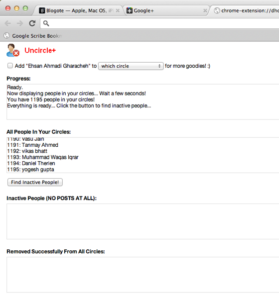
If you want to remove existing or your old friends who are not active on Google Plus, then use Uncircle+, which is a Google Chrome extension to remove inactive users from your Google circle.
Despite the age limit locked down by Google Plus, this Google social networking site has successfully collared over 50 million users in a few months.

And if you have unknowingly employed the mass circle feature on Google Plus, then all your existing Gmail contacts are given an invite to join Google Plus.

Removing them manually from your Google Plus account can be extremely hectic, especially if you have over 500 folks who don’t update anymore — or, who just bomb your Google Plus timeline with irrelevant, automated updates in every hour or so.

Remove inactive Google Plus Accounts

Uncircle+ is a Google Chrome extension which uses Google’s API to scan through your Circles and details out the list of folks who haven’t updated their Google Plus account.

You can see the list of inactive users, banned users and also remove them in one click.

  1. Launch Google Chrome browser and install the Uncircle+ extension.
  2. Go to Google Plus and log into your account.
  3. Click on the Uncircle button which opens a new window.
  4. Click on Find Inactive People!
  5. This should generate a list of users who haven’t posted any updates to their Google Plus account.
  6. Once the list is generated, select the users you want to remove.

That was pretty easy, right?

Removing users from your Google Circle is more of a house cleaning task. You don’t want to do it, but when you do it, everything looks a lot better — and you feel good, too!

Big Data: where is big data used and why is it needed
pemco pulse: Optimizing Your Energy Efficiency
AIAM POPULI: Revolutionizing the Way We Live
Mxi Lan: Unveiling the Secrets of a Revolutionary Technology
How to Delete Hotmail Account Like a Boss

Sign Up For Daily Newsletter

Be keep up! Get the latest breaking news delivered straight to your inbox.
[mc4wp_form]
By signing up, you agree to our Terms of Use and acknowledge the data practices in our Privacy Policy. You may unsubscribe at any time.
Share This Article
Facebook Copy Link Print
Share
Previous Article Giveaway: 5 Serials Keys of Ashampoo Burning Studio 11 [Windows]
Next Article Disable HD YouTube Videos

Stay Connected

248.1KLike
69.1KFollow
134KPin
54.3KFollow

							banner							
							banner
Create an Amazing Newspaper
Discover thousands of options, easy to customize layouts, one-click to import demo and much more.
Learn More

Latest News

Juanita Katt
Juanita Katt: The Private Daughter of a Hollywood Family
Biography
What Date is 72 Days From Today?
Guides
What is 18 Weeks From Today?
Weeks
Brazil Tech News
Brazil Tech News: Top 10 Startups Changing Latin America
News

You Might also Like

What Devices Does Smart IPTV Work on?

admin
admin
6 Min Read

The Difference Between Shared and Dedicated Web Hosting

admin
admin
9 Min Read

DigitalSeas IO: Digital Transformation

admin
admin
5 Min Read
//

We influence 20 million users and is the number one business and technology news network on the planet

Sign Up for Our Newsletter

Subscribe to our newsletter to get our newest articles instantly!

[mc4wp_form id=”1616″]

BlogoteBlogote
Follow US
Join Us!
Subscribe to our newsletter and never miss our latest news, podcasts etc..
[mc4wp_form]
Zero spam, Unsubscribe at any time.
Welcome Back!

Sign in to your account

Username or Email Address
Password

Lost your password?