
By using this site, you agree to the Privacy Policy and Terms of Use.
Accept
BlogoteBlogoteBlogote
  • Software
  • Tech News
  • Business
  • Fashion
  • Finance
  • Health
  • Lifestyle
Search
  • Contact
  • Blog
  • Complaint
  • Advertise
Reading: Rip Audio From FLV Videos Or Youtube Videos (FLV TO MP3)
Share
Sign In
Notification Show More
Font ResizerAa
BlogoteBlogote
Font ResizerAa
  • Tech News
  • Gadget
  • Technology
  • Mobile
Search
  • Home
    • Home 1
    • Home 2
    • Home 3
    • Home 4
    • Home 5
  • Categories
    • Tech News
    • Gadget
    • Technology
    • Mobile
  • Bookmarks
  • More Foxiz
    • Sitemap
Have an existing account? Sign In
Follow US
  • Contact
  • Blog
  • Complaint
  • Advertise
Home » Blog » Rip Audio From FLV Videos Or Youtube Videos (FLV TO MP3)
Features

Rip Audio From FLV Videos Or Youtube Videos (FLV TO MP3)

Sara Taylor
Last updated: March 11, 2014 9:17 am
Sara Taylor
Share
SHARE

An easy way to convert FLV videos into audio such as Mp3 can be quite helpful. Most of the FLV Videos are downloaded from Youtube, to extract the audio part, we need to only rip audio from FLV videos of Youtube using freeware tools!

Though YouTube is a video sharing community we know how to upload mp3 on Youtube using free tools. You might not want to make use of YouTube every time to listen your favorite song right? Therefore we download YouTube videos offline and convert these FLV extension into compatible format.

In this post we are not discussing ways to download Youtube videos but, we will rip audio from FLV videos that are already downloaded from Youtube (You can find tons of services that downloads videos from Youtube in FLV Format) or for people who have other flash FLV videos that needs to be converted from FLV to MP3 Format.

The free software I would recommend you to download is Earth media’s “Flv Audio Extractor” which is a small freeware (around 1mb) used for extracting and ripping mp3 audios from flv videos. Here is the detailed procedure to rip FLV into MP3

1. Download Flv Audio extractor – Works on Windows XP, Vista, 2000..

2. Complete the installation and then run FLV audio extractor. Make sure the flv video you want to convert is already saved on your hard-disk.

3. After you run the flv extractor program, check the ‘audio’ to rip audio mp3 from FLV. Add the flv video format using ‘Add’ button as shown in this screen shot.
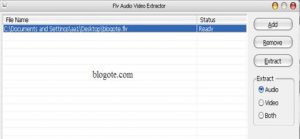
 

4. Click on ‘Extract’ button from the program and choose the path you want to save the newly ripped mp3 file.

5. Wait for the process to complete and check the specified path to get your FLV converted mp3 audio file.

Quality check – A FLV video of 6mb got converted into 1.5mb audio mp3 extension file. The bitrate was 64kbps, not great but it’s definitely manageable. Or maybe you can try to change bitrate of the MP3.

Print Protected PDF File On Windows, Mac OS
Ask Ziggy is the new Siri For Windows Phone 7
Free Nokia Maps Navigation on Nokia Phones Through Ovi Maps [.sis file]
Video Format Supported in PowerPoint
Is Internet Explorer Dead? No, Not yet! [Funny]

Sign Up For Daily Newsletter

Be keep up! Get the latest breaking news delivered straight to your inbox.
[mc4wp_form]
By signing up, you agree to our Terms of Use and acknowledge the data practices in our Privacy Policy. You may unsubscribe at any time.
Share This Article
Facebook Copy Link Print
Share
Previous Article Uninstall UNIBLUE Registry Booster From Computer
Next Article Adobe Photoshop and illustrator CS6 Update Brings Support For Retina MacBooks [Download + Fixing Update Problem]

Stay Connected

248.1KLike
69.1KFollow
134KPin
54.3KFollow

							banner							
							banner
Create an Amazing Newspaper
Discover thousands of options, easy to customize layouts, one-click to import demo and much more.
Learn More

Latest News

Juanita Katt
Juanita Katt: The Private Daughter of a Hollywood Family
Biography
What Date is 72 Days From Today?
Guides
What is 18 Weeks From Today?
Weeks
Brazil Tech News
Brazil Tech News: Top 10 Startups Changing Latin America
News

You Might also Like

Fool Your Friends by Typing Ridiculously Faster on Keyboard

James Betterson
James Betterson
2 Min Read

Flash Firefox Addon to Block Flash Content From Websites

Sara Taylor
Sara Taylor
1 Min Read

BlackBerry News: RSS Reader for BlackBerry Phones

James Betterson
James Betterson
4 Min Read
//

We influence 20 million users and is the number one business and technology news network on the planet

Sign Up for Our Newsletter

Subscribe to our newsletter to get our newest articles instantly!

[mc4wp_form id=”1616″]

BlogoteBlogote
Follow US
Join Us!
Subscribe to our newsletter and never miss our latest news, podcasts etc..
[mc4wp_form]
Zero spam, Unsubscribe at any time.
Welcome Back!

Sign in to your account

Username or Email Address
Password

Lost your password?