
By using this site, you agree to the Privacy Policy and Terms of Use.
Accept
BlogoteBlogoteBlogote
  • Software
  • Tech News
  • Business
  • Fashion
  • Finance
  • Health
  • Lifestyle
Search
  • Contact
  • Blog
  • Complaint
  • Advertise
Reading: Switch Between Multiple iTunes Account With TuneSwitch
Share
Sign In
Notification Show More
Font ResizerAa
BlogoteBlogote
Font ResizerAa
  • Tech News
  • Gadget
  • Technology
  • Mobile
Search
  • Home
    • Home 1
    • Home 2
    • Home 3
    • Home 4
    • Home 5
  • Categories
    • Tech News
    • Gadget
    • Technology
    • Mobile
  • Bookmarks
  • More Foxiz
    • Sitemap
Have an existing account? Sign In
Follow US
  • Contact
  • Blog
  • Complaint
  • Advertise
Home » Blog » Switch Between Multiple iTunes Account With TuneSwitch
How to

Switch Between Multiple iTunes Account With TuneSwitch

Sara Taylor
Last updated: June 6, 2022 7:49 am
Sara Taylor
Share
SHARE

Alright, you have only one iTunes account, right? Fair enough. However, there are many reasons why one would go about having two or more iTunes account.

Why do you need two iTunes account?

Firstly, non-US residents may be aware of the fact that some of the apps/movies are only available in the US AppStore. So, in order to download/buy these apps, one should have an American iTunes account.

Also, whenever an app update is released, for people with multiple accounts, there is a need to switch over to the other iTunes account to be able to download and sync updates with your Apple device. In order to eliminate the hectic task of switching accounts manually, Bastian has come up with a simple yet extremely useful script called “TuneSwitch.”

Use TuneSwitch For Switching iTunes Account

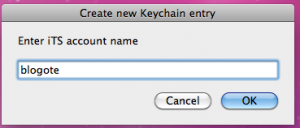
TuneSwitch does exactly what you need: switch between multiple iTunes account. It creates a keychain entry for maintaing your iTunes account. To switch between accounts, you have to perform a one-time action of entering your iTunes username and password, and TuneSwitch will store the entries locally.
 

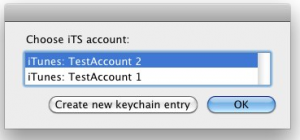
Whenever you want to switch over to the other account, simply select the account name and click “OK.” Neat!
 

Download TuneSwitch (Website).

Convert, Create PSP Mp4 Movie Videos With Vuze
How to delete Google analytics account permanently
Pros and Cons of Visual Resumes and Traditional Resumes
Stumble webpages without downloading Stumbleupon toolbar
Buy Notion Ink Adam Tablet [Second Preorder E-mail]

Sign Up For Daily Newsletter

Be keep up! Get the latest breaking news delivered straight to your inbox.
[mc4wp_form]
By signing up, you agree to our Terms of Use and acknowledge the data practices in our Privacy Policy. You may unsubscribe at any time.
Share This Article
Facebook Copy Link Print
Share
Previous Article Fix iTunes Error 1004 While Restoring iPhone 4
Next Article IS Drive App: Approved Bittorrent App For iPhone and iPod Touch | Works only with iOS 4

Stay Connected

248.1KLike
69.1KFollow
134KPin
54.3KFollow

							banner							
							banner
Create an Amazing Newspaper
Discover thousands of options, easy to customize layouts, one-click to import demo and much more.
Learn More

Latest News

Juanita Katt
Juanita Katt: The Private Daughter of a Hollywood Family
Biography
What Date is 72 Days From Today?
Guides
What is 18 Weeks From Today?
Weeks
Brazil Tech News
Brazil Tech News: Top 10 Startups Changing Latin America
News

You Might also Like

Find Nokia Lumia Phones Availability With Momentum Map

Sara Taylor
Sara Taylor
1 Min Read

Crypto Trading Tips: How To Get Into The NFT World

admin
admin
9 Min Read

No HTC Sync For Mac? You can Still Sync Data Between Mac and HTC Android Phone

Sara Taylor
Sara Taylor
3 Min Read
//

We influence 20 million users and is the number one business and technology news network on the planet

Sign Up for Our Newsletter

Subscribe to our newsletter to get our newest articles instantly!

[mc4wp_form id=”1616″]

BlogoteBlogote
Follow US
Join Us!
Subscribe to our newsletter and never miss our latest news, podcasts etc..
[mc4wp_form]
Zero spam, Unsubscribe at any time.
Welcome Back!

Sign in to your account

Username or Email Address
Password

Lost your password?