
By using this site, you agree to the Privacy Policy and Terms of Use.
Accept
BlogoteBlogoteBlogote
  • Software
  • Tech News
  • Business
  • Fashion
  • Finance
  • Health
  • Lifestyle
Search
  • Contact
  • Blog
  • Complaint
  • Advertise
Reading: Temporarily Disable Flash plugin in Safari Browser using Activity Monitor
Share
Sign In
Notification Show More
Font ResizerAa
BlogoteBlogote
Font ResizerAa
  • Tech News
  • Gadget
  • Technology
  • Mobile
Search
  • Home
    • Home 1
    • Home 2
    • Home 3
    • Home 4
    • Home 5
  • Categories
    • Tech News
    • Gadget
    • Technology
    • Mobile
  • Bookmarks
  • More Foxiz
    • Sitemap
Have an existing account? Sign In
Follow US
  • Contact
  • Blog
  • Complaint
  • Advertise
Home » Blog » Temporarily Disable Flash plugin in Safari Browser using Activity Monitor
How to

Temporarily Disable Flash plugin in Safari Browser using Activity Monitor

Sara Taylor
Last updated: June 6, 2022 7:49 am
Sara Taylor
Share
SHARE

Enabling flash plugin in Safari browser on Mac OS X Mountain Lion can be useful for several reasons — you can watch videos, play flash-based games, view animated websites, or fill flash-based online forms.

Contents
  • How can I block flash player on Safari 6.0?
      • Step 1
      • Step 2
      • Step 3
      • Step 4

At the same time, many of us prefer not to use flash player plugin on Safari browser because, you know, Adobe’s flash brings droves of problems with it. Some of the frequent complaints about flash are as follows:

  • Adobe flash plugin crashes Safari frequently.
  • Adobe flash plugin forces Safari to freeze and become unresponsive.
  • Adobe flash plugin takes up huge chuck of Mac’s memory.

Note: There may exist security loopholes (remember the flashback trojans?) that can put your Mac system at risk, but don’t worry too much about this –  the folks at Adobe are working continuously to fix flash player’s security issues.

How can I block flash player on Safari 6.0?

There are many ways to get rid of Adobe flash player. One way is to download flash uninstaller to permanently delete flash player from your computer. You certainly don’t want to do that, as flash is really useful when you are browsing the web.

The other solution, and the most preferred one, is to temporarily block flash player. When you do that, your slow Safari browser will be much more faster.

Here is how you can use Mac’s Activity Monitor to temporarily disable flash plugin:

Step 1

Launch Safari browser.

Step 2

Visit any flash-based website — go to YouTube, or visit this page.

Step 3

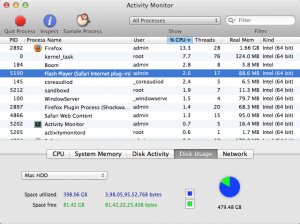
From Spotlight, open Activity Monitor and look for “Flash Player (Safari Internet Plug-in).”
 

Step 4

After highlighting “Flash Player (Safari Internet Plug-in),” click the “Quit Process” button. Another window, like the one below, appears. Click “Quit.”


This stops Safari’s flash player plugin from running in the background. To get back the plugin, restart Safari.

Free Download Gtalk for Mobiles [Sony Ericsson & HTC Phones]
How to delete instagram account
How to Block Cell Phone Number on Verizon [Verizon Number Blocking Trick]
6 Top Tips to Enhance Your Movie-Watching Experience in UK
Stumble webpages without downloading Stumbleupon toolbar

Sign Up For Daily Newsletter

Be keep up! Get the latest breaking news delivered straight to your inbox.
[mc4wp_form]
By signing up, you agree to our Terms of Use and acknowledge the data practices in our Privacy Policy. You may unsubscribe at any time.
Share This Article
Facebook Copy Link Print
Share
Previous Article How to Hide or Remove Apple Maps on iPhone, iPad, iPod Touch Without Jailbreaking
Next Article How to Show Music Lyrics in YouTube Videos

Stay Connected

248.1KLike
69.1KFollow
134KPin
54.3KFollow

							banner							
							banner
Create an Amazing Newspaper
Discover thousands of options, easy to customize layouts, one-click to import demo and much more.
Learn More

Latest News

Juanita Katt
Juanita Katt: The Private Daughter of a Hollywood Family
Biography
What Date is 72 Days From Today?
Guides
What is 18 Weeks From Today?
Weeks
Brazil Tech News
Brazil Tech News: Top 10 Startups Changing Latin America
News

You Might also Like

Close PayPal Account Without Delete Option

Sara Taylor
Sara Taylor
3 Min Read

Fix Error Permission Denied on Torrent Files

admin
admin
2 Min Read

Enable Gzip Compression on WordPress Blog

Sara Taylor
Sara Taylor
2 Min Read
//

We influence 20 million users and is the number one business and technology news network on the planet

Sign Up for Our Newsletter

Subscribe to our newsletter to get our newest articles instantly!

[mc4wp_form id=”1616″]

BlogoteBlogote
Follow US
Join Us!
Subscribe to our newsletter and never miss our latest news, podcasts etc..
[mc4wp_form]
Zero spam, Unsubscribe at any time.
Welcome Back!

Sign in to your account

Username or Email Address
Password

Lost your password?



