
By using this site, you agree to the Privacy Policy and Terms of Use.
Accept
BlogoteBlogoteBlogote
  • Software
  • Tech News
  • Business
  • Fashion
  • Finance
  • Health
  • Lifestyle
Search
  • Contact
  • Blog
  • Complaint
  • Advertise
Reading: Uploading Multiple Photos on Facebook
Share
Sign In
Notification Show More
Font ResizerAa
BlogoteBlogote
Font ResizerAa
  • Tech News
  • Gadget
  • Technology
  • Mobile
Search
  • Home
    • Home 1
    • Home 2
    • Home 3
    • Home 4
    • Home 5
  • Categories
    • Tech News
    • Gadget
    • Technology
    • Mobile
  • Bookmarks
  • More Foxiz
    • Sitemap
Have an existing account? Sign In
Follow US
  • Contact
  • Blog
  • Complaint
  • Advertise
Home » Blog » Uploading Multiple Photos on Facebook
How to

Uploading Multiple Photos on Facebook

Sara Taylor
Last updated: June 6, 2022 7:49 am
Sara Taylor
Share
SHARE

Isn’t it easier to upload photos to your Facebook account using your mobile phone than your computer?

Contents
  • Select and Upload Photos in Bulk on Facebook
  • Transfer Multiple Photos to Facebook Using Batch App

The problem here is that by default you cannot upload bulk photos on Facebook. You may use the mobile version or stick with the iOS Facebook app on your iPhone, but there’s no option to select and batch upload photos.

Select and Upload Photos in Bulk on Facebook

The manual way of uploading multiple photos is not at all hard, though it surely is time consuming. Here’s what you need to do:

Step 1:
 Launch the iOS Facebook app from your iPhone, iPad or iPod Touch.

Step 2: Go to Photos from the left panel and tap on + to add pictures of your choice available in the library — you can also capture and upload photos using iPhone’s camera.
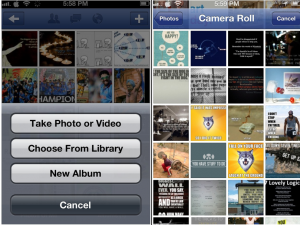
Step 3: Follow Step 1 & 2 to add more pictures.
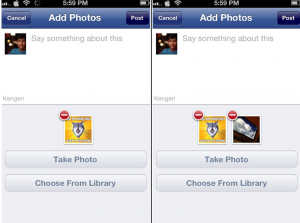
It is clear that there’s no way to create an album of photos in one-click. However, there’s another easy way out for uploading photos in bulk — use third-party apps.

Transfer Multiple Photos to Facebook Using Batch App

Batch app changes the way we upload photos. Developed only for Facebook users, this app lets you transfer multiple photos from your iPhone to your Facebook account.

You can also share your whole album in one-click. You have to log in to your Facebook once, and select the batch of photos from your iPhone that needs to be uploaded.
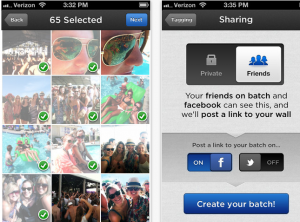
Yet another batch uploader app that lets you upload up to 20 photos at a time is PhotoUp. You can also preview your photos before sending them to your Facebook account — yes, it’s a free app!

If you have any app suggestion, please let us know through your comments below.

Get iTunes Music Notification on Mac Dock
When Games Crashes, Freezes on Your Mac
Google Translate: Easy Way to Translate Multiple Languages
How to Select Vmware Server Local Host and Add Virtual Machine
List of MP3/MP4 Player Supported by Philips Songbird

Sign Up For Daily Newsletter

Be keep up! Get the latest breaking news delivered straight to your inbox.
[mc4wp_form]
By signing up, you agree to our Terms of Use and acknowledge the data practices in our Privacy Policy. You may unsubscribe at any time.
Share This Article
Facebook Copy Link Print
Share
Previous Article Access Educational Videos of Khan Academy on iOS Devices
Next Article Reset Network to Fix WiFi Issues on iPhone 5, iOS 6.0 / 6.0.1 Firmware

Stay Connected

248.1KLike
69.1KFollow
134KPin
54.3KFollow

							banner							
							banner
Create an Amazing Newspaper
Discover thousands of options, easy to customize layouts, one-click to import demo and much more.
Learn More

Latest News

Juanita Katt
Juanita Katt: The Private Daughter of a Hollywood Family
Biography
What Date is 72 Days From Today?
Guides
What is 18 Weeks From Today?
Weeks
Brazil Tech News
Brazil Tech News: Top 10 Startups Changing Latin America
News

You Might also Like

How to Perform a System Restore in Windows 11

admin
admin
2 Min Read

M3U Converter to Convert .M3u to Wma Wave File Format

James Betterson
James Betterson
1 Min Read

Remove Kaspersky Antivirus 2010 Trial from Computer

Sara Taylor
Sara Taylor
2 Min Read
//

We influence 20 million users and is the number one business and technology news network on the planet

Sign Up for Our Newsletter

Subscribe to our newsletter to get our newest articles instantly!

[mc4wp_form id=”1616″]

BlogoteBlogote
Follow US
Join Us!
Subscribe to our newsletter and never miss our latest news, podcasts etc..
[mc4wp_form]
Zero spam, Unsubscribe at any time.
Welcome Back!

Sign in to your account

Username or Email Address
Password

Lost your password?