By using this site, you agree to the Privacy Policy and Terms of Use.
Accept
BlogoteBlogoteBlogote
  • Software
  • Tech News
  • Business
  • Fashion
  • Finance
  • Health
  • Lifestyle
Search
  • Contact
  • Blog
  • Complaint
  • Advertise
Reading: How to Embed Facebook Fan Page on Website/Blogs?
Share
Sign In
Notification Show More
Font ResizerAa
BlogoteBlogote
Font ResizerAa
  • Tech News
  • Gadget
  • Technology
  • Mobile
Search
  • Home
    • Home 1
    • Home 2
    • Home 3
    • Home 4
    • Home 5
  • Categories
    • Tech News
    • Gadget
    • Technology
    • Mobile
  • Bookmarks
  • More Foxiz
    • Sitemap
Have an existing account? Sign In
Follow US
  • Contact
  • Blog
  • Complaint
  • Advertise
Home » Blog » How to Embed Facebook Fan Page on Website/Blogs?
Ideas

How to Embed Facebook Fan Page on Website/Blogs?

Sara Taylor
Last updated: March 26, 2010 6:46 am
Sara Taylor
Share
SHARE

So, how do add an facebook page on your website or blog sidebar? Here is an quick and easy tutorial to help you avoid intricate situation and instantly add facebook fan pages on your websites.

First of all, you need to create a page from your facebook profile. For example, blogote’s fan page can be found here. You can also become a fan if you like this blog :)

The benefit of making pages lies in building a community and knowing more about your users. However, I’ve also seen that facebook pages loads quite slower on website compared to other elements (atleast on this website).

There was no easy way to add the facebook pages on website using an facebook profile. In the pages section, you can only manage your existing pages and cannot add them to website. In anyway, for those of you who are looking for information, here is how you can embed facebook fan pages on website..

After playing around for a while, I found out the developer link which can be accessed by clicking here.
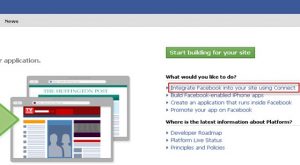
Click on Integrate Facebook into your site using Connect and once the window loads you will find various options to connect your site with facebook as shown.
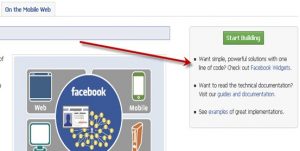
Click on the url that says ’Facebook widgets’ or directly visit this url which displays numerous facebook . Choose fanbox and proceed with the rest of the instruction would take couple of seconds.

You will be provided with the code that needs to be added on your website, once you’re done with that, refresh your webpage and there you’ve facebook fan page embedded to your website ;)

How to contact instant Paypal Customer Support Service
Facebook Pidgin Plugin – Chat From Your Facebook Account in Pidgin
Internet Faxing Software Services
Best Songbird Addon Extensions
Add Audio to Captured/Recorded Snagit Video [Snagit Tip]

Sign Up For Daily Newsletter

Be keep up! Get the latest breaking news delivered straight to your inbox.
[mc4wp_form]
By signing up, you agree to our Terms of Use and acknowledge the data practices in our Privacy Policy. You may unsubscribe at any time.
Share This Article
Facebook Copy Link Print
Share
Previous Article 64 bit 32 bit games vista.txt
Next Article Find HP Product Key License, Model Number from HP Notebook Compaq PCs

Stay Connected

248.1KLike
69.1KFollow
134KPin
54.3KFollow

							banner							
							banner
Create an Amazing Newspaper
Discover thousands of options, easy to customize layouts, one-click to import demo and much more.
Learn More

Latest News

What Date is 72 Days From Today?
Guides
What is 18 Weeks From Today?
Weeks
Brazil Tech News
Brazil Tech News: Top 10 Startups Changing Latin America
News
The Best AI Video Generator for YouTube: Turning Scripts into Viral Content Fast
Guides

You Might also Like

Sony Free PSP Theme Creator

admin
admin
3 Min Read

Rapidshare Proxy(ies)? Possible to bypass Rapidshare download limit

admin
admin
3 Min Read

Download Theme Skin for Foobar 2000 Player

James Betterson
James Betterson
1 Min Read
//

We influence 20 million users and is the number one business and technology news network on the planet

Sign Up for Our Newsletter

Subscribe to our newsletter to get our newest articles instantly!

[mc4wp_form id=”1616″]

BlogoteBlogote
Follow US
Join Us!
Subscribe to our newsletter and never miss our latest news, podcasts etc..
[mc4wp_form]
Zero spam, Unsubscribe at any time.
Welcome Back!

Sign in to your account

Username or Email Address
Password

Lost your password?