By using this site, you agree to the Privacy Policy and Terms of Use.
Accept
BlogoteBlogoteBlogote
  • Software
  • Tech News
  • Business
  • Fashion
  • Finance
  • Health
  • Lifestyle
Search
  • Contact
  • Blog
  • Complaint
  • Advertise
Reading: Touching Base with the iPad: My Personal iPad Review
Share
Sign In
Notification Show More
Font ResizerAa
BlogoteBlogote
Font ResizerAa
  • Tech News
  • Gadget
  • Technology
  • Mobile
Search
  • Home
    • Home 1
    • Home 2
    • Home 3
    • Home 4
    • Home 5
  • Categories
    • Tech News
    • Gadget
    • Technology
    • Mobile
  • Bookmarks
  • More Foxiz
    • Sitemap
Have an existing account? Sign In
Follow US
  • Contact
  • Blog
  • Complaint
  • Advertise
Home » Blog » Touching Base with the iPad: My Personal iPad Review
Apple

Touching Base with the iPad: My Personal iPad Review

Sara Taylor
Last updated: June 6, 2022 7:49 am
Sara Taylor
Share
SHARE

It was a nice Saturday morning when my cousins got their Apple iPad. And oh boy! They, or We to be more appropriate, were so amazed with the new gadget and they didn’t seem to notice it’s been hours since they started meddling with it, clicking here, pressing there, taking photos and screenshots and testing every application that the device have to offer.

But I have got to admit that after several hours of exploration, there still remains a lot of interesting features that my cousins (and with me of course!) need to get acquainted with the Ipad. Since we started getting our hands-on and inspection, me and my cousins have touched first base with Ipad and here are a few of what we came to know about it:
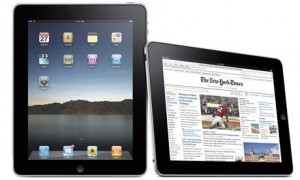
The screen, it was huge and vivid. So bright with lively colors it simply left us dumbfounded! And when the Epicurious  (an intermediary application), we were all rendered speechless by the dazzling red splash on the screen, whereas the Marvel Comics application, though still in beta form was also astounding. With the iPad screen, you would never feel that it’s like a screen taken away from a laptop; instead it gives you a feeling of having a really big iPhone monitor in front of you.

Due to the bigger screen size, applications are displayed more conveniently for the user, it can be split in a landscape mode (content to the right and items index to the left). The Ipad is even more functional, due mainly to the additional items on the toolbars plus the ‘popover’ UI which could impossibly fit in an iPhone. Pretty fast operating system too as seen from the no-delay zooms and pans even when running the Safari browser.

Moreover, there are also several accessories that we have tried with the Apple iPad to further enhance its performance. One is a proper case to give it a slight inclination when placed on your lap or on a table top. The Keyboard dock can be attached for maximized typing and with its Bluetooth accessories for audio, headphones and many others make it a feature plus gadget. The iPad of course charges exclusively through its own power adapters.

Additional iPad applications can be acquired from the App store. File transfer with Ipad is also made much easier. There’s even an application called iWork for reception and conversion of files among others apps.

Apple’s Solution for the iPhone 4 Antenna Debacle
Create Apple ID for iTunes App Store Without Adding Credit Card Details
Working iOS 5.0.1 Jailbreak Coming Soon! [For iPhone 4S and iPad 2 Users]
The Apple iPad Jailbroken Video
Easy Guide on How to Downgrade iPhone 3.1.3 to 3.1.2 Firmware

Sign Up For Daily Newsletter

Be keep up! Get the latest breaking news delivered straight to your inbox.
[mc4wp_form]
By signing up, you agree to our Terms of Use and acknowledge the data practices in our Privacy Policy. You may unsubscribe at any time.
Share This Article
Facebook Copy Link Print
Share
Previous Article Top iTunes alternatives for Linux
Next Article Is the New iPhone Model Built with High Definition?

Stay Connected

248.1KLike
69.1KFollow
134KPin
54.3KFollow

							banner							
							banner
Create an Amazing Newspaper
Discover thousands of options, easy to customize layouts, one-click to import demo and much more.
Learn More

Latest News

What Date is 72 Days From Today?
Guides
What is 18 Weeks From Today?
Weeks
Brazil Tech News
Brazil Tech News: Top 10 Startups Changing Latin America
News
The Best AI Video Generator for YouTube: Turning Scripts into Viral Content Fast
Guides

You Might also Like

Clever Background images for your iPhone

Sara Taylor
Sara Taylor
1 Min Read

iOS 6.0.1 WiFi issues Continues for iPhone 5/4S, iPad Users

admin
admin
5 Min Read

Get Free iPhone Apps to Download For Your Apple iPhone

Sara Taylor
Sara Taylor
1 Min Read
//

We influence 20 million users and is the number one business and technology news network on the planet

Sign Up for Our Newsletter

Subscribe to our newsletter to get our newest articles instantly!

[mc4wp_form id=”1616″]

BlogoteBlogote
Follow US
Join Us!
Subscribe to our newsletter and never miss our latest news, podcasts etc..
[mc4wp_form]
Zero spam, Unsubscribe at any time.
Welcome Back!

Sign in to your account

Username or Email Address
Password

Lost your password?