
By using this site, you agree to the Privacy Policy and Terms of Use.
Accept
BlogoteBlogoteBlogote
  • Software
  • Tech News
  • Business
  • Fashion
  • Finance
  • Health
  • Lifestyle
Search
  • Contact
  • Blog
  • Complaint
  • Advertise
Reading: Create Mac OS X Lion Installation DVD
Share
Sign In
Notification Show More
Font ResizerAa
BlogoteBlogote
Font ResizerAa
  • Tech News
  • Gadget
  • Technology
  • Mobile
Search
  • Home
    • Home 1
    • Home 2
    • Home 3
    • Home 4
    • Home 5
  • Categories
    • Tech News
    • Gadget
    • Technology
    • Mobile
  • Bookmarks
  • More Foxiz
    • Sitemap
Have an existing account? Sign In
Follow US
  • Contact
  • Blog
  • Complaint
  • Advertise
Home » Blog » Create Mac OS X Lion Installation DVD
Apple

Create Mac OS X Lion Installation DVD

Sara Taylor
Last updated: June 6, 2022 7:49 am
Sara Taylor
Share
SHARE

Assuming that you have a backup of Lion’s InstallESD.dmg disk image on your desktop, creating a OS X Lion installation DVD out of this disk image file is really a piece of cake.

Before we begin with the procedure, make sure that the empty DVD or USB flash drive — yes, you can even use USB flash drives — has at least 4GB of free space.

To make a Lion installation DVD, which is bootable, we will use Apple’s Disk Utility tool. Follow the steps given below, and don’t hesitate to leave your comments if you need any help.
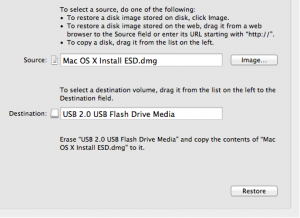
 

Steps to Create a Mac OSX Lion DVD

  1. Insert the blank DVD into your Mac.
  2. Launch Disk Utility — Go to the Applications folder, head over to Utility folder to locate the Disk Utility program.
  3. Drag the .dmg disk image to the left-hand sidebar of Disk Utility. Highlight this file.
  4. Click on Restore tab (there are two tabs: First Aid and Restore).
  5. Drag the .dmg file to Source, and the Destination is your empty DVD (or flash drive) as shown in the screenshot above, although I have used USB flash drive.
  6. Click on Burn, if you want to burn the disk image file to the DVD. For those of you using the USB flash drive, clicking on Restore button will create a bootable OS X Lion.

That’s it! You are all set — you have a bootable Lion DVD!

Next time when you boot up your Mac, hold down the Option key, while making sure that the Lion DVD is already inserted into the Mac’s drive. A screen will appear asking you to choose the volume that you’d like the system to boot from.

Click on the Lion-installed DVD to begin installing OS X Lion on your Mac computer.

Fix WiFi Problems & Access Wikipedia Offline on iOS 6.0 / 6.0.1 iOS Devices
Exclusive Tip: Checking Browsing History on iOS Safari Browser
Fruit Ninja Cheats and Tips to Score High Points
Track Lost iPhone using Apple’s Free Tracking Service
Clever Background images for your iPhone

Sign Up For Daily Newsletter

Be keep up! Get the latest breaking news delivered straight to your inbox.
[mc4wp_form]
By signing up, you agree to our Terms of Use and acknowledge the data practices in our Privacy Policy. You may unsubscribe at any time.
Share This Article
Facebook Copy Link Print
Share
Previous Article Jailbreak Update: iPad Mini on iOS 6 Successfully Jailbroken
Next Article Transfer and Open PDF Files on Windows Phone 7

Stay Connected

248.1KLike
69.1KFollow
134KPin
54.3KFollow

							banner							
							banner
Create an Amazing Newspaper
Discover thousands of options, easy to customize layouts, one-click to import demo and much more.
Learn More

Latest News

Juanita Katt
Juanita Katt: The Private Daughter of a Hollywood Family
Biography
What Date is 72 Days From Today?
Guides
What is 18 Weeks From Today?
Weeks
Brazil Tech News
Brazil Tech News: Top 10 Startups Changing Latin America
News

You Might also Like

Want to Install Winterboard Themes on iPhone/iPod touch? Here’s How to do it.

Sara Taylor
Sara Taylor
2 Min Read

Is the New iPhone Model Built with High Definition?

Sara Taylor
Sara Taylor
3 Min Read

Fix Error Permission Denied on Torrent Files

admin
admin
2 Min Read
//

We influence 20 million users and is the number one business and technology news network on the planet

Sign Up for Our Newsletter

Subscribe to our newsletter to get our newest articles instantly!

[mc4wp_form id=”1616″]

BlogoteBlogote
Follow US
Join Us!
Subscribe to our newsletter and never miss our latest news, podcasts etc..
[mc4wp_form]
Zero spam, Unsubscribe at any time.
Welcome Back!

Sign in to your account

Username or Email Address
Password

Lost your password?