By using this site, you agree to the Privacy Policy and Terms of Use.
Accept
BlogoteBlogoteBlogote
  • Software
  • Tech News
  • Business
  • Fashion
  • Finance
  • Health
  • Lifestyle
Search
  • Contact
  • Blog
  • Complaint
  • Advertise
Reading: Find Best Apps With AppBrain for Android
Share
Sign In
Notification Show More
Font ResizerAa
BlogoteBlogote
Font ResizerAa
  • Tech News
  • Gadget
  • Technology
  • Mobile
Search
  • Home
    • Home 1
    • Home 2
    • Home 3
    • Home 4
    • Home 5
  • Categories
    • Tech News
    • Gadget
    • Technology
    • Mobile
  • Bookmarks
  • More Foxiz
    • Sitemap
Have an existing account? Sign In
Follow US
  • Contact
  • Blog
  • Complaint
  • Advertise
Home » Blog » Find Best Apps With AppBrain for Android
How to

Find Best Apps With AppBrain for Android

James Betterson
Last updated: June 6, 2022 7:49 am
James Betterson
Share
SHARE

Unless you’re running the Froyo (2.2) version of Android you must know how much of a hassle getting apps off the market is. Not only are you expected to search and find your desired app on the tiny screen but you also have to put up with numerous steps to get the app installed and also misleading entries.

Here’s where a third party client like appBrain steps in. What it lets you do is search for apps on your computer and installs them on your phone effortlessly. Makes getting your hands on the app of your choice that much easier.
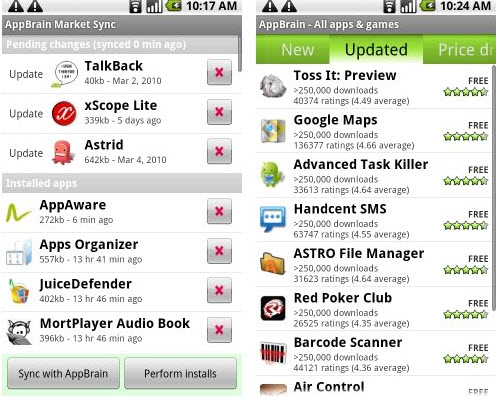
All you need to do is head on over to AppBrain.com and set up an account. Following which you are required to download the AppBrain app from the market and install in on your phone. Once the app is installed you can sync your device with your AppBrain account. What it does is it compiles a list of all your installed apps and keeps a list of them on your account. Once you’re done with this you need to download and install Fast Web Installer from the market following which’s installation you are ready to go.

Appbrain for Android

You can now browse the 100,000+ apps on your computer screen and read up relevant information regarding them. There are lists of top selling and most popular apps present too which you can use to come across many new apps. If you are looking to search for a particular app then the search is fast and accurate and throws back pretty relevant results.

The search is much better than on the market resulting in easier access to your desired apps. Once you’ve found the app you had been looking for you can click on it to get info about it and pressing the install button will beam the app to your phone and install it instantly without you having to do anything.

You can also select apps that you need to uninstall which will be removed from your phone automatically the next time you sync the AppBrain app on your phone with your AppBrain account. Lastly it also lets you create public lists of the apps that you are using or like or recommend so that you can share those apps with others.

So you see how AppBrain makes your apps installing business so much better and with minimum hassle. If you are one of those who don’t like the app market much and can’t wait for the Froyo update, this is what you should be looking at.

Fix Bad DirectSound Driver: Error code 88780078 in Windows XP, Vista, Windows 7
Download Sumatra PDF – Free Open Source PDF reader
Safe Droid X Rooting Guide Works
Securing Your Mobile App: Why Android Developers Need a Code Signing Certificate
How to Improve Your Customer Verification Process

Sign Up For Daily Newsletter

Be keep up! Get the latest breaking news delivered straight to your inbox.
[mc4wp_form]
By signing up, you agree to our Terms of Use and acknowledge the data practices in our Privacy Policy. You may unsubscribe at any time.
Share This Article
Facebook Copy Link Print
Share
Previous Article Block Ads on all Mac OS X Browsers With Glimmer Blocker
Next Article Extract Background Music from Video Files | Audio From Video Freeware

Stay Connected

248.1KLike
69.1KFollow
134KPin
54.3KFollow

							banner							
							banner
Create an Amazing Newspaper
Discover thousands of options, easy to customize layouts, one-click to import demo and much more.
Learn More

Latest News

What Date is 72 Days From Today?
Guides
What is 18 Weeks From Today?
Weeks
Brazil Tech News
Brazil Tech News: Top 10 Startups Changing Latin America
News
The Best AI Video Generator for YouTube: Turning Scripts into Viral Content Fast
Guides

You Might also Like

Unlock Angry Birds Level With JavaScript Code

James Betterson
James Betterson
2 Min Read

How to Overcome Forgotten Facebook Password

Kelly Jhonson
Kelly Jhonson
3 Min Read

How to Check If Windows 10 Is Genuine or Not

admin
admin
5 Min Read
//

We influence 20 million users and is the number one business and technology news network on the planet

Sign Up for Our Newsletter

Subscribe to our newsletter to get our newest articles instantly!

[mc4wp_form id=”1616″]

BlogoteBlogote
Follow US
Join Us!
Subscribe to our newsletter and never miss our latest news, podcasts etc..
[mc4wp_form]
Zero spam, Unsubscribe at any time.
Welcome Back!

Sign in to your account

Username or Email Address
Password

Lost your password?