By using this site, you agree to the Privacy Policy and Terms of Use.
Accept
BlogoteBlogoteBlogote
  • Software
  • Tech News
  • Business
  • Fashion
  • Finance
  • Health
  • Lifestyle
Search
  • Contact
  • Blog
  • Complaint
  • Advertise
Reading: How to Cancel Active Subscription From Your Skype Account
Share
Sign In
Notification Show More
Font ResizerAa
BlogoteBlogote
Font ResizerAa
  • Tech News
  • Gadget
  • Technology
  • Mobile
Search
  • Home
    • Home 1
    • Home 2
    • Home 3
    • Home 4
    • Home 5
  • Categories
    • Tech News
    • Gadget
    • Technology
    • Mobile
  • Bookmarks
  • More Foxiz
    • Sitemap
Have an existing account? Sign In
Follow US
  • Contact
  • Blog
  • Complaint
  • Advertise
Home » Blog » How to Cancel Active Subscription From Your Skype Account
How to

How to Cancel Active Subscription From Your Skype Account

admin
Last updated: June 8, 2022 7:49 am
admin
Share
SHARE

Imagine waking up one day to find out a part of your money was deducted from your PayPal account because you were subscribed to a monthly service. Now that’s unfair. What can you do about this? Probably contact the company that received your money and claim a refund? Fortunately, Skype offers refund if your subscription was activated accidentally, though under one condition:

Contents
  • Skype Subscription Cancellation
      • Step 1
      • Step 2
      •  Step 3
      • Step 4
  • One month subscriptions can only be refunded if you request the refund within a month after you’ve purchased the subscription and you haven’t used it.

This is valid even if you have subscribed for a 3-month or 12-month Skype plan.

Skype Subscription Cancellation

Although one can always claim a refund at a later point of time, you can put yourself in a better position by cancelling your Skype’s subscription — this will save both your time and energy.

Last week we wrote about Skype’s international calling offer where anyone can make calls to any mobile numbers right through the program (read the post for more information), and a lot of people activated this free plan.

Sure, there’s no need to pay anything to make free calls, but remember the offer is limited to just one month — which means Skype will automatically renew the next month by charging your card (credit or debit) or PayPal account. Why not cancel the whole plan if you do not intend to use it? The whole cancellation process is really easy; here’s what you need to do:

Step 1

Go to Skype.com and login to your account.

Step 2

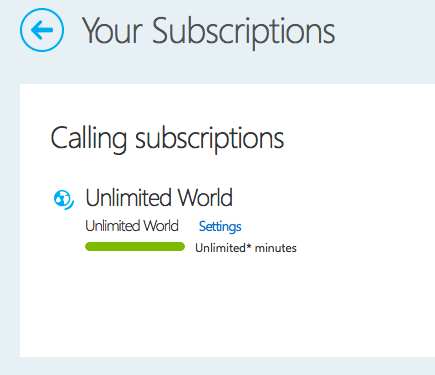
Now go to this link which shows all your active subscriptions. Hit the “settings” link
 Step 3

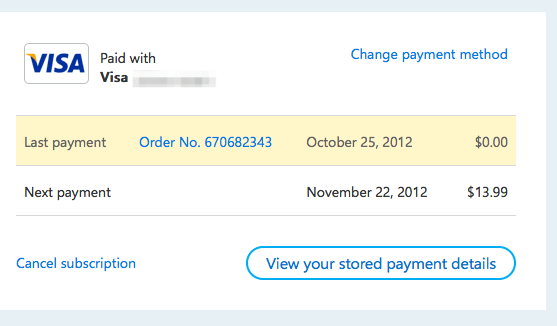
Hit the “Cancel subscription” link.
Step 4

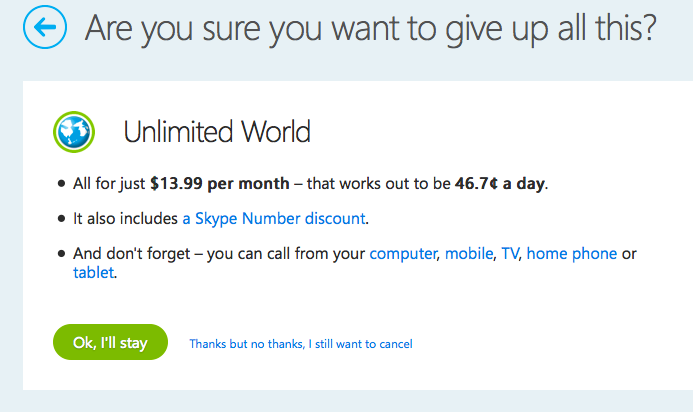
Confirm the cancellation by clicking on “Thanks but no thanks, I still want to cancel.”
Simple, isn’t it? A message like the one below will appear in the next page:

You’ve cancelled your Unlimited World subscription. You can continue to make calls until it expires on November 25, 2012. No further payments will be taken unless you reactivate this subscription.

Were you able to successfully cancel your subscriptions on Skype? Did you face any issues? Let us know through your comments below!

Play YouTube Videos in HQ on iPhone Over 3G Connection [Tip]
Call International Phone Numbers For Free — As Skype Offers One Month Premium Subscription
A Guide to Clearing your Browser History in Windows
Increase Cyber ​​Attack Protection, Dewaweb Takes Advantage of Cloudflare Magic Transit
Watch free English movies TV channel episodes online legally

Sign Up For Daily Newsletter

Be keep up! Get the latest breaking news delivered straight to your inbox.
[mc4wp_form]
By signing up, you agree to our Terms of Use and acknowledge the data practices in our Privacy Policy. You may unsubscribe at any time.
Share This Article
Facebook Copy Link Print
Share
Previous Article How To Play Pokemon GO on PC or Laptop With Koplayer
Next Article How to Install Fixplay IndoXXI

Stay Connected

248.1KLike
69.1KFollow
134KPin
54.3KFollow

							banner							
							banner
Create an Amazing Newspaper
Discover thousands of options, easy to customize layouts, one-click to import demo and much more.
Learn More

Latest News

What Date is 72 Days From Today?
Guides
What is 18 Weeks From Today?
Weeks
Brazil Tech News
Brazil Tech News: Top 10 Startups Changing Latin America
News
The Best AI Video Generator for YouTube: Turning Scripts into Viral Content Fast
Guides

You Might also Like

Unknown network error on Instagram: what is it and how to fix it

admin
admin
7 Min Read

How to activate ephemeral mode on Instagram

admin
admin
4 Min Read

o2tvseries – Download Movies & Shows in MP4, HD, and 3GP in 2021

admin
admin
5 Min Read
//

We influence 20 million users and is the number one business and technology news network on the planet

Sign Up for Our Newsletter

Subscribe to our newsletter to get our newest articles instantly!

[mc4wp_form id=”1616″]

BlogoteBlogote
Follow US
Join Us!
Subscribe to our newsletter and never miss our latest news, podcasts etc..
[mc4wp_form]
Zero spam, Unsubscribe at any time.
Welcome Back!

Sign in to your account

Username or Email Address
Password

Lost your password?