
By using this site, you agree to the Privacy Policy and Terms of Use.
Accept
BlogoteBlogoteBlogote
  • Software
  • Tech News
  • Business
  • Fashion
  • Finance
  • Health
  • Lifestyle
Search
  • Contact
  • Blog
  • Complaint
  • Advertise
Reading: Save Flash Games or Movies From Internet Explorer Browser
Share
Sign In
Notification Show More
Font ResizerAa
BlogoteBlogote
Font ResizerAa
  • Tech News
  • Gadget
  • Technology
  • Mobile
Search
  • Home
    • Home 1
    • Home 2
    • Home 3
    • Home 4
    • Home 5
  • Categories
    • Tech News
    • Gadget
    • Technology
    • Mobile
  • Bookmarks
  • More Foxiz
    • Sitemap
Have an existing account? Sign In
Follow US
  • Contact
  • Blog
  • Complaint
  • Advertise
Home » Blog » Save Flash Games or Movies From Internet Explorer Browser
How to

Save Flash Games or Movies From Internet Explorer Browser

Sara Taylor
Last updated: June 6, 2022 7:49 am
Sara Taylor
Share
SHARE

Although there are few manual ways to extract SWF Flash content from websites using browsers and even desktop software’s that will (freely) save, as well as download flash movies or flash games from the web sites – here is an addon specially developed for Internet explorer browser by Sothink that helps in saving flash content with a single click.

Sothink are providing this IE browser addon that supports Internet explorer 7, 8 including the older IE browsers though they are almost dead.

To save any content such as flash games or flash movie videos from a particular page, download this addon and unzip it. You will have to execute the exe file. Make sure that Internet explorer is closed while performing this operation.
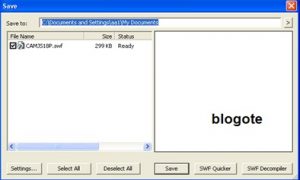
 

Once you’re done with the installation process, open Internet explorer and you will find a round blue button that allows you to save swf flash files. Visit the website or the flash game site to extract the flash content and save it on your desktop.

Sothink IE addon is 422kb in size and works well on Windows platform. I’ve tested the program by opening flash website and trying to save the flash content, it did work out smoothly! ;)

Call International Phone Numbers For Free — As Skype Offers One Month Premium Subscription
iPhone 3G iOS 4.1: Does the iOS 4.1 Fare Better on the iPhone 3G?
Pre-order HTC 8X Windows Phone in India at a Resonable Price
AniCloud: Is It Legal To Watch Anime Online For Free
How to turn off WhatsApp auto-download

Sign Up For Daily Newsletter

Be keep up! Get the latest breaking news delivered straight to your inbox.
[mc4wp_form]
By signing up, you agree to our Terms of Use and acknowledge the data practices in our Privacy Policy. You may unsubscribe at any time.
Share This Article
Facebook Copy Link Print
Share
Previous Article Funny iPhone 4S/5 Prank Played on the Streets
Next Article WordPress URL Shortening Plugin To Mask Webpages Links

Stay Connected

248.1KLike
69.1KFollow
134KPin
54.3KFollow

							banner							
							banner
Create an Amazing Newspaper
Discover thousands of options, easy to customize layouts, one-click to import demo and much more.
Learn More

Latest News

Juanita Katt
Juanita Katt: The Private Daughter of a Hollywood Family
Biography
What Date is 72 Days From Today?
Guides
What is 18 Weeks From Today?
Weeks
Brazil Tech News
Brazil Tech News: Top 10 Startups Changing Latin America
News

You Might also Like

How to Change Gmail Password

Kelly Jhonson
Kelly Jhonson
2 Min Read

List of Omegle websites

James Betterson
James Betterson
6 Min Read

Add Facebook Messenger to Firefox Browser’s Sidebar

Sara Taylor
Sara Taylor
2 Min Read
//

We influence 20 million users and is the number one business and technology news network on the planet

Sign Up for Our Newsletter

Subscribe to our newsletter to get our newest articles instantly!

[mc4wp_form id=”1616″]

BlogoteBlogote
Follow US
Join Us!
Subscribe to our newsletter and never miss our latest news, podcasts etc..
[mc4wp_form]
Zero spam, Unsubscribe at any time.
Welcome Back!

Sign in to your account

Username or Email Address
Password

Lost your password?