By using this site, you agree to the Privacy Policy and Terms of Use.
Accept
BlogoteBlogoteBlogote
  • Software
  • Tech News
  • Business
  • Fashion
  • Finance
  • Health
  • Lifestyle
Search
  • Contact
  • Blog
  • Complaint
  • Advertise
Reading: Uninstall Little Snitch Completely From Mac
Share
Sign In
Notification Show More
Font ResizerAa
BlogoteBlogote
Font ResizerAa
  • Tech News
  • Gadget
  • Technology
  • Mobile
Search
  • Home
    • Home 1
    • Home 2
    • Home 3
    • Home 4
    • Home 5
  • Categories
    • Tech News
    • Gadget
    • Technology
    • Mobile
  • Bookmarks
  • More Foxiz
    • Sitemap
Have an existing account? Sign In
Follow US
  • Contact
  • Blog
  • Complaint
  • Advertise
Home » Blog » Uninstall Little Snitch Completely From Mac
How to

Uninstall Little Snitch Completely From Mac

admin
Last updated: June 6, 2022 7:49 am
admin
Share
SHARE

Little Snitch for Mac OS is a great little gem to protect your data from being sent out to third-party apps through the Internet. For instance, you can use Little Snitch to hamper the outgoing traffic and block websites and apps that require access to the data stored on your Mac.

In other words, Little Snitch provides flexible options to grant or block permissions to Mac applications.
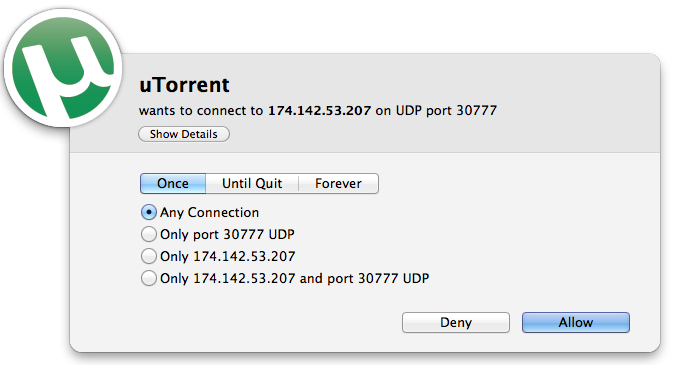
However, if you want to uninstall Little Snitch from your Mac, for you’ve your own reasons, then keep reading further.

Remove Little Snitch App Completely From Mac OS

Dragging the application to Trash folder will remove the application, but, unfortunately, not all the core files of Little Snitch are deleted and the files still reside on your Mac.

Also, All-in-one installers like AppZapper and AppCleaner may often fall short with complex applications. But if you have an app cleaner installed on your Mac, give it a shot, otherwise use the default Little Snitch uninstaller.

To make the removal procedure easier, Little Snitch has its own uninstaller that can be found using the following steps:

  1. Open Finder, search for Little Snitch DMG file.
  2. Click on Little Snitch Installer — yes, installer!
  3. A window pops up with two options: Uninstall and Install.
  4. Choose Uninstall to remove Little Snitch from Mac. To install the app again, click on Install.

Pretty easy, right? But you haven’t won yet. There are some user files that needs to be deleted to permanently remove Little Snitch from your computer.

So, if you wish to completely remove the stored preference on your Mac, then delete the following files and folders, as mentioned at Obdev:

/Library/Application Support/Objective Development/Little Snitch/
~/Library/Application Support/Little Snitch/
~/Library/Preferences/at.obdev.LittleSnitchConfiguration.plist
~/Library/Preferences/at.obdev.LittleSnitchNetworkMonitor.plist
~/Library/Preferences/at.obdev.LittleSnitchInstaller.plist

The “~” tilde sign refers to your home folder.

That’s it! All the redundant files of Little Snitch are gone. In case you want to reinstall the app, you have to launch the .DMG file again.

How to Reset Mac OS X Lion Password [Guide]
Create Custom Email Signatures for Gmail, Aol, Yahoo & Hotmail
How to Restore Address Book Backup on Mac OS
Instant Win Games & Free Prizes at Sweepstakes Advantage
8 Ways to Fix Plugged in Not Charging

Sign Up For Daily Newsletter

Be keep up! Get the latest breaking news delivered straight to your inbox.
[mc4wp_form]
By signing up, you agree to our Terms of Use and acknowledge the data practices in our Privacy Policy. You may unsubscribe at any time.
Share This Article
Facebook Copy Link Print
Share
Previous Article How to install Amazon Prime Video on an Android TV
Next Article Guide to Hosts File For Mac OS X Lion Users

Stay Connected

248.1KLike
69.1KFollow
134KPin
54.3KFollow

							banner							
							banner
Create an Amazing Newspaper
Discover thousands of options, easy to customize layouts, one-click to import demo and much more.
Learn More

Latest News

What Date is 72 Days From Today?
Guides
What is 18 Weeks From Today?
Weeks
Brazil Tech News
Brazil Tech News: Top 10 Startups Changing Latin America
News
The Best AI Video Generator for YouTube: Turning Scripts into Viral Content Fast
Guides

You Might also Like

How to Win 2048 – Easiest Strategy and Game Guide

admin
admin
7 Min Read

Game Lags on Sony PSP? Fix by uncompressing CSO to ISO Game File

admin
admin
2 Min Read

How to Speed-up Your Mac [Performance Guide]

Sara Taylor
Sara Taylor
4 Min Read
//

We influence 20 million users and is the number one business and technology news network on the planet

Sign Up for Our Newsletter

Subscribe to our newsletter to get our newest articles instantly!

[mc4wp_form id=”1616″]

BlogoteBlogote
Follow US
Join Us!
Subscribe to our newsletter and never miss our latest news, podcasts etc..
[mc4wp_form]
Zero spam, Unsubscribe at any time.
Welcome Back!

Sign in to your account

Username or Email Address
Password

Lost your password?