
By using this site, you agree to the Privacy Policy and Terms of Use.
Accept
BlogoteBlogoteBlogote
  • Software
  • Tech News
  • Business
  • Fashion
  • Finance
  • Health
  • Lifestyle
Search
  • Contact
  • Blog
  • Complaint
  • Advertise
Reading: View Files Inside .Zip or .Rar File Before Downloading From the Internet
Share
Sign In
Notification Show More
Font ResizerAa
BlogoteBlogote
Font ResizerAa
  • Tech News
  • Gadget
  • Technology
  • Mobile
Search
  • Home
    • Home 1
    • Home 2
    • Home 3
    • Home 4
    • Home 5
  • Categories
    • Tech News
    • Gadget
    • Technology
    • Mobile
  • Bookmarks
  • More Foxiz
    • Sitemap
Have an existing account? Sign In
Follow US
  • Contact
  • Blog
  • Complaint
  • Advertise
Home » Blog » View Files Inside .Zip or .Rar File Before Downloading From the Internet
How to

View Files Inside .Zip or .Rar File Before Downloading From the Internet

James Betterson
Last updated: June 6, 2022 7:49 am
James Betterson
Share
SHARE

How many times do we blindly download .zip, .rar files from file hosting services or unknown sources without knowing that it might contain inappropriate files. Surely, some of them are genuine, but those zipped files do contain unwanted junk files along with the main file which are really wasting our bandwidth.

How cool would it be if we can view the content of the zip or .rar file before downloading? And, what if you could select few files out of the many number of files that are in the .zip contents? Thanks to Archview addon, it’s possible to view files that are hidden un-extracted in zip or rar format.
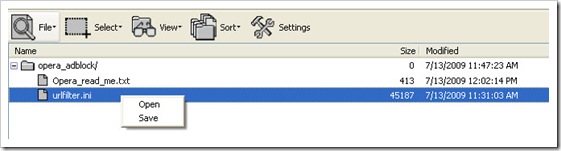
Download Archiview Firefox Addon

Archview works on Firefox and flock browser. You can download it from here and restart your browser to activate the addon. Once done, you don’t have to configure anything. Whenever you find an zip format or rar format files (also supports ISO files) the addon will automatically open an window and show the contents of the file. When not in use, you can disable it by using left click.

You can save the whole zipped folder by viewing the content inside it or select any particular files you need to download. The addon doesn’t add up to high memory usage and resides peacefully on the firefox status bar.

Bookmarklet to Add Youtube Search Engine Box to Firefox Browser
How to recover deleted photos on an Android mobile in 2021
How to Overcome Bluetooth Laptop Error
Access and Unblock Orkut, Myspace websites using Powerscrap
How to Speed Up a Slow Mac in 9 Simple Steps

Sign Up For Daily Newsletter

Be keep up! Get the latest breaking news delivered straight to your inbox.
[mc4wp_form]
By signing up, you agree to our Terms of Use and acknowledge the data practices in our Privacy Policy. You may unsubscribe at any time.
Share This Article
Facebook Copy Link Print
Share
Previous Article Empower Google Chrome with Firefox addon
Next Article The Sphinx of Imagination Reviewed: it’s addictive and life-changing!

Stay Connected

248.1KLike
69.1KFollow
134KPin
54.3KFollow

							banner							
							banner
Create an Amazing Newspaper
Discover thousands of options, easy to customize layouts, one-click to import demo and much more.
Learn More

Latest News

Juanita Katt
Juanita Katt: The Private Daughter of a Hollywood Family
Biography
What Date is 72 Days From Today?
Guides
What is 18 Weeks From Today?
Weeks
Brazil Tech News
Brazil Tech News: Top 10 Startups Changing Latin America
News

You Might also Like

Building A Fulfilling Career In Education: A How-To Guide

admin
admin
8 Min Read

The Sphinx of Imagination Reviewed: it’s addictive and life-changing!

James Betterson
James Betterson
6 Min Read

How to Find Latest Ustream Live Streaming Videos From Twitter

Sara Taylor
Sara Taylor
1 Min Read
//

We influence 20 million users and is the number one business and technology news network on the planet

Sign Up for Our Newsletter

Subscribe to our newsletter to get our newest articles instantly!

[mc4wp_form id=”1616″]

BlogoteBlogote
Follow US
Join Us!
Subscribe to our newsletter and never miss our latest news, podcasts etc..
[mc4wp_form]
Zero spam, Unsubscribe at any time.
Welcome Back!

Sign in to your account

Username or Email Address
Password

Lost your password?