
By using this site, you agree to the Privacy Policy and Terms of Use.
Accept
BlogoteBlogoteBlogote
  • Software
  • Tech News
  • Business
  • Fashion
  • Finance
  • Health
  • Lifestyle
Search
  • Contact
  • Blog
  • Complaint
  • Advertise
Reading: Latest Google Chrome Browser For Mac OS X Lion Available
Share
Sign In
Notification Show More
Font ResizerAa
BlogoteBlogote
Font ResizerAa
  • Tech News
  • Gadget
  • Technology
  • Mobile
Search
  • Home
    • Home 1
    • Home 2
    • Home 3
    • Home 4
    • Home 5
  • Categories
    • Tech News
    • Gadget
    • Technology
    • Mobile
  • Bookmarks
  • More Foxiz
    • Sitemap
Have an existing account? Sign In
Follow US
  • Contact
  • Blog
  • Complaint
  • Advertise
Home » Blog » Latest Google Chrome Browser For Mac OS X Lion Available
News

Latest Google Chrome Browser For Mac OS X Lion Available

Sara Taylor
Last updated: September 23, 2013 7:17 am
Sara Taylor
Share
SHARE

A month after Google Chrome landed on the beta channel, the stable version of Google’s next-generation browser has emerged officially for the Mac users.

Now Google Chrome 14 can be updated on your Mac OS X Lion machine.

The stable version of Google Chrome not only supports Mac OS X Lion but also offers a new way to integrate native code into web apps. This means the apps written in C or C++ can run within the browser.

Chrome will allow programs to run within protected sandboxes to cut down the security threats. This Native Client technology works with web apps available in the Chrome Web Store.

Update Google Chrome on Mac 10.7 Lion
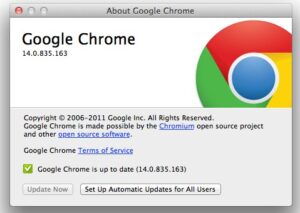
From the end user point of new, the update offers full-screen support on Mac OS X Lion which is a huge plus for power users. Also, Chrome is streamlined with Lion’s overlay scrollbars.

The update also includes Web Audio API that lets developers to add special audio effects without leaving the browser.

If you already have Google Chrome installed on your Mac computer, apply the update by clicking on Chrome from the menu bar and go to About Google Chrome.

To activate full-screen browsing on your Mac, use the hot-key combo of Ctrl+Shift+F.

Firefox Jaegermonkey Upgrade Beefs up Firefox Browser With Improved JavaScript Support
Carle Outlook: A Comprehensive Guide
Netflix video quality returns to normal
Apple Introduces iOS 15 at # WWDC21
pub tv: The Ultimate Guide to Advertising on Television

Sign Up For Daily Newsletter

Be keep up! Get the latest breaking news delivered straight to your inbox.
[mc4wp_form]
By signing up, you agree to our Terms of Use and acknowledge the data practices in our Privacy Policy. You may unsubscribe at any time.
Share This Article
Facebook Copy Link Print
Share
Previous Article Paypal India Discontinuing Electronic Bank Transfer
Next Article What is ODT file and How to Open .ODT File Extension

Stay Connected

248.1KLike
69.1KFollow
134KPin
54.3KFollow

							banner							
							banner
Create an Amazing Newspaper
Discover thousands of options, easy to customize layouts, one-click to import demo and much more.
Learn More

Latest News

Juanita Katt
Juanita Katt: The Private Daughter of a Hollywood Family
Biography
What Date is 72 Days From Today?
Guides
What is 18 Weeks From Today?
Weeks
Brazil Tech News
Brazil Tech News: Top 10 Startups Changing Latin America
News

You Might also Like

Sony Ericsson to Bring Out Gaming Smartphone with Android 3.0!

admin
admin
3 Min Read

Latest VMware Fusion 4 Works on Mac OS X Lion

Sara Taylor
Sara Taylor
1 Min Read

$10 Laptop? India’s Educational Laptop Is Here, But Not At $10

James Betterson
James Betterson
3 Min Read
//

We influence 20 million users and is the number one business and technology news network on the planet

Sign Up for Our Newsletter

Subscribe to our newsletter to get our newest articles instantly!

[mc4wp_form id=”1616″]

BlogoteBlogote
Follow US
Join Us!
Subscribe to our newsletter and never miss our latest news, podcasts etc..
[mc4wp_form]
Zero spam, Unsubscribe at any time.
Welcome Back!

Sign in to your account

Username or Email Address
Password

Lost your password?