


Many people don’t even know what Torrent or BitTorrent is? Or how to use BitTorrent? How Downloading speed is affected? Or even mostly who works on them don’t know how to create a torrent file, from your own computer. Even I earlier, didn’t know most of the things. Let’s start on these all multiple questions which are coming in your minds.
What is BitTorrent?
Most of you have worked on BitTorrent, how many of you know perfectly what is BitTorrent? may be very less or most, but even others do not know, or even when want to know, after looking at the lengthy page of Wiki, refuse. Let me tell you in short, and informative.
Many people don’t even know what Torrent or BitTorrent is? Or how to use BitTorrent? How Downloading speed is affected? Or even mostly who works on them don’t know how to create a torrent file, from your own computer. Even I earlier, didn’t know most of the things. Let’s start on these all multiple questions which are coming in your minds.
What is BitTorrent?
Most of you have worked on BitTorrent, how many of you know perfectly what is BitTorrent? may be very less or most, but even others do not know, or even when want to know, after looking at the lengthy page of Wiki, refuse. Let me tell you in short, and informative.
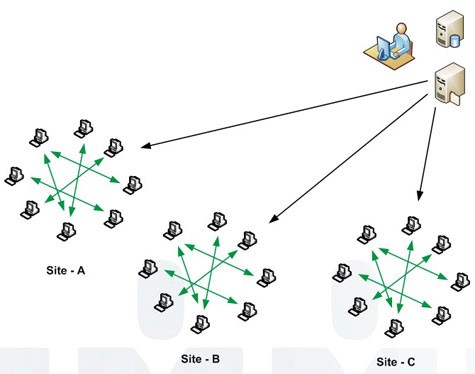
Bit torrent is actually just a protocol which supports peer-to-peer file sharing. In general, peer-to-peer communication is computer-to-computer file sharing, which is done to send large amount of file sharing over the internet. And even it made a large part of file sharing over the internet, as you can guess by the report that in November 35% traffic over internet was due to it. Now you are having a question in mind.
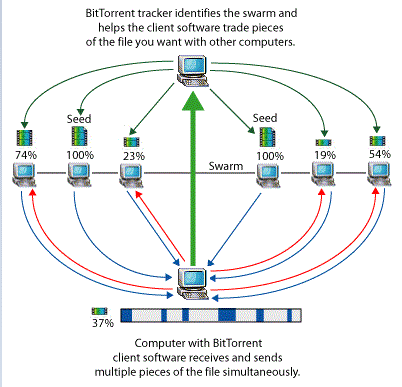
When was BitTorrent released? And who designed BitTorrent?
Bram Cohen was the designer of Bit torrent, he designed the protocol in April 2001, and in 4 months he released the first available version of BitTorrent in May 2001. Earlier, Bram Cohen worked in MojoNation, but he left it and started working on BitTorrent.
He and his friend Len Sessaman unveiled first time about BitTorrent in a conference of hackers, CodeCon conference, as a presentation. He designed it firstly in Python and implemented it.
BitTorrent became most popular because of its sharing of large music, movies online and even at a high speed at that time. But you might be thinking about how file sharing is done by BitTorrent.
BitTorrent Protocol, How BitTorrent works?
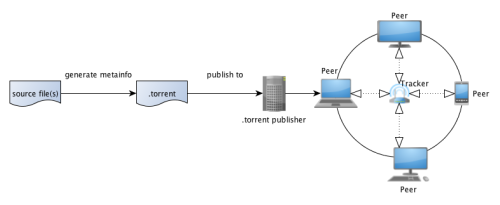
BitTorrent is actually designed to reduce server load and to share a file from various sources. It provides multiple servers to download the single large file in a very fast manner. It replaced the previous old single source for distributing the single file over the internet. It uses multiple mirror servers for distributing any files even at very lower bandwidth.
Basically, a torrent file is made up of the file which is to be distributed. Then this torrent file is available through a seed, which is a BitTorrent node. Then the original file is divided into multiple segments called pieces which is then distributed all over. The torrent file act as peers and leechers while it is distributing over the internet.
Now the file distribution is over to BitTorrent nodes, the file can be even send completely as a copy through seed. The peer act as a piece of file and then either it is transmitted or its copy is transmitted, and when one peer gets the copy it become source for other peers.
Protection of peers by BitTorrent
Now these peers, the pieces of files are protected by cryptographic hash, which secure the piece of file from being attacked by any hacker or malicious attacks. And if any such thing appears it is detected by the BitTorrent, and either the file is repaired or replaced.
These pieces are downloaded by the client in non-sequentially manner, and then arranged by BitTorrent client. This thing allows the user to seek out which part is available and to download it at that time rather than waiting for next file available to be downloaded, even without wasting time.
Distribution and recovery of Peers
Every piece of the BitTorrent file has same size, like if the original file is of 10 Mb then each peer could be of 1 Mb each or as 256 Kb each. In this file sharing their is no loss of data, as the file which is missing can be recovered. When the user downloads torrent file and open it in BitTorrent client, the computer is then connected to trackers listed in torrent file.
And then, the list of peers is given to the client for download. And then files are being downloaded on the basis of peers having the various pieces. And when all are downloaded, client integrates all seeds.
Seeds, Peers, Leechers Meaning and downloading speed
Seeds, peers and leechers are the most important part of BitTorrent file sharing. Seeds are those part which contain the whole piece of original file allocated to them, and are known as peers till they are not fully downloaded. Leechers are those which are downloading the file from peers. More the seeds more the speed and availability as it increase the no. of available file parts.
Seeds
Seeds are the part of file or piece of the original file. Seeds actually are peers, which has one complete part of the file, means more the seeds, more the availability of the file and hence get desirable downloading speed of the file without depending only one server. Seeding is remaining a peer left for other peers to download.
Peers
Peers are the just that instance of BitTorrent client of the file which is connected on computer and transferring data. Unlike seeds, one peer does not has the complete part of the file. Peers are the currently transmitting part. When any peer is fully downloaded it becomes seed, and act as a source to other peers for same file.
Leechers
Leech have two meaning, one is simply the downloader who is downloading the file. Second, it has negative effect on downloading when their is very poor sharing ratio of a file. However sometimes leechers avoid uploading of files due to modifying clients.
What actually are these Torrent files?
Torrent file is a computer file that contains metadata about files and folders to be shared and the trackers. They does not contain the content of file to be distributed, they just have some information of the files, like the size of the file, name, folder structure, cryptographic hash value of each integrated part of file. These files have extensions .torrent as in Myfile.torrent.
These torrent files are binary formatted file, which are bencoded dictionaries having some keys.
announce : It has the URL of the tracker. Tracker is the server which causes the connection between computer and the protocol.
name : It has the names of files and folders which are to be shared.
piece length-no. of bytes per piece having.
length–total size of file in bytes.
How to create a torrent file?
Some people want to share their files over internet but do not know how to make torrent file of them. Lets follow these steps and share your file anywhere.
Step 1: Download BitTorrent client like BitTorrent or utorrent and intsall it.
Step 2: Put all your files which you want to share in one folder only.
Step 3: Open your client, and either click on ‘Create New Torrent’ icon or select it from file menu.
Step 4: Click on ‘Add File’ and select that directory.
Step 5: Now you have to add trackers in ‘add trackers’ box. There are two methods:
- Using available trackers.
- Go to website Trackers List
- Select as many trackers you want and paste them in that box.
- Using your own tracker.
- Login or make an account in any torrent providing website like piratebay, extratorrent, kickass torrent, etc.
- Click on upload, and they will provide you tracker url, paste it in that box.
Step 6: Add any other information if you want.
Step 7: Keep remember to check the seeding check-box, it is compulsory to share.
Step 8: Now your file is ready, first let it upload 100%, and then share the Torrent file generated to any one.
Best BitTorrent clients used worldwide
Here are some of the BitTorrent client which follow the BitTorrent protocol to download the torrent files and make our downloading easy and interesting and more valuable.
BitTorrent
BitTorrent is official and first client using this protocol for sharing of files over internet. Its new version are actually a part of µTorrent, as µTorrent is also official client of BitTorrent. But this client is not available for full use in free version, for its full use money is paid. And it is available for Windows and Mac OS.
µTorrent
µTorrent is also a official client of BitTorrent. It is fully free and available for everyone. Its new version are are as a part of BitTorrent version later than 6.0. It is also available for Windows and Mac Os.
BitComet
BitComet is another client which follows the same protocol for sharing torrent files, and it is written in C++, hence it is available for Microsoft Windows only.
Vuze
Vuze is an another client which is not only used to download torrent files, but also video content of HD quality from source to client using peer-to-peer communication.






