By using this site, you agree to the Privacy Policy and Terms of Use.
Accept
BlogoteBlogoteBlogote
  • Software
  • Tech News
  • Business
  • Fashion
  • Finance
  • Health
  • Lifestyle
Search
  • Contact
  • Blog
  • Complaint
  • Advertise
Reading: Maps+ App is a Free Google Maps Alternative for iPhone users
Share
Sign In
Notification Show More
Font ResizerAa
BlogoteBlogote
Font ResizerAa
  • Tech News
  • Gadget
  • Technology
  • Mobile
Search
  • Home
    • Home 1
    • Home 2
    • Home 3
    • Home 4
    • Home 5
  • Categories
    • Tech News
    • Gadget
    • Technology
    • Mobile
  • Bookmarks
  • More Foxiz
    • Sitemap
Have an existing account? Sign In
Follow US
  • Contact
  • Blog
  • Complaint
  • Advertise
Home » Blog » Maps+ App is a Free Google Maps Alternative for iPhone users
Apple

Maps+ App is a Free Google Maps Alternative for iPhone users

Sara Taylor
Last updated: June 6, 2022 7:49 am
Sara Taylor
Share
SHARE

Although Google is working on an iOS version of Google Maps, we can still use the web version of Google maps on our devices. For those who do not favor the web version, you can always go ahead and download any free map apps from the App Store.

Contents
  • Map+ Brings Google Maps on iOS Devices
  • Download Maps+

You will find a treasure trove of mapping applications in the App Store, but out of all of them, here’s an app that is powered through Google maps and is slightly more powerful than rest of the apps I have used till now.

Map+ Brings Google Maps on iOS Devices

Maps+ is a free app (limited to a certain extent) that brings the functionality and richness of Google Maps on your iPhones and iPads. The sleek interface is combined with a set of tools that does everything one would expect — from guiding you to new places to helping you find directions from your current location.

Current location is accurately pointed out with information such as coordinates and altitude.
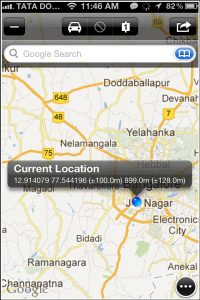
Tapping on the Maps+ screen brings up various options such as Start, Transit, End and Bookmark. You can, of course, zoom in or out to discover more places around you.

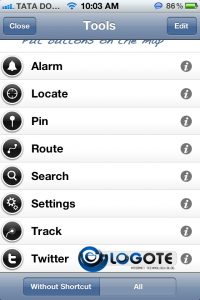
Tap on the black round button on the right-bottom corner to explore tools available in the Maps+ app. Here, you can also edit and record GPS tracks (for devices with GPS), use location-based alarms, search routes, drop pins, and bookmark places. The bookmarked places (alarm, pins, tracks) can always be imported via mail or iTunes.
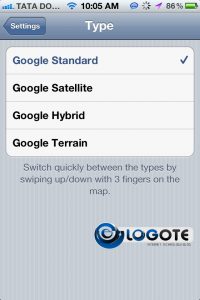
Change the Google map types (there are 4 maps available altogether) by swiping three fingers up or down, which is a neat addition and something that even the stock version of Google maps doesn’t offer.
Deleting multiple pins was a pain on Google maps, and what I really like about the Maps+ app is the ability to “clear” all the dropped pins in one tap.

It goes without saying the app offers almost everything that was available in stock Maps app.

There’s another feature that shows tweets posted by your Twitter friends, making it easier for you to learn more about the current location and the people around you. However, this feature is available only with a $2.99 in-app purchase.

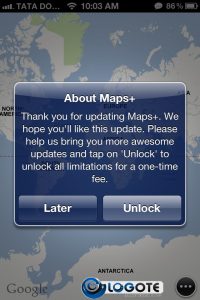
Note that Maps+ is free to download, yes, but there are certain limitations you have to deal with. For instance, you cannot drop pins more than 3 times at any instance of time. Other limitations are as follows:

You can unlock this app to remove all the limitations, for which you have to pay $2.99. However, the free version should suffice for those who primarily want to find directions from their current place.
Download Maps+

Compatible with iPhone, iPod touch, and iPad, Maps+ requires iOS 4.3 or later. Maps+ app will not be able to locate places without WiFi or 3G connection. This app is also optimized for iPhone 5 running iOS 6. You can always download Maps+ from the iTunes App Store.

What are your thoughts on the Maps+ app? Do you love it? Let us know through your comments below.

Dreams Shattered: Cydia Jailbreak for iPhone 5, iOS 6 Device is Not Real?
Word Lens: An iPhone App That Travelers Will Love
iPhone 3G iOS 4.1: Does the iOS 4.1 Fare Better on the iPhone 3G?
Solution: Fix No Sound Problem on iPhone, iPod Touch
How to improve the performance of a slow Mac

Sign Up For Daily Newsletter

Be keep up! Get the latest breaking news delivered straight to your inbox.
[mc4wp_form]
By signing up, you agree to our Terms of Use and acknowledge the data practices in our Privacy Policy. You may unsubscribe at any time.
Share This Article
Facebook Copy Link Print
Share
Previous Article Get Free iPhone Apps to Download For Your Apple iPhone
Next Article Features, Specifications of iPhone 4G/HD

Stay Connected

248.1KLike
69.1KFollow
134KPin
54.3KFollow

							banner							
							banner
Create an Amazing Newspaper
Discover thousands of options, easy to customize layouts, one-click to import demo and much more.
Learn More

Latest News

What Date is 72 Days From Today?
Guides
What is 18 Weeks From Today?
Weeks
Brazil Tech News
Brazil Tech News: Top 10 Startups Changing Latin America
News
The Best AI Video Generator for YouTube: Turning Scripts into Viral Content Fast
Guides

You Might also Like

Intel says Windows is better than MacOS for gaming

admin
admin
1 Min Read

Best Winterboard themes For iPhone/ iPod Touch [Free]

James Betterson
James Betterson
6 Min Read

Save Your Wet iPhone and iPod Touch

Sara Taylor
Sara Taylor
6 Min Read
//

We influence 20 million users and is the number one business and technology news network on the planet

Sign Up for Our Newsletter

Subscribe to our newsletter to get our newest articles instantly!

[mc4wp_form id=”1616″]

BlogoteBlogote
Follow US
Join Us!
Subscribe to our newsletter and never miss our latest news, podcasts etc..
[mc4wp_form]
Zero spam, Unsubscribe at any time.
Welcome Back!

Sign in to your account

Username or Email Address
Password

Lost your password?