
By using this site, you agree to the Privacy Policy and Terms of Use.
Accept
BlogoteBlogoteBlogote
  • Software
  • Tech News
  • Business
  • Fashion
  • Finance
  • Health
  • Lifestyle
Search
  • Contact
  • Blog
  • Complaint
  • Advertise
Reading: Control Preview From Opening Multiple Windows
Share
Sign In
Notification Show More
Font ResizerAa
BlogoteBlogote
Font ResizerAa
  • Tech News
  • Gadget
  • Technology
  • Mobile
Search
  • Home
    • Home 1
    • Home 2
    • Home 3
    • Home 4
    • Home 5
  • Categories
    • Tech News
    • Gadget
    • Technology
    • Mobile
  • Bookmarks
  • More Foxiz
    • Sitemap
Have an existing account? Sign In
Follow US
  • Contact
  • Blog
  • Complaint
  • Advertise
Home » Blog » Control Preview From Opening Multiple Windows
How to

Control Preview From Opening Multiple Windows

James Betterson
Last updated: June 6, 2022 7:49 am
James Betterson
Share
SHARE

Preview is an ingeniously designed built-in Mac utility, and perhaps one of my favorite one on iMac. I can edit documents, delete pages of the PDF file, order the pages of any document the way I need, create signature, and gracefully open a variety of different files.

All that said, there’s something which bothers most of us Mac users. By default, the exclusive Lion-only Resume feature doesn’t align well with Preview. For example, whenever you restart your Mac machine, Preview automatically opens multiple windows which were opened in the previous session.

All your images, PDF files, documents pops up on the screen when you launch Preview. The windows are all over the place. Inarguably, the easiest to get rid of these opened files is to hit the close button.

You can use the keyboard shortcut – ctrl + w – to close every window quickly. If you’ve been doing that already, then there’s another way to avoid Preview windows exploding on your screen. The solution is to group the windows.

From your Preview menu, click on Preferences and tick the radio button – you may select any one of the following options: open all files in one window, or open groups of files in the same window. All your files will be opened in a single window hereafter.
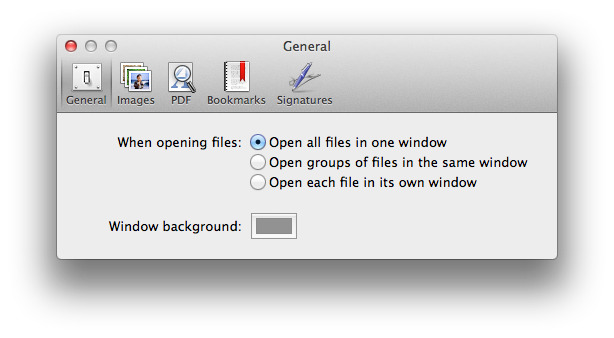
This is the easiest way to control Preview from cluttering your desktop with plethora of windows. You may want to use your mouse or up/down arrow keys from your keyboard to switch to the different files that are listed on the left side of the Preview as shown:

Limit Resume functionality: From your System Preference -> General, select the number of recent items you want your Mac to display upon re-opening apps. This is another way to limit the number of documents that are automatically invoked when you launch Preview.

As per this user, use Terminal command to turn off Preview from opening documents of previous session: type this in your Terminal window:

defaults write com.apple.preview NSQuitAlwaysKeepsWindows -bool false

So these were some of the ways to keep Preview under your control without breaking a sweat. While Lion’s Resume feature is an essential ingredient for some, but for the majority of us, the lack of customization to what and what not to resume, can be a disappointing, especially when we are dealing with confidential documents.

Using Firefox Addons to Blog Your Heart Out
6 Cryptocurrencies Worth Buying in 2022
Windows 10: PC Won’t Go to Sleep Mode
Apple TV App Now Arrives on Android TV Devices
Removing Flashback Trojan From Your Mac

Sign Up For Daily Newsletter

Be keep up! Get the latest breaking news delivered straight to your inbox.
[mc4wp_form]
By signing up, you agree to our Terms of Use and acknowledge the data practices in our Privacy Policy. You may unsubscribe at any time.
Share This Article
Facebook Copy Link Print
Share
Previous Article Website Unblocking Tips From The Pirate Bay
Next Article How to Install Mac OS X 10.7 Lion Without Snow Leopard

Stay Connected

248.1KLike
69.1KFollow
134KPin
54.3KFollow

							banner							
							banner
Create an Amazing Newspaper
Discover thousands of options, easy to customize layouts, one-click to import demo and much more.
Learn More

Latest News

Juanita Katt
Juanita Katt: The Private Daughter of a Hollywood Family
Biography
What Date is 72 Days From Today?
Guides
What is 18 Weeks From Today?
Weeks
Brazil Tech News
Brazil Tech News: Top 10 Startups Changing Latin America
News

You Might also Like

Procedure to Unlock LG Neon GT365 Mobile Phone

Sara Taylor
Sara Taylor
2 Min Read

Sign up for Google Plus now; Age Limit Still in Place

admin
admin
2 Min Read

How to Install Fixplay IndoXXI

admin
admin
2 Min Read
//

We influence 20 million users and is the number one business and technology news network on the planet

Sign Up for Our Newsletter

Subscribe to our newsletter to get our newest articles instantly!

[mc4wp_form id=”1616″]

BlogoteBlogote
Follow US
Join Us!
Subscribe to our newsletter and never miss our latest news, podcasts etc..
[mc4wp_form]
Zero spam, Unsubscribe at any time.
Welcome Back!

Sign in to your account

Username or Email Address
Password

Lost your password?