By using this site, you agree to the Privacy Policy and Terms of Use.
Accept
BlogoteBlogoteBlogote
  • Software
  • Tech News
  • Business
  • Fashion
  • Finance
  • Health
  • Lifestyle
Search
  • Contact
  • Blog
  • Complaint
  • Advertise
Reading: Dealing with App Store Apple Password Requirements
Share
Sign In
Notification Show More
Font ResizerAa
BlogoteBlogote
Font ResizerAa
  • Tech News
  • Gadget
  • Technology
  • Mobile
Search
  • Home
    • Home 1
    • Home 2
    • Home 3
    • Home 4
    • Home 5
  • Categories
    • Tech News
    • Gadget
    • Technology
    • Mobile
  • Bookmarks
  • More Foxiz
    • Sitemap
Have an existing account? Sign In
Follow US
  • Contact
  • Blog
  • Complaint
  • Advertise
Home » Blog » Dealing with App Store Apple Password Requirements
Apple

Dealing with App Store Apple Password Requirements

Sara Taylor
Last updated: June 6, 2022 7:49 am
Sara Taylor
Share
SHARE

Every time I use my iPhone 4S or iPod Touch to download apps off the App Store, a window pops up requesting for my Apple ID password. I enter the password, and it’s wrong. I try again. Wrong password. After a couple of tries when I finally remember my long password, I get to download the app from the App Store.

Sure, this doesn’t happen every day, but it has happened with me on countless occasions. The current iOS 5.1, similar to the older versions, doesn’t save or remember the passwords we enter. My Apple ID password is, of course, entirely different than my “main” password. Why? Because of Apple’s password requirement which strictly suggests users to add digits, uppercase letters and much more. Any Apple password:

  • Must have at least one letter.
  • Must have at least one capital letter.
  • Must have at least one number.
  • Should not contain multiple identical consecutive characters.
  • Should not be the same as the account name.
  • Should be at least 8 characters.
  • Should not be a common password.

Having a complex password can definitely protect your Apple account, but mixing capital letters with numbers is something I was not used to. So I came up with this strategy to have an Apple password that is not only stronger but one I could easily remember without racking my brain.


Note that remembering any password requires practice. That said, the tip below can help you make difficult passwords in a couple of seconds and remember them easily whenever the need arises:

How to Remember Apple ID Password:

  • Pick a word (lowercase)
  • Pick a number
  • Pick an animal (uppercase)
  • Mix them together.

New Password example:

  • Pick a word: blogote
  • Pick a number: 555
  • Pick an animal: CAT

The key here is to mix them such that you will never forget. This is how I do:
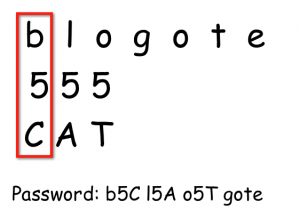
  • The first letter in blogote is b.
  • The first digit in 555 is 5.
  • The first letter in CAT is C.

b5C is the first part of my password. Similarly, the second letter in blogote is l. The second digit in 555 is 5, and the second letter in CAT is A. I have l5A that is the second part of password. In other words, I am moving one column at a time.

You can mix them in your own ways to create a strong password. You can also add the site’s name (Apple instead of blogote) while keeping the digit and animal the same. This way you can generate unlimited number of unique passwords for every important site.

Android Vs. iPhone iOS: Latest Numbers Says Android OS Rules the SmartPhones
Free Apple iPhone Theme Generator/Maker
Latest iOS4.2 for iPhone, iPad And iPod touch is here! [Apple Developers Download iOS4.2 Beta]
Working iPhone 4S and iPad 2 Jailbreak Tool To Be Released Soon
Ways to Open PDF files on iPod Touch

Sign Up For Daily Newsletter

Be keep up! Get the latest breaking news delivered straight to your inbox.
[mc4wp_form]
By signing up, you agree to our Terms of Use and acknowledge the data practices in our Privacy Policy. You may unsubscribe at any time.
Share This Article
Facebook Copy Link Print
Share
Previous Article Unknown network error on Instagram: what is it and how to fix it
Next Article Features, Specifications of iPhone 4G/HD

Stay Connected

248.1KLike
69.1KFollow
134KPin
54.3KFollow

							banner							
							banner
Create an Amazing Newspaper
Discover thousands of options, easy to customize layouts, one-click to import demo and much more.
Learn More

Latest News

Juanita Katt
Juanita Katt: The Private Daughter of a Hollywood Family
Biography
What Date is 72 Days From Today?
Guides
What is 18 Weeks From Today?
Weeks
Brazil Tech News
Brazil Tech News: Top 10 Startups Changing Latin America
News

You Might also Like

iOS 6 Update: Developers Download iOS 6.1 Beta 2 Firmware

Sara Taylor
Sara Taylor
3 Min Read

Should You Buy the “Education only” iMac?

Sara Taylor
Sara Taylor
3 Min Read

Apple is Removing Emoji / Emoticon Apps from iTunes App Store

Sara Taylor
Sara Taylor
3 Min Read
//

We influence 20 million users and is the number one business and technology news network on the planet

Sign Up for Our Newsletter

Subscribe to our newsletter to get our newest articles instantly!

[mc4wp_form id=”1616″]

BlogoteBlogote
Follow US
Join Us!
Subscribe to our newsletter and never miss our latest news, podcasts etc..
[mc4wp_form]
Zero spam, Unsubscribe at any time.
Welcome Back!

Sign in to your account

Username or Email Address
Password

Lost your password?