
Nokia promised to launch iOS version of its Here maps, and within a blink of an eye it’s finally available for download in the iTunes App Store. If you are looking for a viable alternative for Google Maps or Apple Maps on your iOS devices, then read our review given below. First, let’s start with the good stuffs.
Nokia Here is remarkably easy to use, like every other map apps out there. Plus it’s free, too. The app has a plain search box that sits on the top with a button to the right. Clicking on this button brings plenty of options where you can search places, find routes, collect and save your favorite destination (requires registration), and finally send feedback to improve the app.
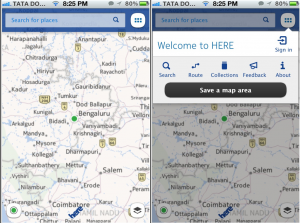
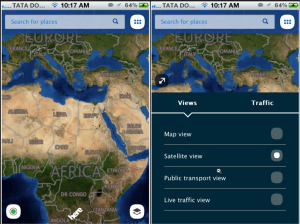
On the bottom-right corner there’s a button that lets you change the current map view. It’s possible to switch from map view to satellite view for realistic details or activate public transit directions. There’s also a live traffic view that promises to show real-time traffic.
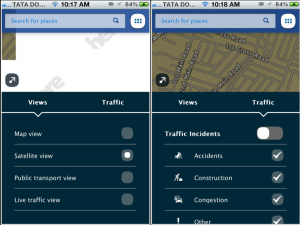
Accidents, construction sites, congestion on roads can be visualized on the Here map.
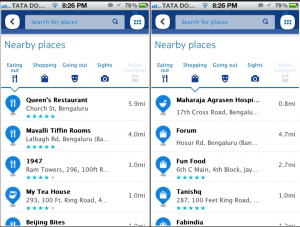
Here maps tries to unearth newer places around your current location using the Discover feature.
Seen from a vantage point, Nokia Here looks like a glorious map that could very well replace your default Google maps or Apple Maps. But here’s a couple of unspoken truth you should know:
Users can neither switch to street view to witness a more realistic world nor can they have a glimpse at the vector images. The 3D view is still only available in the web version of Here maps. The much touted turn-by-turn voice navigation feature works only when you are on your foot. Using Nokia Here maps as your go-to map may not be the best idea.
Fonts, as we mentioned earlier, are blurry. The blurriness is evident on Retina display devices — iPhone, iPad and iPod Touch. Restaurants, on the other hand, are not marked accurately. But there’s hope though, as the folks at Nokia are constantly working on fixing a lot of broken features and introducing newer ones in between.
Remember that Nokia recently acquired Berkeley, California-based Earthmine, a company focusing on capturing 3D data using various technologies. Nokia also owns NavTEQ, which is a popular in-car navigation system that shows satellite imagery, directions, live traffic, and information on public transportation. Nokia Here has positioned itself rightly to beat the daylight out of Google Maps and Apple Maps by adding Maps Creator. As more and more users register and edit roads, name places, accuracy of Here Maps will only be refined. But for now, the iOS version is far-off from being perfect.
Have you downloaded Nokia Here apps yet? What do you think? Any complaints or problems? With Google grinding out iOS version of Google Maps, and various Google alternatives out there, the competition only gets tougher for Nokia. In anyway, we users are widely benefited.
Download Nokia Here maps
Requirements: Compatible with iPhone, iPod touch, and iPad. Works on iOS 4.3, iOS 5 or iOS 6 and higher. Here maps is optimized for iPhone 5.