
By using this site, you agree to the Privacy Policy and Terms of Use.
Accept
BlogoteBlogoteBlogote
  • Software
  • Tech News
  • Business
  • Fashion
  • Finance
  • Health
  • Lifestyle
Search
  • Contact
  • Blog
  • Complaint
  • Advertise
Reading: Exclusive Tip: Checking Browsing History on iOS Safari Browser
Share
Sign In
Notification Show More
Font ResizerAa
BlogoteBlogote
Font ResizerAa
  • Tech News
  • Gadget
  • Technology
  • Mobile
Search
  • Home
    • Home 1
    • Home 2
    • Home 3
    • Home 4
    • Home 5
  • Categories
    • Tech News
    • Gadget
    • Technology
    • Mobile
  • Bookmarks
  • More Foxiz
    • Sitemap
Have an existing account? Sign In
Follow US
  • Contact
  • Blog
  • Complaint
  • Advertise
Home » Blog » Exclusive Tip: Checking Browsing History on iOS Safari Browser
Apple

Exclusive Tip: Checking Browsing History on iOS Safari Browser

Sara Taylor
Last updated: June 6, 2022 7:49 am
Sara Taylor
Share
SHARE

Did you know: All the Internet websites you are browsing are saved in a special place on your iPhone, iPad or iPod Touch? This place is called History. If you are new to this, then invest a few minutes reading this article to learn how to check the history of the recently accessed websites on your Safari browser.

Some of you may already know what should be done here: launch Safari, tap on the various buttons located at the bottom, and access the history menu. That’s right, but there is another way to check the browser’s history.

efore we talk about this “new” method, let’s elucidate the steps we normally go through to access the history on iOS devices:

Step 1: Launch Safari, then tap on the bookmark button located at the bottom.
Step 2: Go to History to view the the entire browsing history.

Be it iOS 4, iOS 5, or even the new iOS 6, this technique works on any iOS devices. As mentioned before, there’s another way to view history on your Safari browser, and this one is pretty simple:

Hold down the back button on iOS Safari to get the entire history.
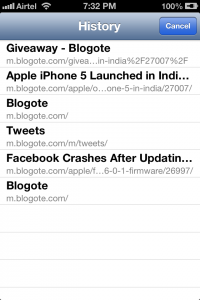
History of recently accessed websites on Safari browser on iOS 6.0.1

Download iOS 4.2.1 IPSW File For iPhone, iPod Touch and iPad
You Can Still Buy iPhone 4 Without Contract At AT&T Wireless Store
Facetime Bandwidth Consumption? Find out how much data Facetime Over 3G Uses
Easy Guide on How to Downgrade iPhone 3.1.3 to 3.1.2 Firmware
Discover & Remove Duplicate Songs Hidden in iTunes 11 Library Without Downloading Any Apps

Sign Up For Daily Newsletter

Be keep up! Get the latest breaking news delivered straight to your inbox.
[mc4wp_form]
By signing up, you agree to our Terms of Use and acknowledge the data practices in our Privacy Policy. You may unsubscribe at any time.
Share This Article
Facebook Copy Link Print
Share
Previous Article Drag-and-Drop to Save YouTube Clips on Mac OSX
Next Article Tip to Arrange and Merge PDF Pages on Mac OS X Lion

Stay Connected

248.1KLike
69.1KFollow
134KPin
54.3KFollow

							banner							
							banner
Create an Amazing Newspaper
Discover thousands of options, easy to customize layouts, one-click to import demo and much more.
Learn More

Latest News

Juanita Katt
Juanita Katt: The Private Daughter of a Hollywood Family
Biography
What Date is 72 Days From Today?
Guides
What is 18 Weeks From Today?
Weeks
Brazil Tech News
Brazil Tech News: Top 10 Startups Changing Latin America
News

You Might also Like

Best Winterboard themes For iPhone/ iPod Touch [Free]

James Betterson
James Betterson
6 Min Read

Intel says Windows is better than MacOS for gaming

admin
admin
1 Min Read
Apple

How to Rename the AirTag

admin
admin
2 Min Read
//

We influence 20 million users and is the number one business and technology news network on the planet

Sign Up for Our Newsletter

Subscribe to our newsletter to get our newest articles instantly!

[mc4wp_form id=”1616″]

BlogoteBlogote
Follow US
Join Us!
Subscribe to our newsletter and never miss our latest news, podcasts etc..
[mc4wp_form]
Zero spam, Unsubscribe at any time.
Welcome Back!

Sign in to your account

Username or Email Address
Password

Lost your password?