


Facial recognition technology is growing leaps and bounds. It is, indeed, a fascinating subject. In fact, this technology in the coming years can reveal Social Security Number, find your Facebook profile, and all of your photos publicly available on the Internet can be instantly searched to find out more about you, which is, simply put, downright scary.
Like speech recognition, Apple hasn’t utilized the facial recognition technology to its full potential. On Mac, there exist applications that can detect your face, but these are not fully-fledged, high-end softwares. However, Apple, Microsoft and Google have incorporated facial recognition technology into their indigenous photo management apps, which are free to use.
Face Recognition Apps to Tag Photos on Mac
Here is an attempt to list some of the well-known face recognition apps that automatically tag the pictures stored on your local machine.
iPhoto, which is Apple’s photo management app, has a face recognition and tagging feature. If you have thousands of photos, and you’ve tagged only a dozens of them, then it wouldn’t take you long to realize that manually tagging photos is a painful task. Let iPhoto do the rest for you.
iPhoto matches the photos that are already stored in your database, and it will automatically tag them. Plus the out of the box integration makes iPhoto a near-perfect to managing your photos. What more? iPhoto can even recognize cats.
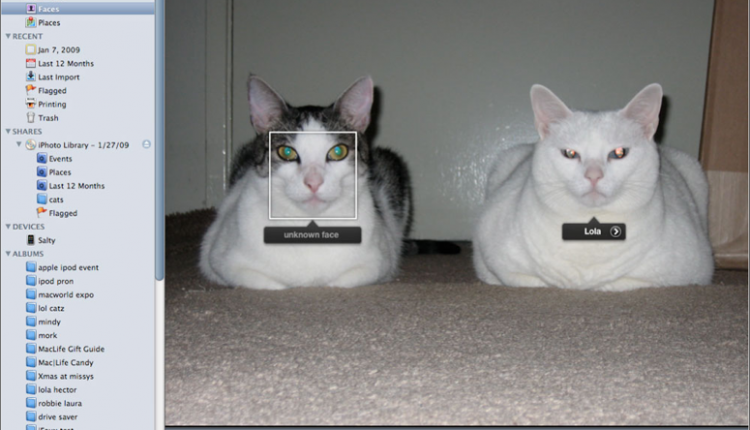
iPhoto is a part of iLife, which is usually bundled as a freebie when you purchase a Mac.
Google’s free photo management utility, Picasa, is an excellent option that not only organizes your photos but also uses face-matching technology to tag and identify people in those photos. In a matter of minutes, depending on the number of photos you have, Picasa can recognize and tag faces automatically.
The Windows Live Photo Gallery is another web-enabled photo management tool that is similar to Picasa. It can edit photos, automatically detect faces and tag them. Although not as accurate as you’d expect, it can also pull in names from your Live ID’s address book.
However, you should know that there are a number of reasons why face detection might not just work every time when you use these apps. For example, when the face is tilted in a different direction, or due to the changing lighting condition, these apps will fail to detect and tag the faces automatically.
Picasa’s face detection technology deserves a seal of approval. It can churn thousands of photos faster than iPhoto does, and photos can be accessed from your Mac or PC. That said, it goes without saying that the winner is Picasa.
Protect Your Mac With Facial Recognition Apps
If you are in the look out for a standalone face recognition system for protecting your Mac — MacBook Pro, MacBook Air, and iMac — against illegal access when you are out, then KeyLemon is worth giving a shot. The software detects your face, locks the computer when you are away, and unlocks the session with face detection. As one would expect, the software can be yours for a price of $29.
Verilook is another commercial face identification app primarily used for biometric system developers and integrators. It can store and recall data on Mac and Windows, and comes with an SDK that can be yours for almost a whopping $550.
If you are interested in learning more about creating your own software to recognize faces on your computer, then check out this nifty little guide put together by the students of Cornerll University to help you get started and learn the facets of creating a face recognition system.





