
By using this site, you agree to the Privacy Policy and Terms of Use.
Accept
BlogoteBlogoteBlogote
  • Software
  • Tech News
  • Business
  • Fashion
  • Finance
  • Health
  • Lifestyle
Search
  • Contact
  • Blog
  • Complaint
  • Advertise
Reading: Fix Error Permission Denied on Torrent Files
Share
Sign In
Notification Show More
Font ResizerAa
BlogoteBlogote
Font ResizerAa
  • Tech News
  • Gadget
  • Technology
  • Mobile
Search
  • Home
    • Home 1
    • Home 2
    • Home 3
    • Home 4
    • Home 5
  • Categories
    • Tech News
    • Gadget
    • Technology
    • Mobile
  • Bookmarks
  • More Foxiz
    • Sitemap
Have an existing account? Sign In
Follow US
  • Contact
  • Blog
  • Complaint
  • Advertise
Home » Blog » Fix Error Permission Denied on Torrent Files
AppleHow to

Fix Error Permission Denied on Torrent Files

admin
Last updated: June 6, 2022 7:49 am
admin
Share
SHARE

A new problem related to torrent has cropped up recently. Download a torrent file off the Internet, launch it through your torrent client, and the file cheekily throws a “Error: Permission Denied” message.

Denied permission, in this case, will stop your torrent client from downloading the torrent file. Similarly, there are instances when other torrent client displays a snippet of error text like this: “write to disk permission denied.”

Such error message appears because your torrent client — uTorrent, Transmission, or any other bitTorrent client — is trying to write to files or directories but the permission is limited to certain users like, say, admin or super-user.
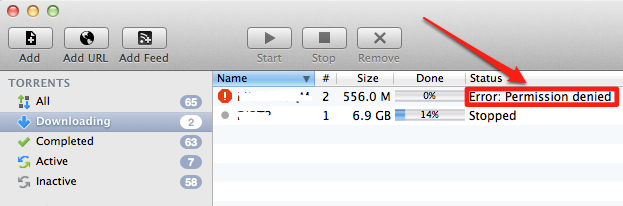
Error: Permission Denied message on my Mac OS X.

Mac users, and I believe even Windows users, using uTorrent and Transmission torrent client are the victims of this bug. Fret not, I have a solution to this problem

How to: Fixing Error: Permission Denied Message on Torrent Clients

Using Transmission client to solve “Error: Permission Denied” message.

Assuming the issue is with the new uTorrent update, we will change the location of .torrent files. All your .torrent files are downloaded into a specific folder.

So, to eliminate the error of permission denied, we will move our future .torrent files into another folder.

Step 1: Launch your torrent client — uTorrent, in my case.

Step 2: Click on uTorrent menu, then go to Preference.

Step 3:
 Navigate to Directories tab from the window.

Step 4:
 Check Store .torrents in:

Step 5:
 Choose a different folder to save your torrent files. Perhaps you can create a new folder on your desktop, or use desktop as the default folder to save .torrent files.

Step 6: Re-download your .torrent file, and the Error: Permission Denied message should no longer appear on uTorrent.

Does this help? I was able to fix the problem on my Transmission client on Mac. Let me know!

Free Private Registration For Domain name [Godaddy trick]
Reasons Why You Should Hire a Link Building Agency for Your SEO Strategy
Procedure to Unlock LG Neon GT365 Mobile Phone
How to delete your Instagram account
Get Back Older iChat Logs and Messages

Sign Up For Daily Newsletter

Be keep up! Get the latest breaking news delivered straight to your inbox.
[mc4wp_form]
By signing up, you agree to our Terms of Use and acknowledge the data practices in our Privacy Policy. You may unsubscribe at any time.
Share This Article
Facebook Copy Link Print
Share
Previous Article The PlayStation 5 controller is now compatible with Apple devices
Next Article iOS 6.0.1 WiFi issues Continues for iPhone 5/4S, iPad Users

Stay Connected

248.1KLike
69.1KFollow
134KPin
54.3KFollow

							banner							
							banner
Create an Amazing Newspaper
Discover thousands of options, easy to customize layouts, one-click to import demo and much more.
Learn More

Latest News

Juanita Katt
Juanita Katt: The Private Daughter of a Hollywood Family
Biography
What Date is 72 Days From Today?
Guides
What is 18 Weeks From Today?
Weeks
Brazil Tech News
Brazil Tech News: Top 10 Startups Changing Latin America
News

You Might also Like

Streaming Netflix on Wii

Sara Taylor
Sara Taylor
4 Min Read

JailbreakMe.com is here. Jailbreak iPhone 4, 3GS, 3G on iOS 4 / iOS 4.0.1 and iPad on iOS 3.2.1

Sara Taylor
Sara Taylor
3 Min Read

Knownhost Review — Three Years of Reliable Hosting!

admin
admin
3 Min Read
//

We influence 20 million users and is the number one business and technology news network on the planet

Sign Up for Our Newsletter

Subscribe to our newsletter to get our newest articles instantly!

[mc4wp_form id=”1616″]

BlogoteBlogote
Follow US
Join Us!
Subscribe to our newsletter and never miss our latest news, podcasts etc..
[mc4wp_form]
Zero spam, Unsubscribe at any time.
Welcome Back!

Sign in to your account

Username or Email Address
Password

Lost your password?