By using this site, you agree to the Privacy Policy and Terms of Use.
Accept
BlogoteBlogoteBlogote
  • Software
  • Tech News
  • Business
  • Fashion
  • Finance
  • Health
  • Lifestyle
Search
  • Contact
  • Blog
  • Complaint
  • Advertise
Reading: How to Change Gmail Password
Share
Sign In
Notification Show More
Font ResizerAa
BlogoteBlogote
Font ResizerAa
  • Tech News
  • Gadget
  • Technology
  • Mobile
Search
  • Home
    • Home 1
    • Home 2
    • Home 3
    • Home 4
    • Home 5
  • Categories
    • Tech News
    • Gadget
    • Technology
    • Mobile
  • Bookmarks
  • More Foxiz
    • Sitemap
Have an existing account? Sign In
Follow US
  • Contact
  • Blog
  • Complaint
  • Advertise
Home » Blog » How to Change Gmail Password
How to

How to Change Gmail Password

Kelly Jhonson
Last updated: June 6, 2022 7:49 am
Kelly Jhonson
Share
SHARE

Many people think that changing the password of a gmail account gradually is not important, especially since the process of having the account is free. Even if it’s hacked, you can do it again.
That’s a glimpse of the reason that changing the gmail account password is not important. I can understand people who think that way, because I don’t think they think that gmail is an important asset. In contrast to business people who use their gmail account a lot as the main communication tool with their clients. A gmail account is a very valuable asset, apart from having a list of potential customers or clients, you can also use it as a follow-up tool or a newsletter for business purposes. This is the underlying reason that changing account passwords periodically is necessary, one of which is to avoid account theft.

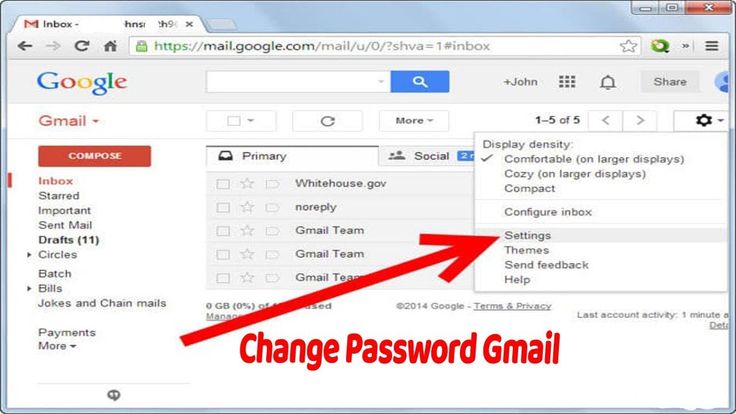
Here’s how to change your gmail password   that you can do:
1. Login to your gmail account.
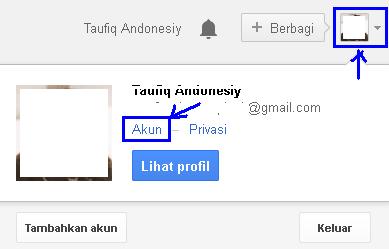
2. Click the profile picture in the upper right corner of your account, then click Account .
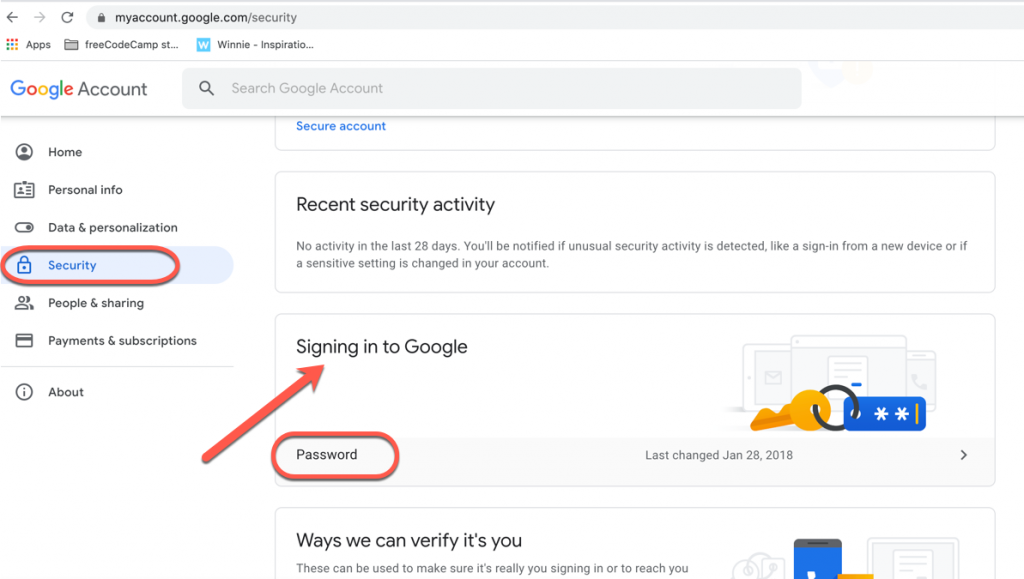
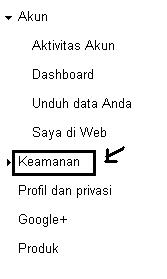
3. You will be taken to a new tab menu. Select the security menu on the left side of the page.
4. Click change password .
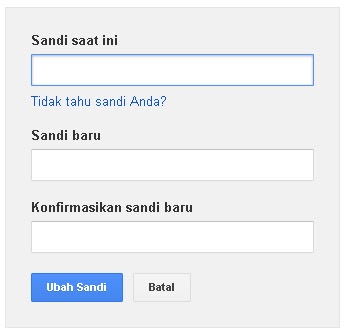
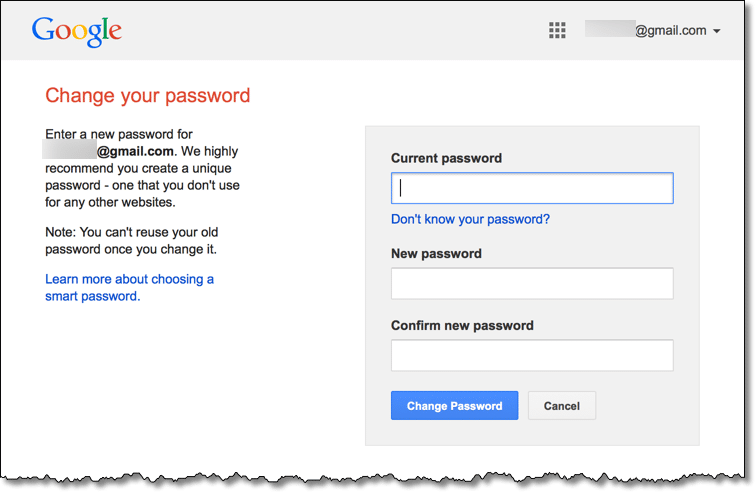
5. Fill in the form that appears with your old password, and the two fields below it with your new password.
6. Congratulations! Your gmail password has been changed. 😀

Those are the steps on how to change the gmail password presented by the Computer Technology Article which may be useful for readers throughout the universe… 😀

Fixing Samsung Kies Problem on Mac OS Mountain Lion
How to Overcome Bluetooth Laptop Error
6 Tricks That Every TikTok User Must Know
How to Open PDF Files on Mac For Free
Best Old Microsoft Games | Classic Games From MS

Sign Up For Daily Newsletter

Be keep up! Get the latest breaking news delivered straight to your inbox.
[mc4wp_form]
By signing up, you agree to our Terms of Use and acknowledge the data practices in our Privacy Policy. You may unsubscribe at any time.
Share This Article
Facebook Copy Link Print
Share
Previous Article How to Change Yahoo Email Password
Next Article How to Turn Off the Computer Correctly

Stay Connected

248.1KLike
69.1KFollow
134KPin
54.3KFollow

							banner							
							banner
Create an Amazing Newspaper
Discover thousands of options, easy to customize layouts, one-click to import demo and much more.
Learn More

Latest News

What Date is 72 Days From Today?
Guides
What is 18 Weeks From Today?
Weeks
Brazil Tech News
Brazil Tech News: Top 10 Startups Changing Latin America
News
The Best AI Video Generator for YouTube: Turning Scripts into Viral Content Fast
Guides

You Might also Like

Fix Missing Comdlg32.ocx Run time Error in Portable apps

Sara Taylor
Sara Taylor
1 Min Read

Fix Bad DirectSound Driver: Error code 88780078 in Windows XP, Vista, Windows 7

Sara Taylor
Sara Taylor
3 Min Read

UC Browser – The Silent Winner In This Noisy Mobile Browser World

James Betterson
James Betterson
4 Min Read
//

We influence 20 million users and is the number one business and technology news network on the planet

Sign Up for Our Newsletter

Subscribe to our newsletter to get our newest articles instantly!

[mc4wp_form id=”1616″]

BlogoteBlogote
Follow US
Join Us!
Subscribe to our newsletter and never miss our latest news, podcasts etc..
[mc4wp_form]
Zero spam, Unsubscribe at any time.
Welcome Back!

Sign in to your account

Username or Email Address
Password

Lost your password?