
By using this site, you agree to the Privacy Policy and Terms of Use.
Accept
BlogoteBlogoteBlogote
  • Software
  • Tech News
  • Business
  • Fashion
  • Finance
  • Health
  • Lifestyle
Search
  • Contact
  • Blog
  • Complaint
  • Advertise
Reading: How to find secret web site pages and content
Share
Sign In
Notification Show More
Font ResizerAa
BlogoteBlogote
Font ResizerAa
  • Tech News
  • Gadget
  • Technology
  • Mobile
Search
  • Home
    • Home 1
    • Home 2
    • Home 3
    • Home 4
    • Home 5
  • Categories
    • Tech News
    • Gadget
    • Technology
    • Mobile
  • Bookmarks
  • More Foxiz
    • Sitemap
Have an existing account? Sign In
Follow US
  • Contact
  • Blog
  • Complaint
  • Advertise
Home » Blog » How to find secret web site pages and content
Ideas

How to find secret web site pages and content

Sara Taylor
Last updated: September 13, 2011 6:32 am
Sara Taylor
Share
SHARE

Web site owner hide their webpages using commands in Robots.txt.Robots.txt is a text file which is located in the root directory of a site.It is used to control webpages  indexed by a robot,ie. you can disallow a particular web page or content to be spidered from search engine robots. By using ‘disallow‘ word you can block any URL of your blog from  reaching search engines.

We will take the help of Robots.text file to see the hidden web site pages and content

Step 1 – Go to Google and type this in the search box

“robots.txt” “disallow:” filetype:txt

Hit enter and you will be presented with loads of Robots file website results which have a disallow command.
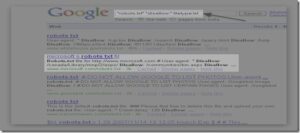
Step 2 – From thousands of results we will choose any website,for example I will open Microsoft robot text file which is in the 1st page (Highlighted).After opening the robot text file,it looks like this
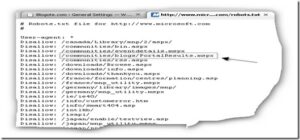
These are the content and pages which Microsoft doesn’t want search engine spider to get indexed.Now copy any line after the word Disallow:

For example we will copy this line :

/communities/blogs/PortalResults.mspx
 

Remember to copy the slash which is at the beginning of the line.


Step 3 – Type the main website url and then the line which you have copied in the Step 2

After combining both the main website URL and the line,Hit enter (See the screenshot)

Main url – http://microsoft.com

Line – /communities/blogs/PortalResults.mspx

Combination – http://www.microsoft.com/communities/blogs/PortalResults.mspx
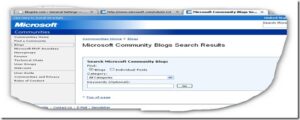
This was the page Microsoft had hidden from the search engine!

This was just an example,you can find some more interesting web pages and other secret content easily.Go ahead and try !

What is PRC File and How to Open .PRC File Extension
What is CRC? Solution For Cyclic Redundancy Check (CRC) Error
PDF To TXT File. How to Convert PDF into Text File Format Freely
Who is AXXO and What are AXXO Movies?
Free Domplayer is Malware Virus – Beware of Dom Player

Sign Up For Daily Newsletter

Be keep up! Get the latest breaking news delivered straight to your inbox.
[mc4wp_form]
By signing up, you agree to our Terms of Use and acknowledge the data practices in our Privacy Policy. You may unsubscribe at any time.
Share This Article
Facebook Copy Link Print
Share
Previous Article How to Create Cool Stylish font to Send Stylish Orkut scraps & testimonials
Next Article Download Free Window Vista ebook [Manual & Guide]

Stay Connected

248.1KLike
69.1KFollow
134KPin
54.3KFollow

							banner							
							banner
Create an Amazing Newspaper
Discover thousands of options, easy to customize layouts, one-click to import demo and much more.
Learn More

Latest News

Juanita Katt
Juanita Katt: The Private Daughter of a Hollywood Family
Biography
What Date is 72 Days From Today?
Guides
What is 18 Weeks From Today?
Weeks
Brazil Tech News
Brazil Tech News: Top 10 Startups Changing Latin America
News

You Might also Like

Change Windows Desktop Background into WhiteBoard

admin
admin
1 Min Read

Add Audio to Captured/Recorded Snagit Video [Snagit Tip]

James Betterson
James Betterson
1 Min Read

How to Integrate Gtalk client on Firefox 3 sidebar

Sara Taylor
Sara Taylor
2 Min Read
//

We influence 20 million users and is the number one business and technology news network on the planet

Sign Up for Our Newsletter

Subscribe to our newsletter to get our newest articles instantly!

[mc4wp_form id=”1616″]

BlogoteBlogote
Follow US
Join Us!
Subscribe to our newsletter and never miss our latest news, podcasts etc..
[mc4wp_form]
Zero spam, Unsubscribe at any time.
Welcome Back!

Sign in to your account

Username or Email Address
Password

Lost your password?