
By using this site, you agree to the Privacy Policy and Terms of Use.
Accept
BlogoteBlogoteBlogote
  • Software
  • Tech News
  • Business
  • Fashion
  • Finance
  • Health
  • Lifestyle
Search
  • Contact
  • Blog
  • Complaint
  • Advertise
Reading: How to Integrate Gtalk client on Firefox 3 sidebar
Share
Sign In
Notification Show More
Font ResizerAa
BlogoteBlogote
Font ResizerAa
  • Tech News
  • Gadget
  • Technology
  • Mobile
Search
  • Home
    • Home 1
    • Home 2
    • Home 3
    • Home 4
    • Home 5
  • Categories
    • Tech News
    • Gadget
    • Technology
    • Mobile
  • Bookmarks
  • More Foxiz
    • Sitemap
Have an existing account? Sign In
Follow US
  • Contact
  • Blog
  • Complaint
  • Advertise
Home » Blog » How to Integrate Gtalk client on Firefox 3 sidebar
Ideas

How to Integrate Gtalk client on Firefox 3 sidebar

Sara Taylor
Last updated: June 19, 2011 10:22 am
Sara Taylor
Share
SHARE

You must have known Gtalk.it is a fast functional chat client from the Google supporting gmail services contact address.You can download Gtalk or you can even launch Gtalk,you don’t need any download for launching the Gtalk online,this just opens as a new tab or a pop up which automatically shows the online and offline contacts of your gmail account if you are signed in your account.

This trick isn’t any Gmail hack but a simple way to Integrate the Gtalk client in your firefox 3 web browser without using any addon or firefox extension.
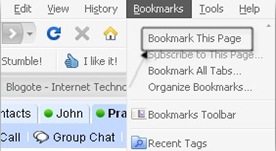
Integrating the Gtalk on your sidebar helps you to chat effectively and also browse web content spread on the Internet with much ease. No need to shift tabs or any windows.Moreover this technique is more useful if you are internet savvy like me.

First just open your Firefox browser and then launch the Gtalk client by clicking here.Just log in to your account if you haven’t done so.Now you can see a chat window with all your contact address (Quite Self explanatory).Just bookmark the page.Alternately you can also press ctlr + D to bookmark the Gtalk page.


Now after bookmarking the Google talk page,Go to your Bookmarks and locate the created Google Talk bookmark.

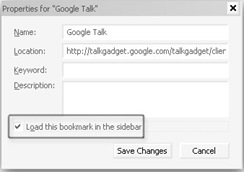
Just right click on Google Talk bookmark and select Properties,a window will be popped out similar to the this screenshot.

Choose the option “Load this bookmark in the sidebar” and hit the Save Changes button.

Again go to your bookmark page,locate the Gtalk bookmark and open it.This time it will be opened in your Firefox sidebar and load all your contacts.Enjoy integrated Browsing + chatting!!
Download Qvee Media Player Alternative Decoder
How to enable ClearType option in Windows XP
How to Completely Uninstall AVG Antivirus With AVG Remover
WeichertOne: Transform the Real Estate Industry
Torrent Uploaders that Match up to Axxo Movies Torrent

Sign Up For Daily Newsletter

Be keep up! Get the latest breaking news delivered straight to your inbox.
[mc4wp_form]
By signing up, you agree to our Terms of Use and acknowledge the data practices in our Privacy Policy. You may unsubscribe at any time.
Share This Article
Facebook Copy Link Print
Share
Previous Article Web Messenger Blocker – Free IM Chat client blocker
Next Article Make Display Pic (Avatar) For Myspace MSN Twitter..

Stay Connected

248.1KLike
69.1KFollow
134KPin
54.3KFollow

							banner							
							banner
Create an Amazing Newspaper
Discover thousands of options, easy to customize layouts, one-click to import demo and much more.
Learn More

Latest News

Juanita Katt
Juanita Katt: The Private Daughter of a Hollywood Family
Biography
What Date is 72 Days From Today?
Guides
What is 18 Weeks From Today?
Weeks
Brazil Tech News
Brazil Tech News: Top 10 Startups Changing Latin America
News

You Might also Like

Find HP Product Key License, Model Number from HP Notebook Compaq PCs

Sara Taylor
Sara Taylor
2 Min Read

Uninstall Dealio Toolbar Addon from Firefox Browser

Sara Taylor
Sara Taylor
2 Min Read

How to Extract Steam GCF Files

James Betterson
James Betterson
2 Min Read
//

We influence 20 million users and is the number one business and technology news network on the planet

Sign Up for Our Newsletter

Subscribe to our newsletter to get our newest articles instantly!

[mc4wp_form id=”1616″]

BlogoteBlogote
Follow US
Join Us!
Subscribe to our newsletter and never miss our latest news, podcasts etc..
[mc4wp_form]
Zero spam, Unsubscribe at any time.
Welcome Back!

Sign in to your account

Username or Email Address
Password

Lost your password?