By using this site, you agree to the Privacy Policy and Terms of Use.
Accept
BlogoteBlogoteBlogote
  • Software
  • Tech News
  • Business
  • Fashion
  • Finance
  • Health
  • Lifestyle
Search
  • Contact
  • Blog
  • Complaint
  • Advertise
Reading: How to Perform a System Restore in Windows 11
Share
Sign In
Notification Show More
Font ResizerAa
BlogoteBlogote
Font ResizerAa
  • Tech News
  • Gadget
  • Technology
  • Mobile
Search
  • Home
    • Home 1
    • Home 2
    • Home 3
    • Home 4
    • Home 5
  • Categories
    • Tech News
    • Gadget
    • Technology
    • Mobile
  • Bookmarks
  • More Foxiz
    • Sitemap
Have an existing account? Sign In
Follow US
  • Contact
  • Blog
  • Complaint
  • Advertise
Home » Blog » How to Perform a System Restore in Windows 11
How to

How to Perform a System Restore in Windows 11

admin
Last updated: June 6, 2022 7:49 am
admin
Share
SHARE

System restore can be an option if Windows 11 experiences problems at any time — whether it’s unstable performance, lag, freezes, viruses, and so on.

Therefore, if you want to use system restore, make sure you have created a restore point when Windows 11 is in a stable state, for example when you just finished a fresh install.

This article will discuss how to do a system restore on Windows 11.

Performing a System Restore in Windows 11

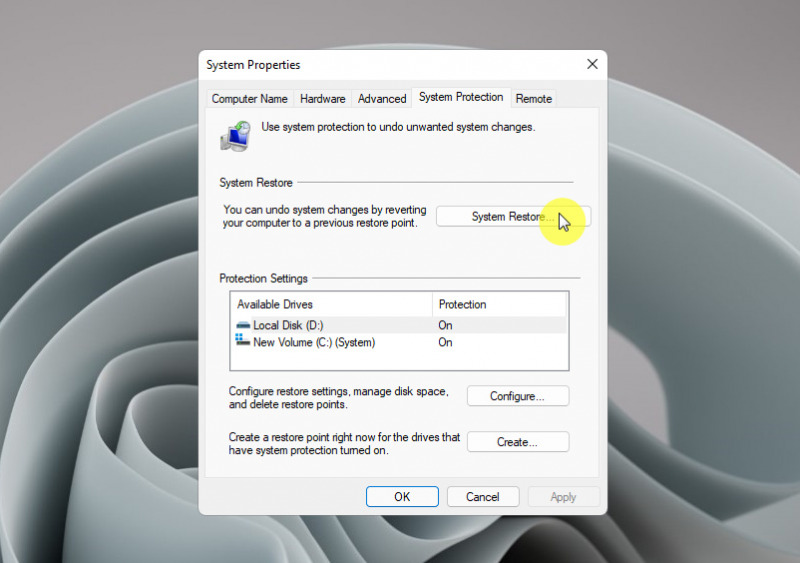
  1. Open Windows Run (Win + R), then type System Properties Protection .
  2. Click the System Restore option .
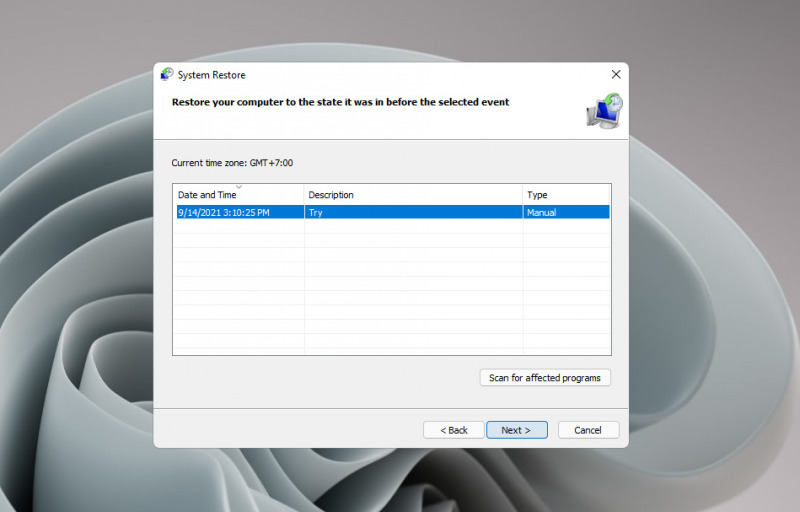
  3. Follow the instructions on the screen, until you are given the option to perform a system restore based on the restore point you created earlier. Select an existing restore point, then click Next .
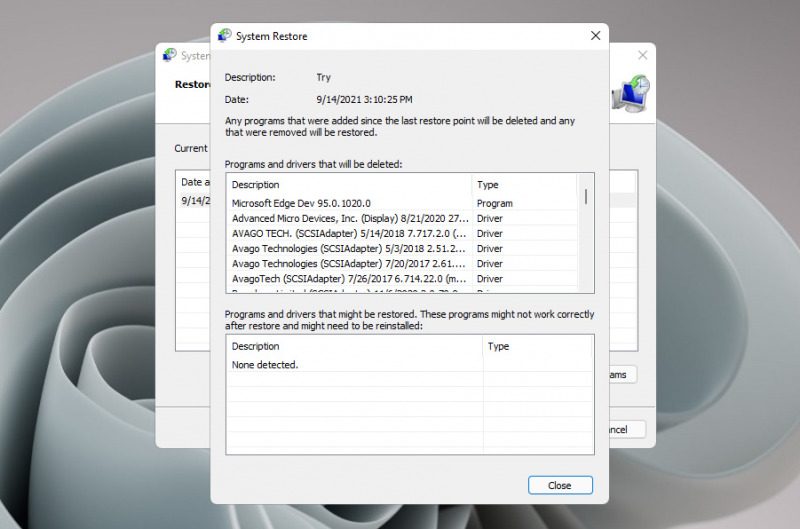
  4. Optionally, you can click the Scan for affected program option to find out what effects will occur when taking restore points. This includes the effect of changes to applications and drivers that will be removed, and vice versa.
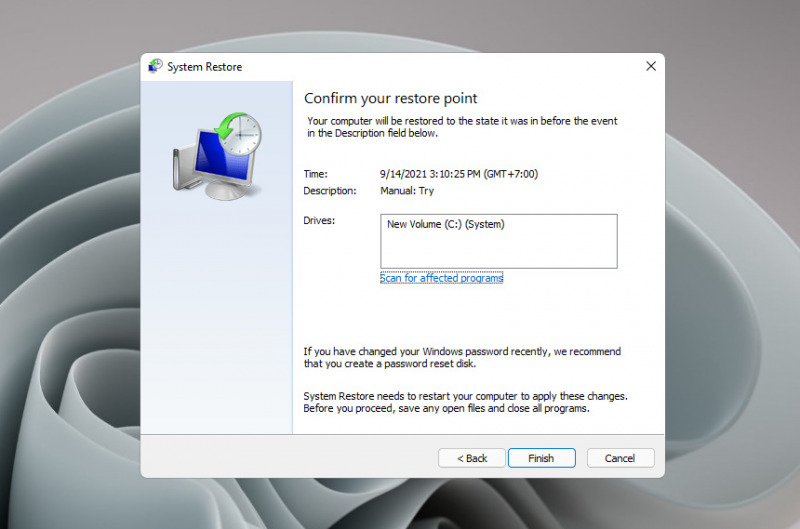
  5. Finally, a final confirmation will appear before the system restore process is carried out.
  6. Done.

Then, you just need to wait for the system restore process to finish. The system will restart and the system restore process begins, the length of time depends on the size of the change between the current state of the system and the one in the system restore.

How to See Other Phone Screens on Your Phone Remotely
Edit XPS File: Learn How to Edit .XPS Documents In Windows Word 2007
How to activate ephemeral mode on Instagram
How to Turn Off the Computer Correctly
Top iTunes alternatives for Linux

Sign Up For Daily Newsletter

Be keep up! Get the latest breaking news delivered straight to your inbox.
[mc4wp_form]
By signing up, you agree to our Terms of Use and acknowledge the data practices in our Privacy Policy. You may unsubscribe at any time.
Share This Article
Facebook Copy Link Print
Share
Previous Article How to Speed Up a Slow Mac in 9 Simple Steps
Next Article How to open Administrative Tools in Windows 11

Stay Connected

248.1KLike
69.1KFollow
134KPin
54.3KFollow

							banner							
							banner
Create an Amazing Newspaper
Discover thousands of options, easy to customize layouts, one-click to import demo and much more.
Learn More

Latest News

Juanita Katt
Juanita Katt: The Private Daughter of a Hollywood Family
Biography
What Date is 72 Days From Today?
Guides
What is 18 Weeks From Today?
Weeks
Brazil Tech News
Brazil Tech News: Top 10 Startups Changing Latin America
News

You Might also Like

Status of iOS 6 Jailbreak for iPhone 4S

Sara Taylor
Sara Taylor
5 Min Read

How to View Windows 10 Saved WiFi Passwords

admin
admin
5 Min Read

How to permanently delete your orkut profile and account

Sara Taylor
Sara Taylor
1 Min Read
//

We influence 20 million users and is the number one business and technology news network on the planet

Sign Up for Our Newsletter

Subscribe to our newsletter to get our newest articles instantly!

[mc4wp_form id=”1616″]

BlogoteBlogote
Follow US
Join Us!
Subscribe to our newsletter and never miss our latest news, podcasts etc..
[mc4wp_form]
Zero spam, Unsubscribe at any time.
Welcome Back!

Sign in to your account

Username or Email Address
Password

Lost your password?