
By using this site, you agree to the Privacy Policy and Terms of Use.
Accept
BlogoteBlogoteBlogote
  • Software
  • Tech News
  • Business
  • Fashion
  • Finance
  • Health
  • Lifestyle
Search
  • Contact
  • Blog
  • Complaint
  • Advertise
Reading: How to Play .MKV Files With Dual-audio Support
Share
Sign In
Notification Show More
Font ResizerAa
BlogoteBlogote
Font ResizerAa
  • Tech News
  • Gadget
  • Technology
  • Mobile
Search
  • Home
    • Home 1
    • Home 2
    • Home 3
    • Home 4
    • Home 5
  • Categories
    • Tech News
    • Gadget
    • Technology
    • Mobile
  • Bookmarks
  • More Foxiz
    • Sitemap
Have an existing account? Sign In
Follow US
  • Contact
  • Blog
  • Complaint
  • Advertise
Home » Blog » How to Play .MKV Files With Dual-audio Support
How to

How to Play .MKV Files With Dual-audio Support

James Betterson
Last updated: June 6, 2022 7:49 am
James Betterson
Share
SHARE

Quite a good number of videos on the internet are supporting “dual-audio” these days. This means, the videos are equipped with two audio files—you have the option to switch between these different audio files (read: languages) and playback the video.

So how do you play videos that has the dual-audio support? If you are not able to change the audio file then the answer is simple: change the media player. Usually, dual-audio’s are linked with the .AVI and .MKV files. Both of these video formats are playable on any of the popular media players.
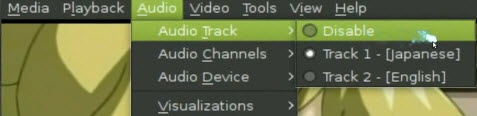
Just in case, if you want to use one audio file with the video permanently, i.e., you want to convert MKV dual-audio to single file, then check out MKVToolnix – a free tool available for Windows, Linux, Mac OS. Simply load the audio along with the video file into this software and let the software take care of the rest.

A much more simpler method is to try out some of the best media player like VLC Player, MPlayer and Media Player Classic for Windows. These media player comes with an inbuilt choice to choose the audio track. So, all you have to do is to download any of the above mentioned media player (I’d recommend downloading the VLC Player)—load the video—and switch between the available audio files.

Getting Rid of the Scratches on the Magic Mouse of my iMac
Fix Bad DirectSound Driver: Error code 88780078 in Windows XP, Vista, Windows 7
How To Delete Instagram Account
What skills will be enhanced with a Data Science online course?
How to Access Your Facebook Email Address

Sign Up For Daily Newsletter

Be keep up! Get the latest breaking news delivered straight to your inbox.
[mc4wp_form]
By signing up, you agree to our Terms of Use and acknowledge the data practices in our Privacy Policy. You may unsubscribe at any time.
Share This Article
Facebook Copy Link Print
Share
Previous Article Fixing Error 200403 AirPlay Mirroring on Apple TV
Next Article Fix Bad DirectSound Driver: Error code 88780078 in Windows XP, Vista, Windows 7

Stay Connected

248.1KLike
69.1KFollow
134KPin
54.3KFollow

							banner							
							banner
Create an Amazing Newspaper
Discover thousands of options, easy to customize layouts, one-click to import demo and much more.
Learn More

Latest News

Juanita Katt
Juanita Katt: The Private Daughter of a Hollywood Family
Biography
What Date is 72 Days From Today?
Guides
What is 18 Weeks From Today?
Weeks
Brazil Tech News
Brazil Tech News: Top 10 Startups Changing Latin America
News

You Might also Like

How to Choose the Right SSL Certificate for Your Business: A Pricing Comparison

admin
admin
4 Min Read

How to screenshot on Mac: The ultimate guide 2023

admin
admin
22 Min Read

Find Popular Posts on Google Plus

Sara Taylor
Sara Taylor
2 Min Read
//

We influence 20 million users and is the number one business and technology news network on the planet

Sign Up for Our Newsletter

Subscribe to our newsletter to get our newest articles instantly!

[mc4wp_form id=”1616″]

BlogoteBlogote
Follow US
Join Us!
Subscribe to our newsletter and never miss our latest news, podcasts etc..
[mc4wp_form]
Zero spam, Unsubscribe at any time.
Welcome Back!

Sign in to your account

Username or Email Address
Password

Lost your password?