By using this site, you agree to the Privacy Policy and Terms of Use.
Accept
BlogoteBlogoteBlogote
  • Software
  • Tech News
  • Business
  • Fashion
  • Finance
  • Health
  • Lifestyle
Search
  • Contact
  • Blog
  • Complaint
  • Advertise
Reading: How To Quickly Add Facebook Friends Without Banned & Blocked
Share
Sign In
Notification Show More
Font ResizerAa
BlogoteBlogote
Font ResizerAa
  • Tech News
  • Gadget
  • Technology
  • Mobile
Search
  • Home
    • Home 1
    • Home 2
    • Home 3
    • Home 4
    • Home 5
  • Categories
    • Tech News
    • Gadget
    • Technology
    • Mobile
  • Bookmarks
  • More Foxiz
    • Sitemap
Have an existing account? Sign In
Follow US
  • Contact
  • Blog
  • Complaint
  • Advertise
Home » Blog » How To Quickly Add Facebook Friends Without Banned & Blocked
How to

How To Quickly Add Facebook Friends Without Banned & Blocked

Kelly Jhonson
Last updated: June 6, 2022 7:49 am
Kelly Jhonson
Share
SHARE

Computer Technology Articles – Confused looking for a quick way to add Facebook friends without being banned and blocked? Check out my study below.

For those of you who like to play Facebook and have the will to make more friends, you will definitely be hindered by Facebook’s rules that require you to add friends you know. Whereas you want to have a lot of different Facebook friends with friends in the real world. And when you add a lot of people, your Facebook account immediately gets a warning from the Facebook admin that your account is blocked so you can’t add friends for several days. Are you upset?


What’s worse, your Facebook account may be permanently banned. The struggle to find friends is in vain. STOP GALAU!!! Follow the tricks that I have tested and have proven successful in increasing friends in a short time without fear of being banned or blocked by the Facebook admin.

Follow the steps on how to quickly add Facebook friends below:


1. Make sure you have liked a lot of Facebook/Fanspage pages. Don’t know Fanpage? Read on Understanding Facebook Pages/Fanspage.

2. After doing the first step, Look on your Facebook homepage. Make sure the home newsfeed setting is the latest newsfeed. Settings as shown below.



3. There must be some fanpage that appears on your Facebook homepage at the top. These fanspages will become your Facebook friends’ fields. Prioritize Fanspage whose post age is no more than 2 minutes. This indicates that Facebook users who like or comment on the post are still online.

This screenshot illustrates that there are 5 people who like the new post from FP Liputan 6.
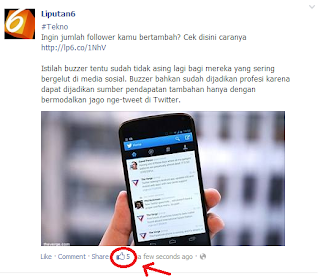


4. See who did the like. Immediately add them as friends by clicking the button that appears. Here you can choose who you want to add.
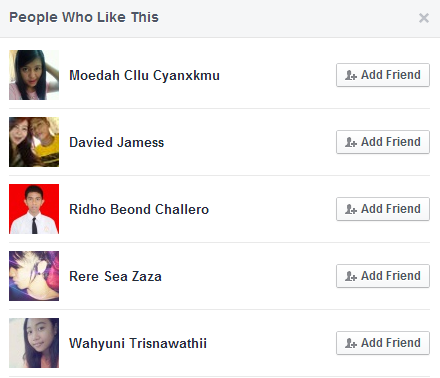

5. Perform the steps above to increase friendship. Guaranteed in a few seconds the Facebook user that you added earlier will immediately accept your friend request.

IMPORTANT:
a. Do add a maximum of 50 people. Before someone accepts friendship, don’t add again. This is to avoid being blocked and banned from the Facebook admin.

b. Cancel the most pending friendships. Friends who don’t immediately accept your friendship may be blocking the process of adding your Facebook friends. So how do you view pending friend requests? Check out How to Find Pending Facebook Friend Requests.

c. If you add a lot of friends with the aim of targeting them as potential customers for your business. Choose the type of Fanspage that suits your business field so that the friends you add are more targeted consumers.

Also read: how to quickly create a unique and interesting Facebook timeline. Those are the tips that the Computer Technology Article blog shares about how to quickly add Facebook friends without being banned and blocked. Hope it’s useful… ^_^

Play YouTube Videos in HQ on iPhone Over 3G Connection [Tip]
Tracking Lost and Stolen Nokia Phone
Create Custom Email Signatures for Gmail, Aol, Yahoo & Hotmail
Get iTunes Music Notification on Mac Dock
HOW TO PLAY PS4 ON CHROMEBOOK WITH HDMI – EASY STEPS

Sign Up For Daily Newsletter

Be keep up! Get the latest breaking news delivered straight to your inbox.
[mc4wp_form]
By signing up, you agree to our Terms of Use and acknowledge the data practices in our Privacy Policy. You may unsubscribe at any time.
Share This Article
Facebook Copy Link Print
Share
Previous Article How to Find Pending Facebook Friend Requests
Next Article How to Change Yahoo Email Password

Stay Connected

248.1KLike
69.1KFollow
134KPin
54.3KFollow

							banner							
							banner
Create an Amazing Newspaper
Discover thousands of options, easy to customize layouts, one-click to import demo and much more.
Learn More

Latest News

What Date is 72 Days From Today?
Guides
What is 18 Weeks From Today?
Weeks
Brazil Tech News
Brazil Tech News: Top 10 Startups Changing Latin America
News
The Best AI Video Generator for YouTube: Turning Scripts into Viral Content Fast
Guides

You Might also Like

Start a Private Video Chat With Your Friends Using AOL AV

James Betterson
James Betterson
2 Min Read
How to

Use ‘Detect Philips Gogear Device’ To Detect Unrecognized Philips Mp3 Player

James Betterson
James Betterson
1 Min Read

How to delete instagram account

admin
admin
9 Min Read
//

We influence 20 million users and is the number one business and technology news network on the planet

Sign Up for Our Newsletter

Subscribe to our newsletter to get our newest articles instantly!

[mc4wp_form id=”1616″]

BlogoteBlogote
Follow US
Join Us!
Subscribe to our newsletter and never miss our latest news, podcasts etc..
[mc4wp_form]
Zero spam, Unsubscribe at any time.
Welcome Back!

Sign in to your account

Username or Email Address
Password

Lost your password?