For those of you who are confused about how to find a pending Facebook friend request, you can follow the following discussion.
Facebook as the most popular social media site in the world with its pagerank that continues to compete with Google for the top rank has millions of visitors every minute. Many people use this online friendship site for various purposes, such as adding friends, staying in touch with distant relatives, sharing knowledge, seeking knowledge, even the one that is popular lately, many users use it as a promotional medium.

All of these activities certainly require interaction. One of these interactions can be built by sending friend requests to the users you are interacting with. By becoming a friend of other users, the interaction process will be easier to do.
But there are also Facebook users who are competing to add a lot of friends in a reckless way. Everyone, even if they don’t know it, is added regardless of the rules from Facebook. As a result, his Facebook account has the potential to be blocked , including being unable to send friend requests, not being able to send messages, not being able to comment within a certain time, and the most extreme is that the Facebook account is permanently blocked so that it cannot be reused.
The blocking carried out by Facebook is solely done to protect its users from dangerous things, friend requests to unknown people will be monitored by the Facebook admin and are very vulnerable to being blocked.
Please note that if there are too many pending friend requests, then be prepared to get a warning from the Facebook admin, and have a great potential to be permanently blocked. This has happened to me, when my Facebook friend request was probably in the 50s, my account was blocked and I needed to verify a friend’s photo, but because I didn’t know many, my account was permanently blocked. I’m crying… 😀
Well, for those of you who like to add Facebook users, either just adding friends or as potential business prospects, there is a safe way that you can do so that the process of adding your friends is not considered spam by Facebook. Namely by monitoring pending friend requests.
To find out the pending Facebook friend requests, follow the steps from the following computer technology article :
Step 1
Visit this application
Step 2
Click allow in the dialog box that appears.
Step 3
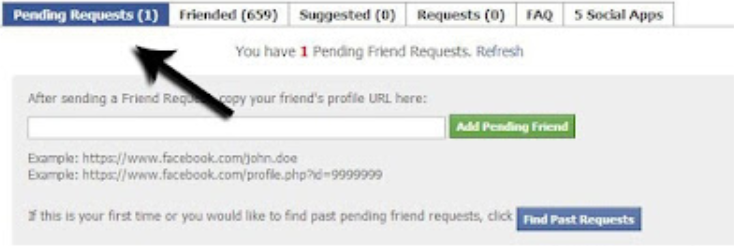
On the new page that appears, click ” Find Past Requests “
Step 4
You will be shown the procedure how to view pending friend requests, Click Get Friend Request Data , in the pop up that appears, you copy the script in it, paste it in the box indicated by the red down arrow. Then click Load Past Request.
Step 5
Now you can see the list of pending friend requests.
You can cancel / cancel the list that appears if the list feels a lot, this is to protect our facebook account from being blocked.
Hopefully this article is useful, and good luck. ^_ ^