
By using this site, you agree to the Privacy Policy and Terms of Use.
Accept
BlogoteBlogoteBlogote
  • Software
  • Tech News
  • Business
  • Fashion
  • Finance
  • Health
  • Lifestyle
Search
  • Contact
  • Blog
  • Complaint
  • Advertise
Reading: How to Reinstall ChickHEN Hack on PSP
Share
Sign In
Notification Show More
Font ResizerAa
BlogoteBlogote
Font ResizerAa
  • Tech News
  • Gadget
  • Technology
  • Mobile
Search
  • Home
    • Home 1
    • Home 2
    • Home 3
    • Home 4
    • Home 5
  • Categories
    • Tech News
    • Gadget
    • Technology
    • Mobile
  • Bookmarks
  • More Foxiz
    • Sitemap
Have an existing account? Sign In
Follow US
  • Contact
  • Blog
  • Complaint
  • Advertise
Home » Blog » How to Reinstall ChickHEN Hack on PSP
Games

How to Reinstall ChickHEN Hack on PSP

Sara Taylor
Last updated: August 18, 2013 9:00 am
Sara Taylor
Share
SHARE

For starters, ChickHEN is an homebrew enabler that lets you flash your PSP’s RAM so that you can play games and install homebrew applications.

Although you can download chickHEN with no strings attached, but you should have an official firmware of 5.03 to execute chickHEN on your PSP 1000, PSP 2000, PSP 3000 and PSP 3004 model.

Assuming that you’ve already installed chickHEN on your PSP device – and even after multiple tries the chickHEN images are not working on your PSP, then instead of recreating the whole process, try to reinstall chickHEN folder.

Want to Reinstall ChickHEN on PSP?

So, if your PSP refuses to show the green boot up screen then reinstalling chickHEN hack is the last definitive option you should go with. Firstly, assuming that chickHEN doesn’t work on your PSP, download the chickHEN R2 enabler from here (alternate link).

Extract and open the folder named Slim. Here you can find the new chickHEN folder.

Now connect your PSP through USB connection and navigate to the PSP’s PHOTO from your computer
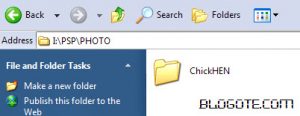
You will notice the ChickHEN folder in your PSP’s Photo section, now replace the non-working chickHEN (which is in your memory card) with the new chickHEN folder that you’ve extracted.

Safely unplug the PSP and execute the ChickHEN by visiting Photo section and it should work. It worked for me on the first try. That’s about it. Hope this helps!

Addicted to Gaming? Get Rid of Gaming Addiction [Video]
CS:GO Dust 2 Callouts Introduction
How To Play Pokemon GO on PC or Laptop With Koplayer
How to Win 2048 – Easiest Strategy and Game Guide
Free Fire Redeem Codes 2021

Sign Up For Daily Newsletter

Be keep up! Get the latest breaking news delivered straight to your inbox.
[mc4wp_form]
By signing up, you agree to our Terms of Use and acknowledge the data practices in our Privacy Policy. You may unsubscribe at any time.
Share This Article
Facebook Copy Link Print
Share
Previous Article HP’s New Envy 17 3D and Envy 14 Beats Laptops
Next Article Do we have an iPhone 5 Jailbreak for iOS 6 Firmware?

Stay Connected

248.1KLike
69.1KFollow
134KPin
54.3KFollow

							banner							
							banner
Create an Amazing Newspaper
Discover thousands of options, easy to customize layouts, one-click to import demo and much more.
Learn More

Latest News

Juanita Katt
Juanita Katt: The Private Daughter of a Hollywood Family
Biography
What Date is 72 Days From Today?
Guides
What is 18 Weeks From Today?
Weeks
Brazil Tech News
Brazil Tech News: Top 10 Startups Changing Latin America
News

You Might also Like

5 Tricks to Use the latest Garena Free Fire Redeem Code With New Updates in 2021?

admin
admin
6 Min Read

Combo Picks.net – Your Guide to Winning Big!

admin
admin
7 Min Read

Esports: Pros And Cons Of Professional Gaming

admin
admin
6 Min Read
//

We influence 20 million users and is the number one business and technology news network on the planet

Sign Up for Our Newsletter

Subscribe to our newsletter to get our newest articles instantly!

[mc4wp_form id=”1616″]

BlogoteBlogote
Follow US
Join Us!
Subscribe to our newsletter and never miss our latest news, podcasts etc..
[mc4wp_form]
Zero spam, Unsubscribe at any time.
Welcome Back!

Sign in to your account

Username or Email Address
Password

Lost your password?