
By using this site, you agree to the Privacy Policy and Terms of Use.
Accept
BlogoteBlogoteBlogote
  • Software
  • Tech News
  • Business
  • Fashion
  • Finance
  • Health
  • Lifestyle
Search
  • Contact
  • Blog
  • Complaint
  • Advertise
Reading: Incompatible Apps on Mac OS X 10.7 Lion
Share
Sign In
Notification Show More
Font ResizerAa
BlogoteBlogote
Font ResizerAa
  • Tech News
  • Gadget
  • Technology
  • Mobile
Search
  • Home
    • Home 1
    • Home 2
    • Home 3
    • Home 4
    • Home 5
  • Categories
    • Tech News
    • Gadget
    • Technology
    • Mobile
  • Bookmarks
  • More Foxiz
    • Sitemap
Have an existing account? Sign In
Follow US
  • Contact
  • Blog
  • Complaint
  • Advertise
Home » Blog » Incompatible Apps on Mac OS X 10.7 Lion
How to

Incompatible Apps on Mac OS X 10.7 Lion

Sara Taylor
Last updated: June 6, 2022 7:49 am
Sara Taylor
Share
SHARE

The latest installment of Mac OS is the Mac OS X 10.7 Lion, which introduces a host of new features including support for multi-touch gestures, Mission Control, newly designed Mail, and so on.

Contents
  • Finding Incompatible Apps on iMac/MacBook using System Information:
  • Apple’s Incompatible Software Folder
  • List of Apps Not Working on Mac OS X Lion
  • Microsoft Office 2011 on Mac OS X Lion

However, when you are upgrading from Snow Leopard to Mac OS X Lion, you might be concerned about the apps and their compatibility with the Mac OS X Lion. So, in this article we will tap into the number of ways to check for the incompatible nature of the apps on Mac OS X 10.7 Lion.

Finding Incompatible Apps on iMac/MacBook using System Information:

If you have upgraded to Mac OS X Lion, and you are not sure which of the already-installed apps are compatible on your machine, then use System Information to find the nuggets of useful information.
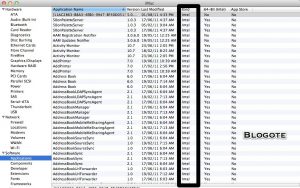
Go to Spotlight and type “System Information.” Look for the “Software” menu on the left side and click on “Applications.” Applications labeled as “PowerPC” will not work on Mac OS X Lion.

Apple’s Incompatible Software Folder

According to Apple, the easiest way to find incompatible software is to check the root level of the hard drive for a folder named “Incompatible Software.” This folder stores applications which are not working after you have upgraded to Mac OS X Lion.

Pretty cool, right? Apparently, that’s how Apple rolls.

List of Apps Not Working on Mac OS X Lion

RoaringApps Wiki has an elegantly designed compatible table outlining the apps status — whether they are compatible with Mac OS X Lion or not.
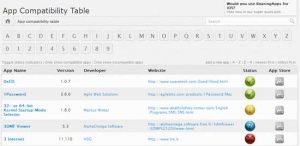
You can access the site by clicking here. Plus there are inside scoop on an app that are definitely useful.

Microsoft Office 2011 on Mac OS X Lion

Microsoft has a support document detailing the known issues with Office for Mac on Lion OS. Also, there are a couple of issues with Excel, PowerPoint and Word briefed out on the Microsoft website.

Lastly, Apple has also dropped support for Rosetta, the emulator for allowing PowerPC programs to run on Intel Macs.

This sums up for ways to check for incompatible apps on Mac OS X Lion. I’m yet to encounter an app that doesn’t work on my Lion-installed iMac. Most of the apps I’ve downloaded before upgrading to Lion works seamlessly with Lion thus far.

How to Restore Address Book Backup on Mac OS
How to Install Google Earth on Ubuntu 10.04 (Lucid Lynx)
o2tvseries – Download Movies & Shows in MP4, HD, and 3GP in 2021
Uploading Multiple Photos on Facebook
How to Remove Password in Windows 10

Sign Up For Daily Newsletter

Be keep up! Get the latest breaking news delivered straight to your inbox.
[mc4wp_form]
By signing up, you agree to our Terms of Use and acknowledge the data practices in our Privacy Policy. You may unsubscribe at any time.
Share This Article
Facebook Copy Link Print
Share
Previous Article The iPhone 4 iFixit Teardown
Next Article Find out Jailbreaking and Unlocking Possibilities With IPSW Downloader (Also Download IPSW Files)

Stay Connected

248.1KLike
69.1KFollow
134KPin
54.3KFollow

							banner							
							banner
Create an Amazing Newspaper
Discover thousands of options, easy to customize layouts, one-click to import demo and much more.
Learn More

Latest News

Juanita Katt
Juanita Katt: The Private Daughter of a Hollywood Family
Biography
What Date is 72 Days From Today?
Guides
What is 18 Weeks From Today?
Weeks
Brazil Tech News
Brazil Tech News: Top 10 Startups Changing Latin America
News

You Might also Like

Convert Image Format to PSD, Jpeg Format

Sara Taylor
Sara Taylor
1 Min Read

Find Best Apps With AppBrain for Android

James Betterson
James Betterson
3 Min Read

List of Fake Antivirus Softwares and Rogue Programs

admin
admin
13 Min Read
//

We influence 20 million users and is the number one business and technology news network on the planet

Sign Up for Our Newsletter

Subscribe to our newsletter to get our newest articles instantly!

[mc4wp_form id=”1616″]

BlogoteBlogote
Follow US
Join Us!
Subscribe to our newsletter and never miss our latest news, podcasts etc..
[mc4wp_form]
Zero spam, Unsubscribe at any time.
Welcome Back!

Sign in to your account

Username or Email Address
Password

Lost your password?