
By using this site, you agree to the Privacy Policy and Terms of Use.
Accept
BlogoteBlogoteBlogote
  • Software
  • Tech News
  • Business
  • Fashion
  • Finance
  • Health
  • Lifestyle
Search
  • Contact
  • Blog
  • Complaint
  • Advertise
Reading: Safe Droid X Rooting Guide Works
Share
Sign In
Notification Show More
Font ResizerAa
BlogoteBlogote
Font ResizerAa
  • Tech News
  • Gadget
  • Technology
  • Mobile
Search
  • Home
    • Home 1
    • Home 2
    • Home 3
    • Home 4
    • Home 5
  • Categories
    • Tech News
    • Gadget
    • Technology
    • Mobile
  • Bookmarks
  • More Foxiz
    • Sitemap
Have an existing account? Sign In
Follow US
  • Contact
  • Blog
  • Complaint
  • Advertise
Home » Blog » Safe Droid X Rooting Guide Works
How to

Safe Droid X Rooting Guide Works

James Betterson
Last updated: June 6, 2022 7:49 am
James Betterson
Share
SHARE

Despite the fact that rooting can self destruct your Droid X, some of the talented folks managed to root the Motorola Droid X device successfully over at droid forum board. We saw this coming, right? 😉

The guide to root Droid X comes to us courtesy of Rainabba, admin at Alldroid.org forum. Having a quick look at the forum post, I can say this is a safe tutorial that really works on Droid X phone!
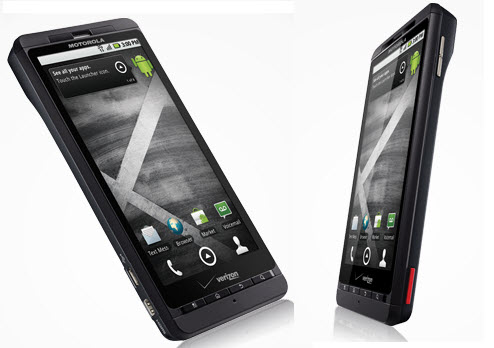
Just go through the series of instructions posted here for rooting Droid X. Also it is highly recommended to check out the original source as they are updating the guide quite often. Btw, your rooted droid x will not be able to install custom ROMs.

Guide to Safely Root Droid X

  • Download the attached archive and expand it to a folder you can find (eg. c:DroidXRoot_v2) (Register at the droid forum for accessing the file)
  • Set up ADB
  • On the Droid X phone: Home, Menu Button, Settings, Applications, Development: Make sure the “USB debugging” option is enabled/checked.
  • Status bar, USB connection: Make sure “PC Mode” is selected.
  • Open a command prompt (Windows: Start, Run, “cmd”, OK; Linux: Terminal)
  • Run “adb devices”. If you don’t see your device listed under “List of devices attached”, return to step 2 and follow the link to setup ADB (use that topic for support) and return here when “adb devices” lists your X.
  • Run “CD c:DroidXRoot” (or where ever you expanded the archive)
  • Run “adb push Superuser.apk /sdcard/Superuser.apk“
  • Run “adb push su /sdcard/su“
  • Run “adb push busybox /sdcard/busybox“
  • Run “adb push exploid /sqlite_stmt_journals/exploid“
  • Run “adb shell“
  • Run “cd sqlite_stmt_journals“
  • Run “chmod 755 exploid“
  • On your phone, navigate to a screen where you can switch wifi/bluetooth on/off easily (settings, or a home screen with a widget)
  • IMMEDIATELY after executing the next step, toggle wifi or bluetooth off and back on
  • Run “./exploid” and follow directions on screen. Once this completes you’ll be back at a shell prompt.
  • Run “rootshell“. You’ll be prompted for a password.
  • Type in password “secretlol” and press Enter then you are root! (You’ll know because your prompt will now be a “#” instead of “$”)
  • Run “cp /sdcard/Superuser.apk /system/app/Superuser.apk“
  • Run “cp /sdcard/su /system/bin/su“
  • Run “cp /sdcard/busybox /system/bin/busybox“
  • Run “chmod 4755 /system/bin/su“
  • Run “chmod 4755 /system/bin/busybox“
  • Run “rm /system/bin/rootshell“
  • Run “exit” to drop from root to a non-root user shell (on phone still)
  • Run “exit” to drop back to your machine command prompt (instead of phone)

To Confirm root is established on Droid X:

  1. Run “adb shell“
  2. Run “su” (now you should see the # sign which indicates you are root)
  3. Watch your screen so you can allow Superuser root access.
Install and Play Doom 3 on Mac [Works on Intel Mac]
Privacy Matters more: Guide to Hide Your Webcam, Time to Mute-mic – Get Rid of Notifications
Remove Kaspersky Antivirus 2010 Trial from Computer
Rollback restore method from Windows 11 to Windows 10
How to Install Mac OS X 10.7 Lion Without Snow Leopard

Sign Up For Daily Newsletter

Be keep up! Get the latest breaking news delivered straight to your inbox.
[mc4wp_form]
By signing up, you agree to our Terms of Use and acknowledge the data practices in our Privacy Policy. You may unsubscribe at any time.
Share This Article
Facebook Copy Link Print
Share
Previous Article Fix Missing Comdlg32.ocx Run time Error in Portable apps
Next Article Desi iPhone Siri Can Speak in Hindi Language

Stay Connected

248.1KLike
69.1KFollow
134KPin
54.3KFollow

							banner							
							banner
Create an Amazing Newspaper
Discover thousands of options, easy to customize layouts, one-click to import demo and much more.
Learn More

Latest News

Juanita Katt
Juanita Katt: The Private Daughter of a Hollywood Family
Biography
What Date is 72 Days From Today?
Guides
What is 18 Weeks From Today?
Weeks
Brazil Tech News
Brazil Tech News: Top 10 Startups Changing Latin America
News

You Might also Like

License Key For Ashampoo Burning Studio 2010 [Legal Serial Key]

James Betterson
James Betterson
4 Min Read

How to Win 2048 – Easiest Strategy and Game Guide

admin
admin
7 Min Read

How to Install Fixplay IndoXXI

admin
admin
2 Min Read
//

We influence 20 million users and is the number one business and technology news network on the planet

Sign Up for Our Newsletter

Subscribe to our newsletter to get our newest articles instantly!

[mc4wp_form id=”1616″]

BlogoteBlogote
Follow US
Join Us!
Subscribe to our newsletter and never miss our latest news, podcasts etc..
[mc4wp_form]
Zero spam, Unsubscribe at any time.
Welcome Back!

Sign in to your account

Username or Email Address
Password

Lost your password?