
By using this site, you agree to the Privacy Policy and Terms of Use.
Accept
BlogoteBlogoteBlogote
  • Software
  • Tech News
  • Business
  • Fashion
  • Finance
  • Health
  • Lifestyle
Search
  • Contact
  • Blog
  • Complaint
  • Advertise
Reading: Track Lost iPhone using Apple’s Free Tracking Service
Share
Sign In
Notification Show More
Font ResizerAa
BlogoteBlogote
Font ResizerAa
  • Tech News
  • Gadget
  • Technology
  • Mobile
Search
  • Home
    • Home 1
    • Home 2
    • Home 3
    • Home 4
    • Home 5
  • Categories
    • Tech News
    • Gadget
    • Technology
    • Mobile
  • Bookmarks
  • More Foxiz
    • Sitemap
Have an existing account? Sign In
Follow US
  • Contact
  • Blog
  • Complaint
  • Advertise
Home » Blog » Track Lost iPhone using Apple’s Free Tracking Service
Apple

Track Lost iPhone using Apple’s Free Tracking Service

Sara Taylor
Last updated: June 6, 2022 7:49 am
Sara Taylor
Share
SHARE

Track Lost iPhone’s Current Location using iCloud

We all have spent a good deal of money to purchase our new iPhones and iPads. These iOS devices can certainly do some amazing things, but have you really given a thought on how to protect these precious devices? What will you do if you lose your iPhone in your office or college? What does it take to find a misplaced iPhone? How easy is it to recover a lost iPhone?

Contents
  • Track Lost iPhone’s Current Location using iCloud
    • Using Apple’s help for Tracking an iPhone
  • Activating Find My iPhone on iPhone 4S/4, iPad & iPod Touch
      • Step 1: Log in to iCloud
      • Step 2: Use Find My iPhone
      • Step 3: Find iPhone’s location
  • Conclusion:

Instead of going around in circles, filing a complaint, searching each and every room of your house, or asking people about your “lost” iPhone, you’d be better off using tracking services. These tracking services will reveal the exact location of your iOS devices, making it easier to know if the device was stolen or lost (there’s a big difference between the two).

Using Apple’s help for Tracking an iPhone

A free, and highly recommended, tracking service comes from Apple — it’s called Find My iPhone. Find My iPhone tracks any Apple product —MacBook, iPad, iPhone, etc. Even if your iPhone is stolen, and the Internet connection is switched on, you can know the device’s location in real-time.

Activating Find My iPhone on iPhone 4S/4, iPad & iPod Touch

Step 1: Log in to iCloud

Visit iCloud.com from your browser and enter your Apple ID and password.

Step 2: Use Find My iPhone

Click on “Find My iPhone” icon.

Step 3: Find iPhone’s location

You will know the exact location of your iPhone automatically.
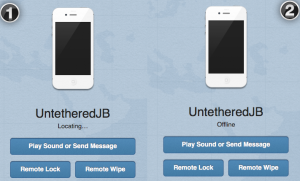
You can also do the following:

  • Play Sound or send message: If your iPhone is misplaced, send an SMS and someone may get in touch with you. You can also play a sound.
  • Remote Lock: Clicking on this button will lock your iPhone permanently. No one can access your device.
  • Remote Wipe: Delete all the data from your iPhone in a one click.

Note: Find My iPhone works only when:

  • You have already signed into iCloud from your iPhone.
  • You have enabled Find My iPhone on your iPhone.
  • You have switched on Location Services on your iPhone.

iPhone is offline: What does this mean?

From the above screenshot in Step 3, you will notice my iPhone cannot be tracked through Find My iPhone. The message appearing under my white iPhone 4S says “Offline.” In other words, my iPhone was switched off while I was writing this tutorial. However, you must know that Find My iPhone will not work when:

  • Your iPhone is stolen and the Location Service is turned off.
  • Your iPhone is stolen and someone has signed out of iCloud
  • Your iPhone is stolen and Find My iPhone is disabled.
  • Your iPhone is stolen and someone did a factory reset on your iPhone.

Receive an email when your iPhone is found:

Check the box “email me when this iPhone is found.” This can help you trace your iPhone’s location when the device is turned on.

email iphone found Track Lost iPhone using Apples Free Tracking Service

Conclusion:

While there are numerous ways to track a lost or stolen iPhone, Find My iPhone should be your first choice for several reasons a) it’s free b) it works. My only gripe is, if you have not enabled it already on your iPhone, the service is almost useless.

But if you have used Find My iPhone before, and it’s already activated on your iOS device, this invaluable tracking service can save your day.


Cydia Theme Center For iPhone Jailbroken Phones
Download Greenpois0n RC5 For Windows — Untethered jailbreak for iOS 4.2.1
MAC CHM Reader To View CHM Files on Mac OS
Want to Install Winterboard Themes on iPhone/iPod touch? Here’s How to do it.
How to Open PDF Files on Mac For Free

Sign Up For Daily Newsletter

Be keep up! Get the latest breaking news delivered straight to your inbox.
[mc4wp_form]
By signing up, you agree to our Terms of Use and acknowledge the data practices in our Privacy Policy. You may unsubscribe at any time.
Share This Article
Facebook Copy Link Print
Share
Previous Article Simple Trick to Stop Video Buffering on YouTube
Next Article Optimize PNG and JPEG Images on Mac OS

Stay Connected

248.1KLike
69.1KFollow
134KPin
54.3KFollow

							banner							
							banner
Create an Amazing Newspaper
Discover thousands of options, easy to customize layouts, one-click to import demo and much more.
Learn More

Latest News

Juanita Katt
Juanita Katt: The Private Daughter of a Hollywood Family
Biography
What Date is 72 Days From Today?
Guides
What is 18 Weeks From Today?
Weeks
Brazil Tech News
Brazil Tech News: Top 10 Startups Changing Latin America
News

You Might also Like

Features, Specifications of iPhone 4G/HD

Sara Taylor
Sara Taylor
2 Min Read

SpringFlash: Free iPhone 4 Cydia App For Jailbroken iPhone4

Sara Taylor
Sara Taylor
1 Min Read

Get iOS 5.0.1 Download Links For iPhone 4S and iPad 2

Sara Taylor
Sara Taylor
2 Min Read
//

We influence 20 million users and is the number one business and technology news network on the planet

Sign Up for Our Newsletter

Subscribe to our newsletter to get our newest articles instantly!

[mc4wp_form id=”1616″]

BlogoteBlogote
Follow US
Join Us!
Subscribe to our newsletter and never miss our latest news, podcasts etc..
[mc4wp_form]
Zero spam, Unsubscribe at any time.
Welcome Back!

Sign in to your account

Username or Email Address
Password

Lost your password?