
By using this site, you agree to the Privacy Policy and Terms of Use.
Accept
BlogoteBlogoteBlogote
  • Software
  • Tech News
  • Business
  • Fashion
  • Finance
  • Health
  • Lifestyle
Search
  • Contact
  • Blog
  • Complaint
  • Advertise
Reading: Apple iTunes 11: Here’s How to Bring Back Album Artwork (Cover Photo) for Songs
Share
Sign In
Notification Show More
Font ResizerAa
BlogoteBlogote
Font ResizerAa
  • Tech News
  • Gadget
  • Technology
  • Mobile
Search
  • Home
    • Home 1
    • Home 2
    • Home 3
    • Home 4
    • Home 5
  • Categories
    • Tech News
    • Gadget
    • Technology
    • Mobile
  • Bookmarks
  • More Foxiz
    • Sitemap
Have an existing account? Sign In
Follow US
  • Contact
  • Blog
  • Complaint
  • Advertise
Home » Blog » Apple iTunes 11: Here’s How to Bring Back Album Artwork (Cover Photo) for Songs
Apple

Apple iTunes 11: Here’s How to Bring Back Album Artwork (Cover Photo) for Songs

Sara Taylor
Last updated: June 6, 2022 7:49 am
Sara Taylor
Share
SHARE

Although we are happy with the new iTunes 11, there are folks out there struggling and eventually complaining about this media player. One of the common complaint is that the new iTunes 11 no longer shows album artwork in the left pane. There was an Album List View in iTunes 10, if you remember, which is now replaced with Artist view in the newer version.

Some of the power users have expressed disappointment over this missing feature, which — fortunately — can be brought back. First, let’s look at the complaints from the Apple forum:

In list view, album art is invisible — the album art square in the lower left-hand corner is gone. So unless the track is playing, you can’t see album art. This is terrible news for people who need list view, like DJs. People like me who rely on album art to remember what an album is, can no longer just click around and see the covers. This was a tremendous memory aid, which is now gone.

For me, iTunes 11 is much worse than iTunes 10.

You can no longer view album art by selecting a track in list view.

Now to see album covers, you have to either play the track, or switch to grid or artist list — which show either no tracks, or very few tracks.

Apple may have meticulously polished the surface of iTunes 11 but taking out existing features have left a lot of users angry, as you can probably figure out from this thread on Apple forum. Fortunately, there’s a way to bring back the lost album artwork. The solution, though fairly simple, requires a lot of effort. This is a manual solution, which means if you have thousands of songs that are completely unorganized, then you may want to look elsewhere.

We are going to select tracks, and drop the album cover image in a window. Here are the steps to follow:

  • Click on the tracks you want the album artwork for, and then right-click and choose “Get info.”


  • A window with this message appears: “Are you sure you want to edit info for multiple items?” Hit the “Yes” button.
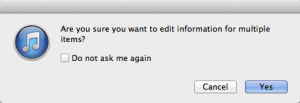
  • Drag the JPG or any other image file to the right-hand corner where it says “Artwork.”

Unfortunately, there’s no way to automate the whole process, which means next time if you want the album art preview or the album cover photo, you have to go through the whole process once again — it’s painful, we know. But do we have any other option?

Via Apple forum

How to improve the performance of a slow Mac
Fixing Error 200403 AirPlay Mirroring on Apple TV
How to get rid of iAd Banner ads on iOS Devices
iOS Tip: Avoid Eye Strain by Increasing the Font Size of SMS, Emails, Contacts, and iMessage
Download Free iCHM reader-Read CHM files on MAC OS X

Sign Up For Daily Newsletter

Be keep up! Get the latest breaking news delivered straight to your inbox.
[mc4wp_form]
By signing up, you agree to our Terms of Use and acknowledge the data practices in our Privacy Policy. You may unsubscribe at any time.
Share This Article
Facebook Copy Link Print
Share
Previous Article Top 5 Hilarious iPhone 5 Commercial Parodies on YouTube
Next Article Fix AutoSpell Check on Mac OS X

Stay Connected

248.1KLike
69.1KFollow
134KPin
54.3KFollow

							banner							
							banner
Create an Amazing Newspaper
Discover thousands of options, easy to customize layouts, one-click to import demo and much more.
Learn More

Latest News

Juanita Katt
Juanita Katt: The Private Daughter of a Hollywood Family
Biography
What Date is 72 Days From Today?
Guides
What is 18 Weeks From Today?
Weeks
Brazil Tech News
Brazil Tech News: Top 10 Startups Changing Latin America
News

You Might also Like

Live Blogs to Follow iPhone 5 Event

Sara Taylor
Sara Taylor
2 Min Read

Find out Jailbreaking and Unlocking Possibilities With IPSW Downloader (Also Download IPSW Files)

Sara Taylor
Sara Taylor
1 Min Read

Create Mac OS X Lion Installation DVD

Sara Taylor
Sara Taylor
2 Min Read
//

We influence 20 million users and is the number one business and technology news network on the planet

Sign Up for Our Newsletter

Subscribe to our newsletter to get our newest articles instantly!

[mc4wp_form id=”1616″]

BlogoteBlogote
Follow US
Join Us!
Subscribe to our newsletter and never miss our latest news, podcasts etc..
[mc4wp_form]
Zero spam, Unsubscribe at any time.
Welcome Back!

Sign in to your account

Username or Email Address
Password

Lost your password?