By using this site, you agree to the Privacy Policy and Terms of Use.
Accept
BlogoteBlogoteBlogote
  • Software
  • Tech News
  • Business
  • Fashion
  • Finance
  • Health
  • Lifestyle
Search
  • Contact
  • Blog
  • Complaint
  • Advertise
Reading: Backup All SMS Messages From Phone inbox (.SIS File)
Share
Sign In
Notification Show More
Font ResizerAa
BlogoteBlogote
Font ResizerAa
  • Tech News
  • Gadget
  • Technology
  • Mobile
Search
  • Home
    • Home 1
    • Home 2
    • Home 3
    • Home 4
    • Home 5
  • Categories
    • Tech News
    • Gadget
    • Technology
    • Mobile
  • Bookmarks
  • More Foxiz
    • Sitemap
Have an existing account? Sign In
Follow US
  • Contact
  • Blog
  • Complaint
  • Advertise
Home » Blog » Backup All SMS Messages From Phone inbox (.SIS File)
How to

Backup All SMS Messages From Phone inbox (.SIS File)

James Betterson
Last updated: June 6, 2022 7:49 am
James Betterson
Share
SHARE

I still remember when I lost all my sms messages from the inbox because of multiple tasking. I know it’s weird, I had to change the cell phone for the good.. Yes, I was never able to retrieve those deleted sms messages as I never made a back up of messages.

Fortunately, here is an SIS file (an standard format for most of the mobile phones) softwares that can back up sms messages into an text file for free. With this freeware sis file message backup software you can instantly save all sms messages in text file for future use.

The software named Message mirror works on Nokia and other phones that supports .sis format (including Symbian OS 9.0). You can also hide messages and backup all messages in Text, Html, Csv and XML format.
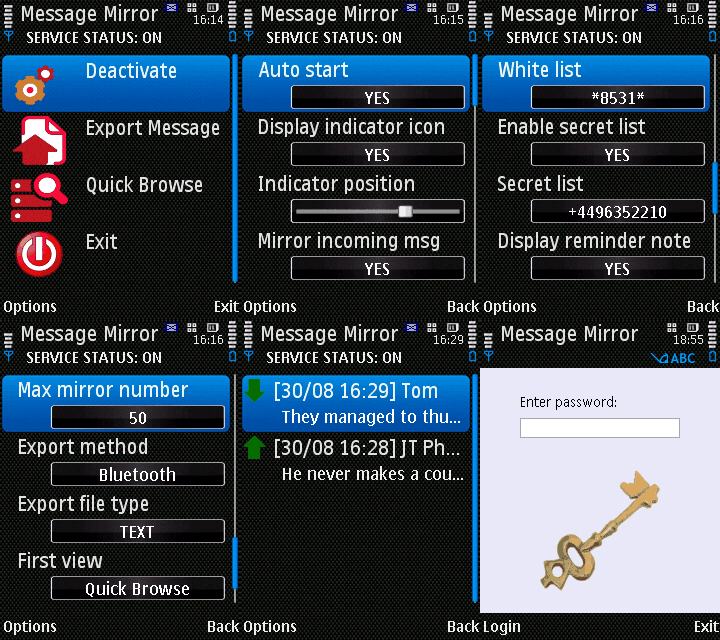
There is also a paid full version of Message mirror, but the free version would suffice your needs.

Message Mirror .sis Supports

LG KS10, Nokia 3250, Nokia 5500, Nokia 5700, Nokia 6110, Nokia 6120, Nokia 6290, Nokia E50, Nokia E60, Nokia E61, Nokia E61i, Nokia E62, Nokia E65, Nokia E70, Nokia E90, Nokia N71, Nokia N73, Nokia N75, Nokia N76, Nokia N77, Nokia N80, Nokia N91, Nokia N93i, Nokia N95, Samsung SGH-i520

If you encounter an application error or installation failure such as certificate error contact the application supplier while setting up Message mirror sis file, then change your mobile phone’s date to  2008-01-04.. because this was the date when this backup file was originally posted.

How to Transfer Balance and Get Security Code in NTC?
How to open Administrative Tools in Windows 11
Downgrade iPhone 4/3GS, iPad, iPod Touch 4/3G/2G Without SHSH Blobs Using Bluefreeze
Get iTunes Music Notification on Mac Dock
Drag-and-Drop to Save YouTube Clips on Mac OSX

Sign Up For Daily Newsletter

Be keep up! Get the latest breaking news delivered straight to your inbox.
[mc4wp_form]
By signing up, you agree to our Terms of Use and acknowledge the data practices in our Privacy Policy. You may unsubscribe at any time.
Share This Article
Facebook Copy Link Print
Share
Previous Article Now Play Flash Games on iPad [Download Free iSwifter App for iPad From iTunes Store]
Next Article Opening and Converting RTF Files on Mac

Stay Connected

248.1KLike
69.1KFollow
134KPin
54.3KFollow

							banner							
							banner
Create an Amazing Newspaper
Discover thousands of options, easy to customize layouts, one-click to import demo and much more.
Learn More

Latest News

Juanita Katt
Juanita Katt: The Private Daughter of a Hollywood Family
Biography
What Date is 72 Days From Today?
Guides
What is 18 Weeks From Today?
Weeks
Brazil Tech News
Brazil Tech News: Top 10 Startups Changing Latin America
News

You Might also Like

8 Best Solutions for Discord to Resolve its opening Problems on Windows 10

admin
admin
8 Min Read

Empower Google Chrome with Firefox addon

admin
admin
5 Min Read

Free apps to Track Android Mobile Phones

Sara Taylor
Sara Taylor
13 Min Read
//

We influence 20 million users and is the number one business and technology news network on the planet

Sign Up for Our Newsletter

Subscribe to our newsletter to get our newest articles instantly!

[mc4wp_form id=”1616″]

BlogoteBlogote
Follow US
Join Us!
Subscribe to our newsletter and never miss our latest news, podcasts etc..
[mc4wp_form]
Zero spam, Unsubscribe at any time.
Welcome Back!

Sign in to your account

Username or Email Address
Password

Lost your password?