By using this site, you agree to the Privacy Policy and Terms of Use.
Accept
BlogoteBlogoteBlogote
  • Software
  • Tech News
  • Business
  • Fashion
  • Finance
  • Health
  • Lifestyle
Search
  • Contact
  • Blog
  • Complaint
  • Advertise
Reading: Backup and Restore Opera Preferences, Bookmarks, Profiles Quickly
Share
Sign In
Notification Show More
Font ResizerAa
BlogoteBlogote
Font ResizerAa
  • Tech News
  • Gadget
  • Technology
  • Mobile
Search
  • Home
    • Home 1
    • Home 2
    • Home 3
    • Home 4
    • Home 5
  • Categories
    • Tech News
    • Gadget
    • Technology
    • Mobile
  • Bookmarks
  • More Foxiz
    • Sitemap
Have an existing account? Sign In
Follow US
  • Contact
  • Blog
  • Complaint
  • Advertise
Home » Blog » Backup and Restore Opera Preferences, Bookmarks, Profiles Quickly
How to

Backup and Restore Opera Preferences, Bookmarks, Profiles Quickly

James Betterson
Last updated: June 6, 2022 7:49 am
James Betterson
Share
SHARE

While you can always backup bookmarks and other settings through the built-in feature in Opera, it is always a mess because you end up having lots of backup files. Also, you may want to know that the backup cannot be restored or transferred to other browsers if you are backing up bookmarks in HTML format. Restoring these files will be a pain. There is no option to do a full backup of the browser’s settings, which is why we resort to third-party tools for backing up the important data.

In this article we will look at the tools I have tested personally to backup my Opera browser. I tested these tools on my Windows computer running XP and Windows 7. Let’s get start?

Tool 1: Opera Backup

Opera backup is a free Windows-only utility which will backup profile, bookmarks, search settings of Opera browser. Once you have downloaded the program, you will be able to save anything — be it bookmarks, certificates, speed dial, dictionaries, so on.
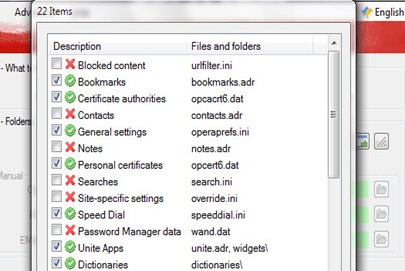
You can also backup the the urlfilter.ini file, passwords (if you cannot keep up with Apple’s strict password requirements) and everything else. Run the program manually, tick the checkboxes for files you would like to backup. To restore the Opera profile, use this application once again and click on restore which will transfer the old settings to the newly installed opera browser.

Tool 2: Browser Backup Pro

Just because the name of the application includes the word “pro” doesn’t mean it’s a paid tool. This free app can save all the Opera’s settings — including bookmarks, history, passwords, plugins, and so on — quickly and efficiently. If you are running out of disk space, don’t worry as this tool comes with 3 ways to compress the backup: slow, normal, and fast.

Enable Windows Media Player Mini player Mode
Using Firefox Addons to Blog Your Heart Out
Recording in High definition With Toshiba Camileo SX900 Camcorder
How to Fix .AVI Video Files on Mac OS
How to Speed-up Your Mac [Performance Guide]

Sign Up For Daily Newsletter

Be keep up! Get the latest breaking news delivered straight to your inbox.
[mc4wp_form]
By signing up, you agree to our Terms of Use and acknowledge the data practices in our Privacy Policy. You may unsubscribe at any time.
Share This Article
Facebook Copy Link Print
Share
Previous Article Stumble webpages without downloading Stumbleupon toolbar
Next Article How to backup profile of Google Chrome browser

Stay Connected

248.1KLike
69.1KFollow
134KPin
54.3KFollow

							banner							
							banner
Create an Amazing Newspaper
Discover thousands of options, easy to customize layouts, one-click to import demo and much more.
Learn More

Latest News

What Date is 72 Days From Today?
Guides
What is 18 Weeks From Today?
Weeks
Brazil Tech News
Brazil Tech News: Top 10 Startups Changing Latin America
News
The Best AI Video Generator for YouTube: Turning Scripts into Viral Content Fast
Guides

You Might also Like

Fix AutoSpell Check on Mac OS X

Sara Taylor
Sara Taylor
2 Min Read

Solution to Error 100 Message on Mac App Store

James Betterson
James Betterson
2 Min Read

Edit XPS File: Learn How to Edit .XPS Documents In Windows Word 2007

James Betterson
James Betterson
2 Min Read
//

We influence 20 million users and is the number one business and technology news network on the planet

Sign Up for Our Newsletter

Subscribe to our newsletter to get our newest articles instantly!

[mc4wp_form id=”1616″]

BlogoteBlogote
Follow US
Join Us!
Subscribe to our newsletter and never miss our latest news, podcasts etc..
[mc4wp_form]
Zero spam, Unsubscribe at any time.
Welcome Back!

Sign in to your account

Username or Email Address
Password

Lost your password?