
iPhone owners with iOS 6.0 / 6.0.1 firmware installed on their devices have been attacked once again. The devices are said to be consuming more cellular data — either that, or it is possibly yet another bug.
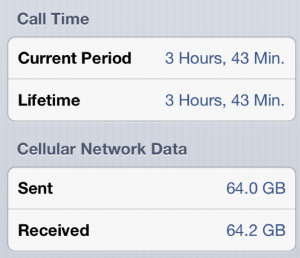
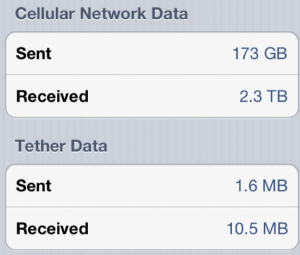
The first screenshot (taken from Reddit) below shows cellular data transfer on an iPhone that was purchased recently. If you observe closely, that’s almost 125 GB of data sent and received in one month. If you think that’s huge, then check out the other screenshot which (unedited) shows 170+ TB (TeraByte) of data was sent through his iPhone. Those numbers can give a heart attack, especially when the bill for such humongous data usage reaches your home.
Here are a couple of complaints gathered from Apple forum:
This happened to one user in our family plan after he updated his iPhone 4S with iOS 6.
Massive outgoing data charges caused him to use over 70% of his 2GB in just 5 days. It shows this data being used at night, but really this is how ATT clumps together all the usage at the end of the day — it is not real time, as ATT confirmed for me.
It is all data that is being SENT. So, that leads me to believe there is a bad bug in the update that is causing some endless loop of transmission. There is no app yet that will show you exactly which apps/programs are sending the data. Nothing else on the phone changed — all the settings for data blah blah blah were unchanged. Before this iOS update, this phone used only half of the 2GB allowance monthly. Now it is on track to suddenly use that within a week!
I’m using an iPhone 5 in Australia. I had an iPhone 4 for almost 2 years an never even went over 1GB in a month. On Wednesday morning I discovered my phone had used 1.3GB in about 10 minutes or so! Then today, Thursday, it did it again, even while it was sitting idle at home on WiFi.
I’ve got some very shady data usage showing up on Verizon as well. Over 300 MB yesterday afternoon while I was sitting in a Starbucks (not using my phone and not on their wifi). Five minutes prior to the 300 MB hit was a 70 MB hit
Users are reporting that Apple’s Podcast app downloads podcasts silently in the background. In fact, users have mentioned that iOS 6.0 has a feature that downloads files in the background, and strangely the same file is downloaded multiple number of times. If you have given permission for such apps, and if cellular data is always turned ON on your iPhone, then it’s time to do something about this.
So what you can do? You can start off by downloading any data management application. One application I could think right off the bat is DataWiz — it’s a free app and definitely useful to track WiFi / 3G / cellular data. You can keep a daily data cap limit as well.
Then, keep an eye on your device’s battery — if your iPhone’s battery drains within 10 hours, then we can deduce that something is wrong. Start by checking all the apps you have downloaded recently, disconnect the Internet access, and switch to WiFi, use DataWiz to match the data consumed over WiFi and cellular data. Try to create a pattern, verify if you are really downloading files or is it just another iOS 6.0 bug (as shown in the screenshot above).
Some users have also reported that upgrading to iOS 6.0.1 seem to have fixed the issue. I cannot confirm this, but if this fixes the issue, please let me know through your comments below!
Users in the Apple forum have painful stories to tell, and they are all blaming iOS 6.0 firmware. More iOS 6.0 related complaints:
