
By using this site, you agree to the Privacy Policy and Terms of Use.
Accept
BlogoteBlogoteBlogote
  • Software
  • Tech News
  • Business
  • Fashion
  • Finance
  • Health
  • Lifestyle
Search
  • Contact
  • Blog
  • Complaint
  • Advertise
Reading: About ntvdm.exe And How to Fix ntvdm CPU Usage on System
Share
Sign In
Notification Show More
Font ResizerAa
BlogoteBlogote
Font ResizerAa
  • Tech News
  • Gadget
  • Technology
  • Mobile
Search
  • Home
    • Home 1
    • Home 2
    • Home 3
    • Home 4
    • Home 5
  • Categories
    • Tech News
    • Gadget
    • Technology
    • Mobile
  • Bookmarks
  • More Foxiz
    • Sitemap
Have an existing account? Sign In
Follow US
  • Contact
  • Blog
  • Complaint
  • Advertise
Home » Blog » About ntvdm.exe And How to Fix ntvdm CPU Usage on System
How to

About ntvdm.exe And How to Fix ntvdm CPU Usage on System

James Betterson
Last updated: June 6, 2022 7:49 am
James Betterson
Share
SHARE

One of the common system files found in 32-bit operating systems, like Windows XP, is ntvdm.exe. It stands for Windows NT Virtual DOS Machine. This file is typically found under C:WindowsSytem32.

The file size in Windows XP is 520,192 bytes and is a core Windows file which is Microsoft signed. Therefore the technical security rating on this file is 2% only. This file is extremely prone to virus attacks and lots of viruses have been known to disguise themselves as ntvdm.exe to avoid suspicion.
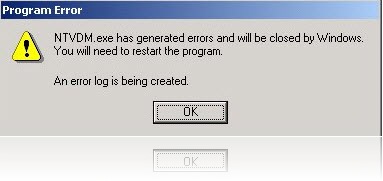
The ntvdm.exe file is normally used when you want to run a 16-bit application on a 32-bit machine. These may include older softwares as well as classic games like Counter Strike which incorporates the half-life 2 engine.

A very common problem that users face when using 16-bit applications is an ntvdm.exe error. Sometimes the file fails to execute whereas in most cases it takes too long to respond thereby hogging on system resources. Sometimes CPU usage can go up to 99-100%. This is typically due to the fact that ntvdm.exe has stopped working. There are a few methods to try and prevent this.

Fix ntvdm.exe CPU Usage

A simple method would be to stop ntvdm.exe from starting up during booting of the computer. To do this, follow the following steps:

  • Select “RUN” from the START menu.
  • Type “msconfig” and press enter
  • Select the “startup” tab
  • Find ntvdm.exe and remove the tick from its side.
  • Reboot your computer.

For emergency cases you can call up the task manager by pressing CTRL+ALT+DEL and stop the process named ntvdm.exe. Keep in mind that this will consequently stop the application which had brought it up in the first place.

Another trick to prevent ntvdm.exe from hogging on system resources is discussed below:

  • This is in case you are using a shortcut (DOS program) to call up ntvdm.exe
  • Right click on the shortcut and select “PROPERTIES”
  • Go to “MISC” and find “ALWAYS SUSPEND”
  • Set the idle sensitivity to “HIGH”
  • Save and exit

This prevents the exe file from using too much of resources when it is waiting to be executed, that is it is in idle status.

Another very common reason of trouble is a virus. Since the ntvdm.exe file is a Windows verified file, hence it is easy for a virus to disguise itself as the file and bypass some scanners. Common problems would include multiple ntvdm.exe processes in task manager, too many unknown processes when you start a DOS application, too many .bat files getting opened etc. In such cases use a good quality anti-virus to scan and remove any forms of virus on your computer.

How to open Administrative Tools in Windows 11
How to Upload Mp3 Audio Song Files To Youtube
Control Preview From Opening Multiple Windows
Simple Trick to Stop Video Buffering on YouTube
Install and Play Doom 3 on Mac [Works on Intel Mac]

Sign Up For Daily Newsletter

Be keep up! Get the latest breaking news delivered straight to your inbox.
[mc4wp_form]
By signing up, you agree to our Terms of Use and acknowledge the data practices in our Privacy Policy. You may unsubscribe at any time.
Share This Article
Facebook Copy Link Print
Share
Previous Article Forcing Google Analytics to Show Real Time Data
Next Article Downgrade iPhone 4/3GS, iPad, iPod Touch 4/3G/2G Without SHSH Blobs Using Bluefreeze

Stay Connected

248.1KLike
69.1KFollow
134KPin
54.3KFollow

							banner							
							banner
Create an Amazing Newspaper
Discover thousands of options, easy to customize layouts, one-click to import demo and much more.
Learn More

Latest News

Juanita Katt
Juanita Katt: The Private Daughter of a Hollywood Family
Biography
What Date is 72 Days From Today?
Guides
What is 18 Weeks From Today?
Weeks
Brazil Tech News
Brazil Tech News: Top 10 Startups Changing Latin America
News

You Might also Like

Building A Fulfilling Career In Education: A How-To Guide

admin
admin
8 Min Read

iPhone 3G iOS 4.1: Does the iOS 4.1 Fare Better on the iPhone 3G?

admin
admin
3 Min Read

Finding Your Lost Desktop Files: A Guide to Mac File Recovery

admin
admin
7 Min Read
//

We influence 20 million users and is the number one business and technology news network on the planet

Sign Up for Our Newsletter

Subscribe to our newsletter to get our newest articles instantly!

[mc4wp_form id=”1616″]

BlogoteBlogote
Follow US
Join Us!
Subscribe to our newsletter and never miss our latest news, podcasts etc..
[mc4wp_form]
Zero spam, Unsubscribe at any time.
Welcome Back!

Sign in to your account

Username or Email Address
Password

Lost your password?



